Welcome to the Onshape forum! Ask questions and join in the discussions about everything Onshape.
First time visiting? Here are some places to start:- Looking for a certain topic? Check out the categories filter or use Search (upper right).
- Need support? Ask a question to our Community Support category.
- Please submit support tickets for bugs but you can request improvements in the Product Feedback category.
- Be respectful, on topic and if you see a problem, Flag it.
If you would like to contact our Community Manager personally, feel free to send a private message or an email.
Streamlining Sheet Metal Exports in Assembly

Hi,
Just a plain question here. I created a configuration Part Studio, and import many variants in one subassembly. What is the most approachable way to export all the sheet metal parts flat pattern to DWG's?
We're talking about around 50-150 instances of one configuration with 2 sheet metal parts, every week.
Thanks in advance,
Luk
Best Answer
-
I'm not sure about the context here, but have you tried deriving all the configurations into one Part Studio? There should be an option to check the box "Preserve active sheet metal models".
This way you have all the sheet metal models in de flat view, ready for export.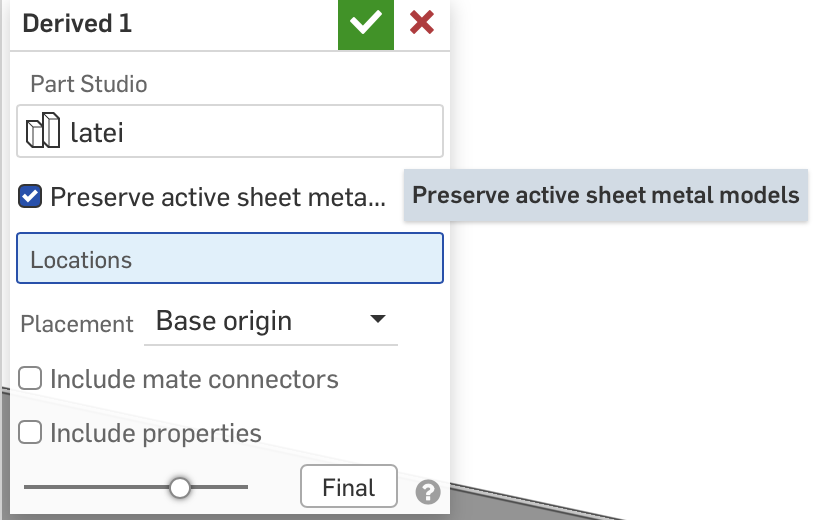
Good luck!0
Answers
-
I'm not sure about the context here, but have you tried deriving all the configurations into one Part Studio? There should be an option to check the box "Preserve active sheet metal models".
This way you have all the sheet metal models in de flat view, ready for export.
Good luck!0