Welcome to the Onshape forum! Ask questions and join in the discussions about everything Onshape.
First time visiting? Here are some places to start:- Looking for a certain topic? Check out the categories filter or use Search (upper right).
- Need support? Ask a question to our Community Support category.
- Please submit support tickets for bugs but you can request improvements in the Product Feedback category.
- Be respectful, on topic and if you see a problem, Flag it.
If you would like to contact our Community Manager personally, feel free to send a private message or an email.
simple loft the wing profiles

Hi,
learning Onshape for a month or so, Im trying to loft between two identical wing shapes, spline with over 100 points. I did split to upper and lower part as suggested. Those wing profiles are identical and on the same axis, only offseted on X.
The loft is rough and doesnt match the spline. I started to make offset front planes with guiding lines, but after 20 of them I just gave up.
Isnt there some better, simple approach to match the loft with spline profile?
Thanks in advice.
Gabriel
PS: The wing is not NACA certified and my spline is already a slight derivation of the 700 points the original contain. And the "original" is likely not 100% original… I dont want more derivation on that design.
Answers
-
Are you lofting the airfoil as a 1 piece solid? Try doing the top and bottom as separate surfaces. Then fill the ends and Enclose to create a solid if needed.
Or maybe Sweep instead of loft?
I'm still pretty new to this (~3 months, on and off), and I still often struggle with lofts.
0 -
100 points in a spline is a recipe for disaster. More points is not better. Even if those points came from a perfectly smooth degree 3 Bézier, if they have the least bit of rounding error (which they will due to the way floating point numbers work), when you create a curve through those points you will get something lumpy. When you try to loft between two such curves, you’ll get a ridiculously complex surface with small perturbations in curvature.
If you can share a public document, we can help more.Simon Gatrall | Product Development, Engineering, Design, Onshape | Ex- IDEO, PCH, Unagi, Carbon | LinkedIn
1 -
This Custom feature is purpose-built for such use cases.
https://cad.onshape.com/documents/33795c7f9b39612da14ee99a/w/18b7ca07fb26d7eb2815ea1d/e/7d0549e4402995ffee27b9c5
0 -
Heh, I used that FeatureScript on my current project and already forgot about it. In my defense, it has been nearly 2 weeks! :-)
0 -
@GregBrown is there a way to enter coordinates for an airfoil that isn't in the library? I couldn't figure that out. I ended up using the AG04 which is very close to the Zone V2 I'm using on the glider.
0 -
Yes in fact there is! Have a look in the UI, there is a pull down option for the
Profile source, namelyCustomvsLibrary:
If you choose Custom then you can provide your own set of data points, as specified here:
TLDR: the numbers are space separated and represent the x and y locations for the locations around the profile starting at the trailing edge and working their way anti-clockwise around. The profile consists of two degree-6 Bezier curves (one for upper, one for lower). The 0.000 0.000 point at the leading edge is not repeated in the list. The data (in meters) are all normalized for a chord length of 1.000 meters and the scaling will be taken care of in the feature.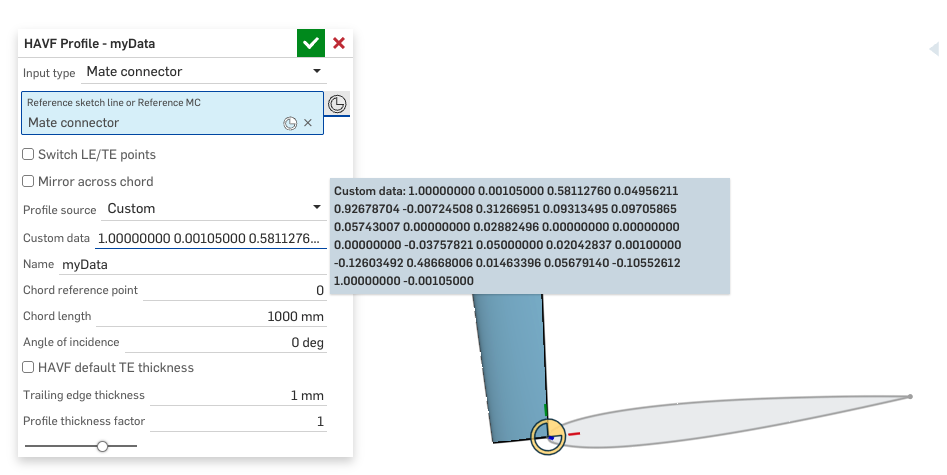 0
0 -
Footnote:
Here is a quick example using HAVF profiles and a couple of boundary surfaces (with and without V-direction guides) for very smooth initial wing skins. Boundary surfaces are superior for this since they maintain the high order (degree-6 in this case) of the curves. The example link has washout and dihedral for demo purposes… not saying this will fly, it was just a quick thing to get you going.0 -
Thank you Greg! I'll give it a try in my next project.
0 -
@GregBrown I finally had some time to try the custom coordinates option, but I can't seem to make it work. When I right click to paste the coordinates into the custom data field, I get the options to "copy" or "convert to expression" but not "paste". Maybe I'm missing something obvious?
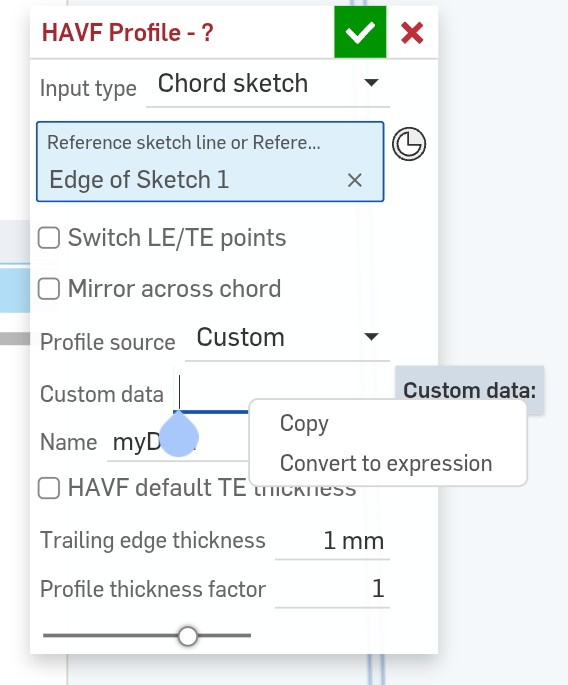
Also I'm wondering if my coordinates are in the correct format. If copying from someplace like the UIUC website I get a series of coordinates like this, but I'm not certain that matches what you described 3 posts above? And if I get the coords from the Profili 2 software they are formatted slight differently
 0
0 -
Are you using guide curves with your spline profile lofts? I modeled a spitfire elliptical wing as a solid with no issues. It had different airfoils at tip and root, along with washout twist. Onshape should handle this with no problems. I would recommend checking the loft for errors.
0




