Welcome to the Onshape forum! Ask questions and join in the discussions about everything Onshape.
First time visiting? Here are some places to start:- Looking for a certain topic? Check out the categories filter or use Search (upper right).
- Need support? Ask a question to our Community Support category.
- Please submit support tickets for bugs but you can request improvements in the Product Feedback category.
- Be respectful, on topic and if you see a problem, Flag it.
If you would like to contact our Community Manager personally, feel free to send a private message or an email.
How would you create this blend?
 ry_gb
Member, csevp, pcbaevp Posts: 259 PRO
ry_gb
Member, csevp, pcbaevp Posts: 259 PRO
Part studio link
I've been encountering this blend a lot lately and it's been really tricky to get it to look good. At it's core, it's a fillet between a cylinder and a flat surface. But how would you approach that when your fillet extends past the bounds of the starting surfaces? I've had mild success, but often most approaches end up with some wonky zebras or else some really weird pinching. I'm attaching some screenshots for reference:
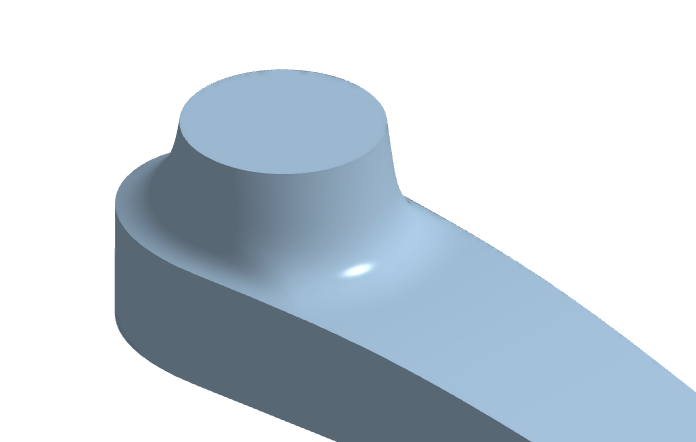
This is the more like what I'm trying to achieve, using T-splines in Fusion (you can ignore the chamfer if you want):
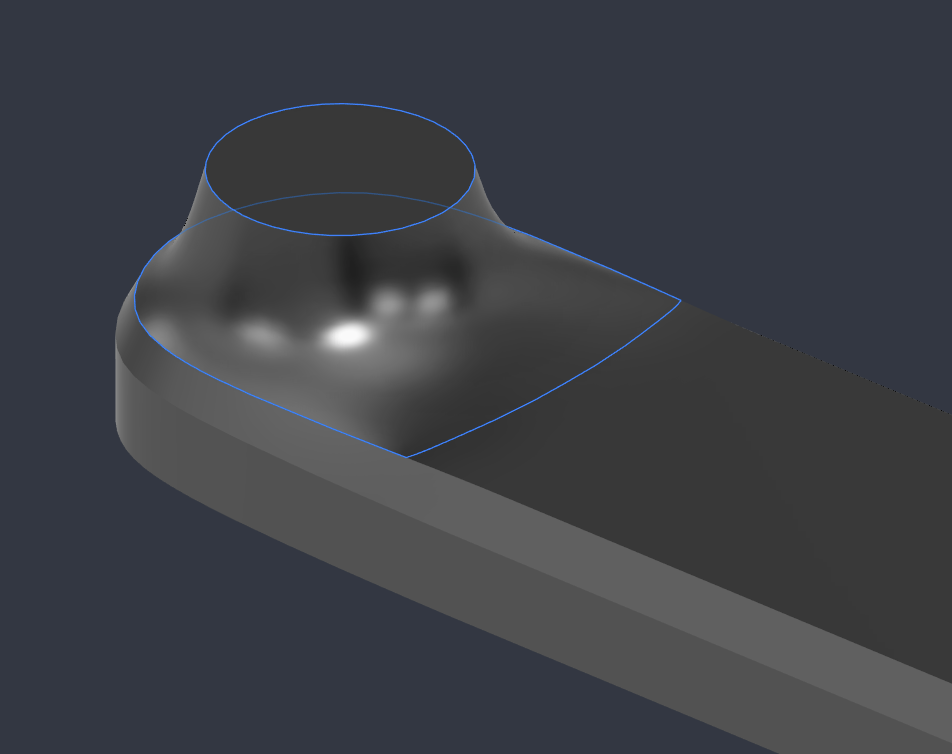
I've got something in a part studio and it mostly looks okay, but I'm curious if anyone has other approaches!
Ramon Yip | glassboard.com