Welcome to the Onshape forum! Ask questions and join in the discussions about everything Onshape.
First time visiting? Here are some places to start:- Looking for a certain topic? Check out the categories filter or use Search (upper right).
- Need support? Ask a question to our Community Support category.
- Please submit support tickets for bugs but you can request improvements in the Product Feedback category.
- Be respectful, on topic and if you see a problem, Flag it.
If you would like to contact our Community Manager personally, feel free to send a private message or an email.
Introducing the Onshape Educator Plan!
 Naomi_E
Member, Moderator, Onshape Employees Posts: 22 PRO
Naomi_E
Member, Moderator, Onshape Employees Posts: 22 PRO
Exciting News for Educators!
We are thrilled to introduce the Onshape Educator plan! This innovative offering is now available for free to teachers and mentors dedicated to shaping the future generation of engineers. Tailored to optimize the CAD and data management capabilities of Onshape, the new Educator Plan encompasses advanced features such as Classes & Assignments and Onshape Simulation.
Built specifically for the needs of educators, Classes & Assignments provides an easy way to manage your class rosters, assign documents, and receive submissions from students. Educators, once your account has been upgraded, create classes quickly using the familiar blue Create button, add students to your roster, and publish the class.
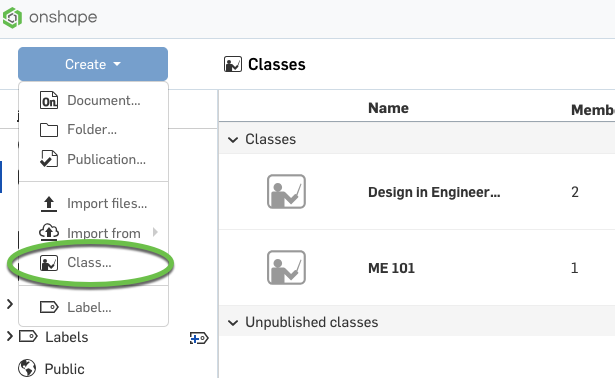
What Your Students Will Experience:
With the latest update, students gain the ability to effortlessly navigate to your class, streamlining their access to assignments and simulation. This enhancement facilitates a quicker review of the work at hand, enabling them to dedicate more class time to honing their design skills.
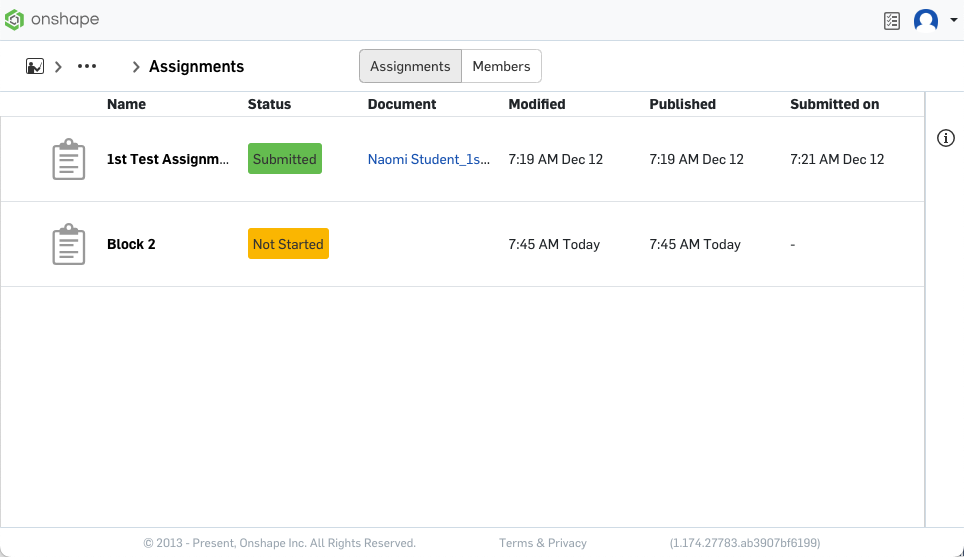
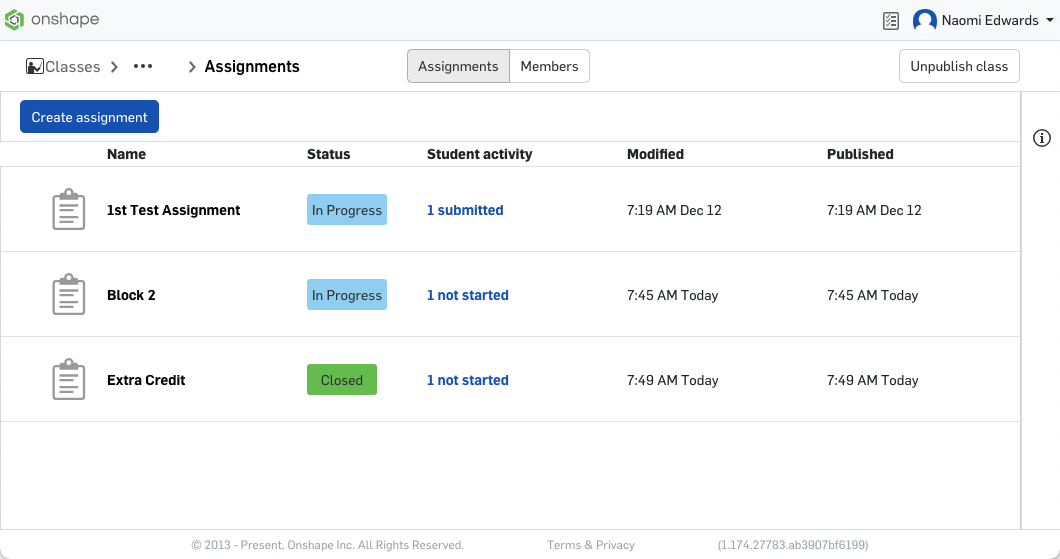
Enhanced Educator Control:
Educators will now enjoy a comprehensive overview of assignment statuses for all students, gaining the ability to efficiently monitor progress and close assignments once completed. This streamlined process simplifies the student and teacher interfaces, offering a more seamless and intuitive document management experience.
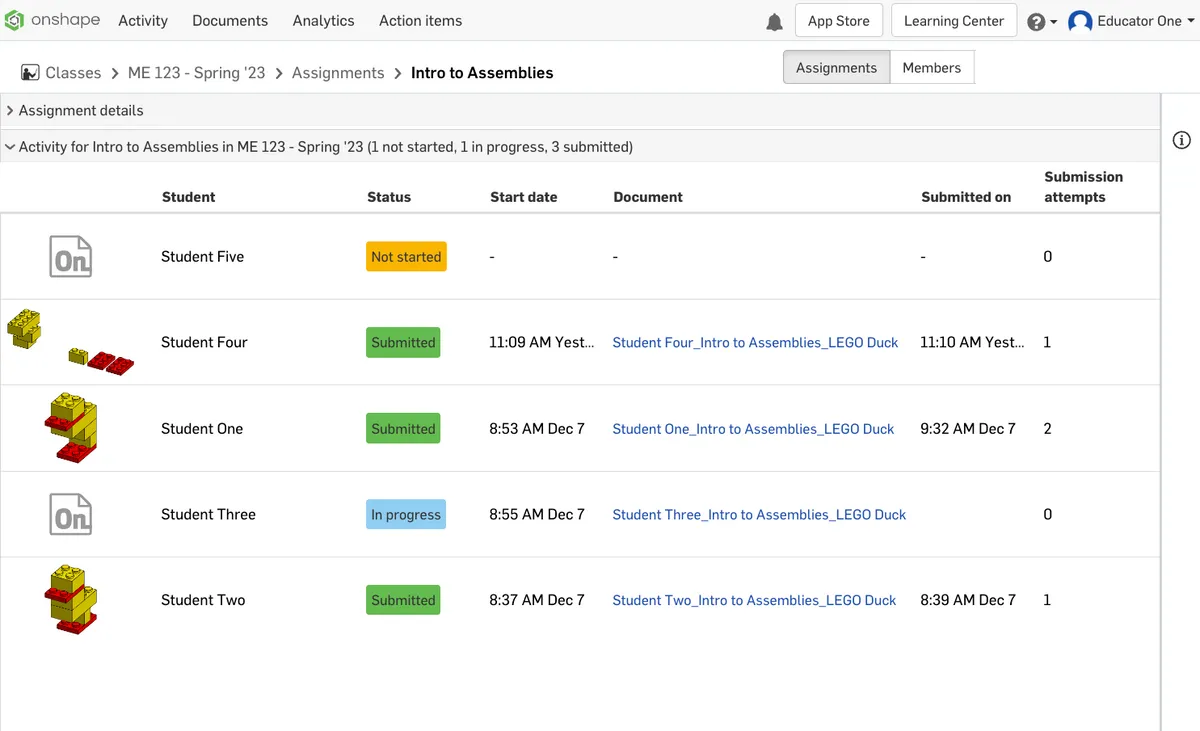
Effortless Grading with Assignment View:
Grading is now more convenient than ever for educators using the assignment view. This feature provides a clear snapshot of each student's status, indicating who has submitted their assignments, who is still actively working, and who has yet to open their assignment. This comprehensive insight eases the grading process, making it a more efficient and organized experience for educators.
Unlock the Power of the Educator Plan:
Verify that you qualify for the plan and upgrade to the enhanced Educator Plan by filling out this form! Take advantage of advanced features tailored to meet the specific needs of educators shaping the future generation of engineers.
**Kindly note that enterprise owners and users need not pursue an upgrade, as enterprise accounts inherently possess these capabilities and more!
Comments
can I upgrade my current free account to be an Educator account? I'm a FIRST Mentor.
Yep! Just go here:
https://www.onshape.com/edu
and sign up.
It will recoginze that you already have an account and ask if you want to upgrade to Educator.
I upgraded my account to EDU and it created a Classroom, and within that classroom are teams and users. This is confusing. The classroom is supposed to be our team, and within our team, there are users.
How does this work? There was no explanation when I upgraded.
How do I have the other mentors upgrade to edu without making their own separate classrooms? How do I get them to join my classroom? How do I get the students to join my classroom?
Where is a page that explains how this works?
You can, if you want, set up classrooms.
Documents can still be created in the normal way, just make sure you select 'owned by be' before creating anything.
To create a class hit the create button and choose 'Class…'
From there you can add students to a class, and or other members of staff. Any work the students do in the class section, (not in the owned by me' section is automatically shared with you. Assignments can be set up to so students can submit work and help keep your stuff organised.
I would check out this course:
https://learn.onshape.com/learn/course/teaching-a-class-in-onshape/
The Classroom is the container for all of your classes, documents, and students.
Under Classroom settings, you can manage users, including adding other mentors. Once you add someone to your Classroom, they will automatically be upgraded to the Educator Plan.
This is a very important piece of information that I had not seen anywhere else before: "Once you add someone to your Classroom, they will automatically be upgraded to the Educator Plan."
Still a little confused about Classroom, Class, and Team, but I'm experimenting with a second account I made as a regular member.
It is not very intuitive to figure out how to use EDU accounts for a team of students that are not part of a class or a school (we are a community-based robot competition team). Even the Official documentation uses the Classroom icon when talking about a Class, and I'm not sure which one they mean.
I'll watch the video you linked, but currently, these are my questions:
- Should I take Classroom to mean our Organization?
- Then within that organization, we have an Educator Team for our Mentors, and two more Teams to represent the two different robotics teams we manage?
- Do I need to use Classes at all for what we're doing? (there's no teaching or assignments, just modeling robot parts)
Yes. A Classroom is similar to a Company in the professional version. It is the top level container for documents, members, and classes.
Yes, I'd make teams within the one Classroom to organize the mentors and robotics teams. But all of the documents will be owned by the Classroom and visible to any Classroom administrators.
You'll get all the benefits of the Education Plan even if you don't use Classes & Assignments. Some robotics teams use C&A for assigning intro CAD assignments to new team members. But, that's up to you.
Tyvm
I have been using an Onshape free account for a few years now and primarily self taught using your online resources and Youtube. It has been an amazing experience learning how to model and create useable files for 3D printing. To me there is an incredible amount of satisfaction turning a thought or concept into a tangible piece. I have worked in professional motorsports my entire career enjoy sharing the knowledge base with others that I have acquired over the years; that being said I am currently starting to mentor my 10 year old son and a few of his friends on automotive application and creative design with an engineering point of view. We are currently starting a STEM project which I am leading them in the design and construction of a scale wind tunnel. I have been encouraging them to start an Onshape account to start understanding parametric modeling and intend to use Simscale to test their design. As an unofficial educator more so just as mentor would it make sense to convert to an educator account and help the kids start their own education accounts. Do you think it may be a little overly ambitious to start teaching kids this young these concepts? personally I feel like these are the skills that will last them a lifetime and want to help ignite the desire for not only automotive understanding but the satisfaction in creative thinking and construction. I appreciate your input and also providing such an amazing resource to the public.
I love that you are getting your son involved with design! I have two boys and my 10 year old loves playing around in Onshape. He's by no means a pro, but he is starting to get a hang of the basics. We've designed a skate ramp, a bird house, and a tree house. We've also done a lot of 3D printing. In particular, he is starting to understand what kind of geometry will work with the 3D printer.
I ran a summer camp a while back and my 5th graders (~10 years old) picked up Onshape remarkably quickly!
I think it would be a legit use of the product if you upgraded yourself to Educator and added your son and his friends to your Classroom.
I am helping put together a STEM program for middle and highschool aged students who are interested in Space and Aerospace careers. I would like to include some easy to follow courses as an introduction to Onshape and then provide them some base files to start with and let them modify and make improvements to the base design before their project is 3d printed. I have the Educator account set up but I am not sure if I can simply add pre-built classes or have to build them myself.
There aren't any pre-built classes (yet). But a lot of people have had success adding the documents from Intro to CAD (https://learn.onshape.com/learning-paths/intro-to-cad) to assignments. Just make your own copy of the Intro to CAD docs and add them to assignments using submission option 2.