Welcome to the Onshape forum! Ask questions and join in the discussions about everything Onshape.
First time visiting? Here are some places to start:- Looking for a certain topic? Check out the categories filter or use Search (upper right).
- Need support? Ask a question to our Community Support category.
- Please submit support tickets for bugs but you can request improvements in the Product Feedback category.
- Be respectful, on topic and if you see a problem, Flag it.
If you would like to contact our Community Manager personally, feel free to send a private message or an email.
Creating a tapered thread
 greg_arnoldussen
Member Posts: 7 ✭
greg_arnoldussen
Member Posts: 7 ✭
I am 3D printing a part where a tapered bolt fits into a (tapered) threaded block. The block then sits snug into a square cavity (not shown) and is split in two. As the bolt screws down into the block it forces the two halves of the block apart exerting a sideways locking force.
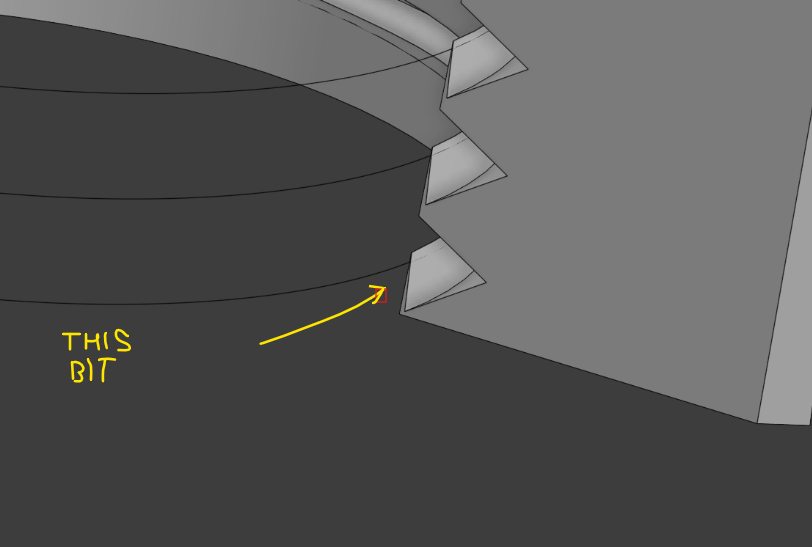
I have not yet found an easy way to construct tapered threads in the custom library so have followed tutorials to have a go myself. I am halfway there except that in respect to the block thread, the side of the triangular cutting tool that is in line with the helix axis digs into the surface on one corner so the thread is not completely cut out (below). Also, I need to extend the thread at the top of the bolt (and bottom of block) as it currently just stops and doesn't carry through - I believe there is an extend boundary tool I can use for this.
Keen for some ideas on how to proceed. If I'm doing it all wrong please feel free to tell me. I prefer to work it out for myself but visualising a cut into a 3D curve like a helix can be a mind bender. Thanks.
https://cad.onshape.com/documents/5fdf074f7731283f5b7b2100/w/a33f1baa405f059dd4395b8c/e/be6760c6dc60ee643dd462c0?renderMode=0&uiState=68cc95dbf73dd92449ab425a
Best Answer
-
robert_scott_jr_
Member Posts: 773 ✭✭✭
Hello Greg. An approach that I imagined after reading your description of the screw and block interaction would be to create the screw with the desired thread and a solid block. It might be easiest to model the block from a sketch using the underside of the screw head as the sketch plane, which will leave the two parts in position for the next step. Use the Boolean/Subtract tool to Remove the bolt body from the block. Split the block in two and use the Move Face tool to remove a bit from the two inner faces of the two block halves. Will that work for you? - Scotty
0
Answers
Hello Greg. An approach that I imagined after reading your description of the screw and block interaction would be to create the screw with the desired thread and a solid block. It might be easiest to model the block from a sketch using the underside of the screw head as the sketch plane, which will leave the two parts in position for the next step. Use the Boolean/Subtract tool to Remove the bolt body from the block. Split the block in two and use the Move Face tool to remove a bit from the two inner faces of the two block halves. Will that work for you? - Scotty
Hi Scotty and thanks for your advice. I did use your approach as far as creating a tapered screw as part one then around that I created the solid block as part two and used boolean to remove the screw from the solid block, then split using a plane. This approach worked well. I used a custom feature script tool "external thread" as the native one didn't seem to work for tapers. I have not used move face before so I need to learn more about that tool. Always more to learn. Thank-you.