Welcome to the Onshape forum! Ask questions and join in the discussions about everything Onshape.
First time visiting? Here are some places to start:- Looking for a certain topic? Check out the categories filter or use Search (upper right).
- Need support? Ask a question to our Community Support category.
- Please submit support tickets for bugs but you can request improvements in the Product Feedback category.
- Be respectful, on topic and if you see a problem, Flag it.
If you would like to contact our Community Manager personally, feel free to send a private message or an email.
Extrude not working even when nothing seems to be wrong
 harry_young
Member Posts: 4 ✭
harry_young
Member Posts: 4 ✭
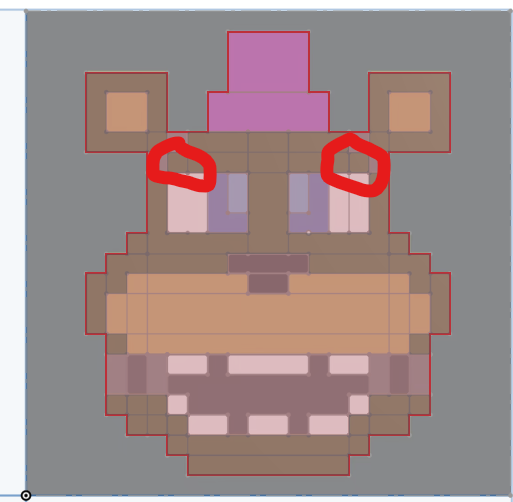
I'm trying to make a model, but when I tried to extrude 2 squares from my sketch, the extrusion doesnt work. Any ideas on how to fix?
0
Comments
At a min. I'd suggest only doing half the sketch and then use mirror after the extrusions are built. Also you might try breaking up the sketch into several sketches like maybe one for each color. While not required, it might make it easier to track down issues such as this. I suspect you're probably trying to create zero thickness (non-manifold) geometry which the software won't let you do. See the example in blue. those 2 blocks cannot exist as one object connected unless they overlap by a little.