Welcome to the Onshape forum! Ask questions and join in the discussions about everything Onshape.
First time visiting? Here are some places to start:- Looking for a certain topic? Check out the categories filter or use Search (upper right).
- Need support? Ask a question to our Community Support category.
- Please submit support tickets for bugs but you can request improvements in the Product Feedback category.
- Be respectful, on topic and if you see a problem, Flag it.
If you would like to contact our Community Manager personally, feel free to send a private message or an email.
New Custom feature: Feature Tree Notes
 jelte_steur_info
Member Posts: 650 PRO
jelte_steur_info
Member Posts: 650 PRO
Hi all,
I abused custom feature scripts to create a hacky alternative to Document notes.
I've been working on an elaborate complicated CAD model for a client. They'll be editing later for alternate versions of a similar design.
I found myself using the 'description feature' of variables and query variables regularly, and wanting something like that with other features.
So I created "Feature Tree Notes" that allows you to add notes in context of the feature tree where you want it for future users of the model:
LINK HERE
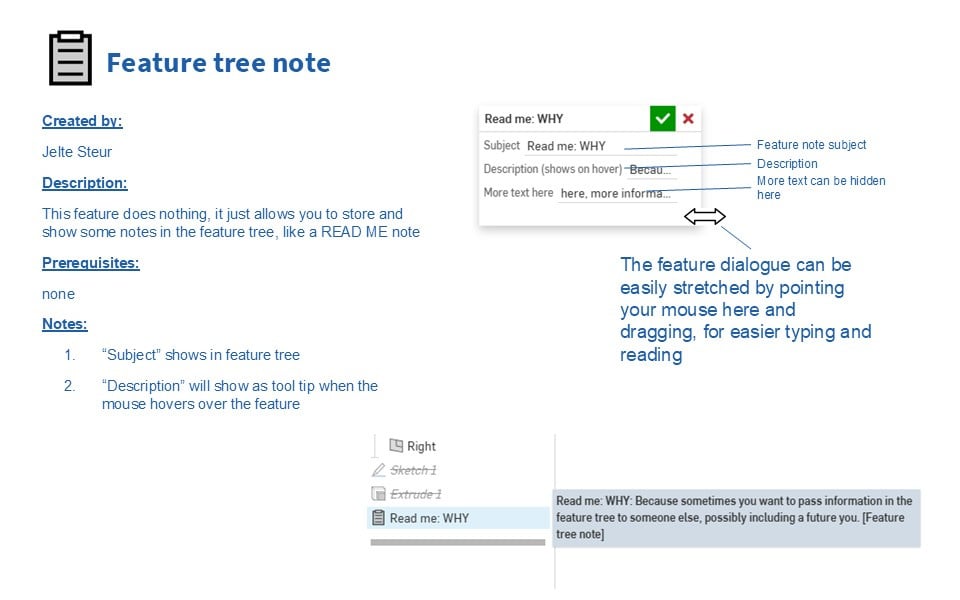
https://cad.onshape.com/documents/afc74bf7462dbbdaf38eec8d/w/ef9a0f17f6e2e3b88b6a4ec5/e/856bb8c77f61f7ec3699d5fa
Comments
This is really cool! Ty.
RENDERCAD
rendercad.ai - Photorealistic product rendering.
▚▞▚▞▚▞▚▞▚
________________________________________________________________________
I love it! I made a "note" feature a while back I never released, but yours is better. Have you seen the Design Intent feature? Very similar, but lets you choose which features you're talking about, which is a nice touch. It'd be a breeze to add that to yours if it helped.
https://cad.onshape.com/documents/6844a9eee3d54ac5624bae3f/v/d627c5b91d79405fe0ed456d/e/1b2a5671035aac52d381cb40
The Onsherpa | Reach peak Onshape productivity
www.theonsherpa.com
It's okay everybody I've got the answers to the questions I know you were gonna ask. There's a 512 character limit on the hover description, but seemingly no limit on the more text field under that.
Derek Van Allen | Engineering Consultant | Meddlerlol my new favorite lorum ipsum alternative
The Onsherpa | Reach peak Onshape productivity
www.theonsherpa.com
There is a 1e6 character count limit:
640K ought to be enough for anybody, right @ilya_baran ?
"640K ought to be enough for anybody" hey I get that reference.
The Onsherpa | Reach peak Onshape productivity
www.theonsherpa.com
@jelte_steur_info Already starting to put this into practice and I'm realizing it might be helpful to be able to add some kind of geometry selection to the feature to be able to highlight what the note pertains to. Right now I've been highlighting parts by creating a query variable in the tree right under the note feature to act as a highlight but that could get messy if my tutorial docs get real lengthy.
Derek Van Allen | Engineering Consultant | MeddlerHey all,
I'm happy such a simple solution can bring such excitement and good use for you all.
@Derek_Van_Allen_BD : Geometry and features can now be referenced, and geometry will be highlighted upon hover (I actually got to code outside of the precondition!)
@jnewth : I guess Bill was right. 640k ought to be enough…
Thanks Jelte, I love this feature!
she/her
I first thought it was not as important, but now I think it is a sweet little helper. It is a bit like commenting code in a script right where things happen, not in a manual. Thanks!