Welcome to the Onshape forum! Ask questions and join in the discussions about everything Onshape.
First time visiting? Here are some places to start:- Looking for a certain topic? Check out the categories filter or use Search (upper right).
- Need support? Ask a question to our Community Support category.
- Please submit support tickets for bugs but you can request improvements in the Product Feedback category.
- Be respectful, on topic and if you see a problem, Flag it.
If you would like to contact our Community Manager personally, feel free to send a private message or an email.
Sketch is not fully defined
 wolfgang_pfeifer
Member Posts: 5 ✭
wolfgang_pfeifer
Member Posts: 5 ✭
in Drawings
I am pretty annoyed. New to this. Cannot transform an element I created. Tried for hours. Its says : Sketch is not fully defined
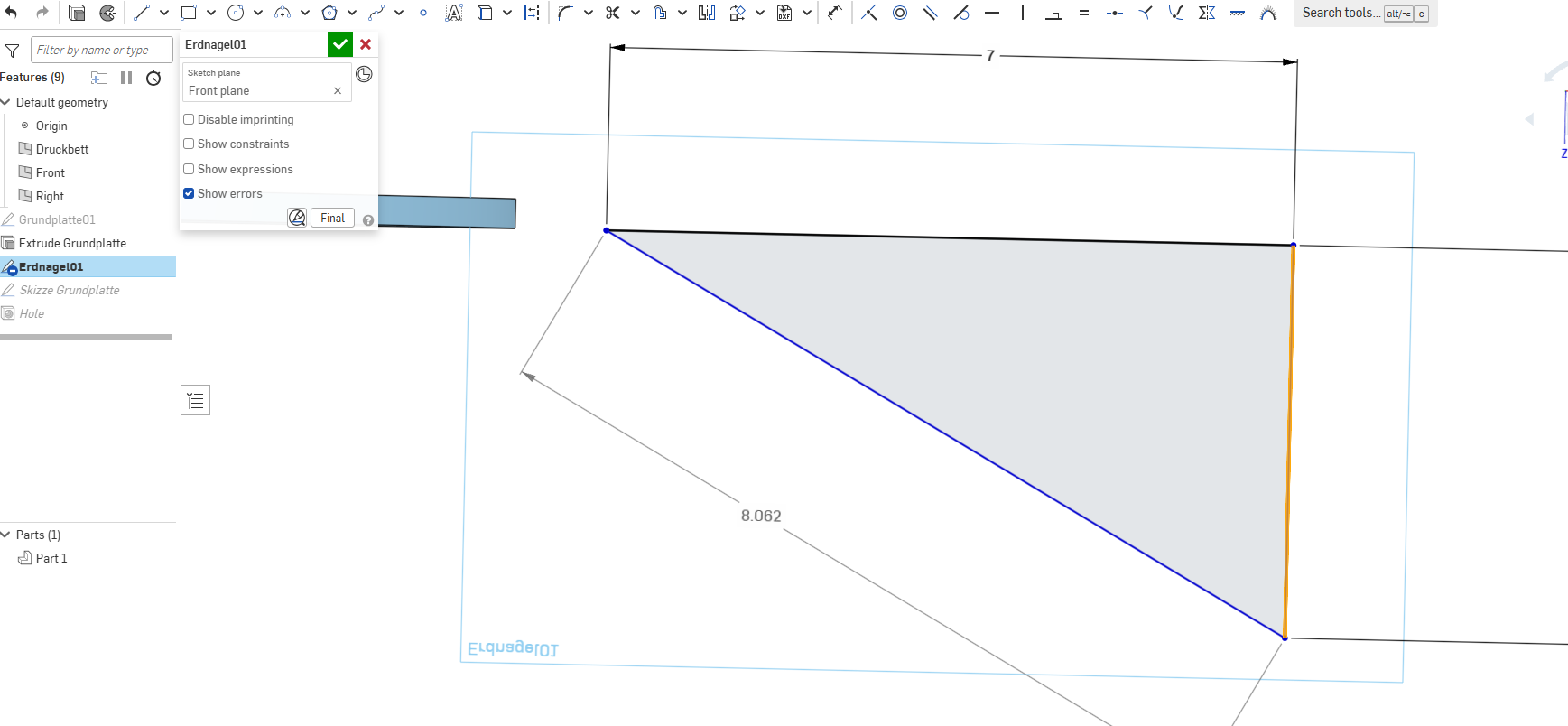
How to solve this ?
0
Comments
A common reason it is not fully defined is because the sketch elements are 'floating' on the sketch plane. You should not be able to use your mouse to move the sketch around. I don't see dimensions that suggest it is 'anchored' in place; it needs to be. Making dimensions or dimensions and constraints to the origin or to another sketch element that is fully constrained should fix it. Also, turn on Show Constraints and check to make sure any lines you intend to be horizontal or vertical are indeed so. - Scotty
A good way to find out where your sketch is not defined is by dragging the blue lines or points and seeing what moves. Then just add dimensions or constraints to stop it.
Try dragging the blue lines and seeing what moves.