Welcome to the Onshape forum! Ask questions and join in the discussions about everything Onshape.
First time visiting? Here are some places to start:- Looking for a certain topic? Check out the categories filter or use Search (upper right).
- Need support? Ask a question to our Community Support category.
- Please submit support tickets for bugs but you can request improvements in the Product Feedback category.
- Be respectful, on topic and if you see a problem, Flag it.
If you would like to contact our Community Manager personally, feel free to send a private message or an email.
Assembly Mirror: How to control / override strategy?
 martin_kopplow
Member Posts: 1,317 PRO
martin_kopplow
Member Posts: 1,317 PRO
I have a bit of an issue with assembly mirror. In principle, it works pretty well, though it has limitations. One of these is this little spring here:
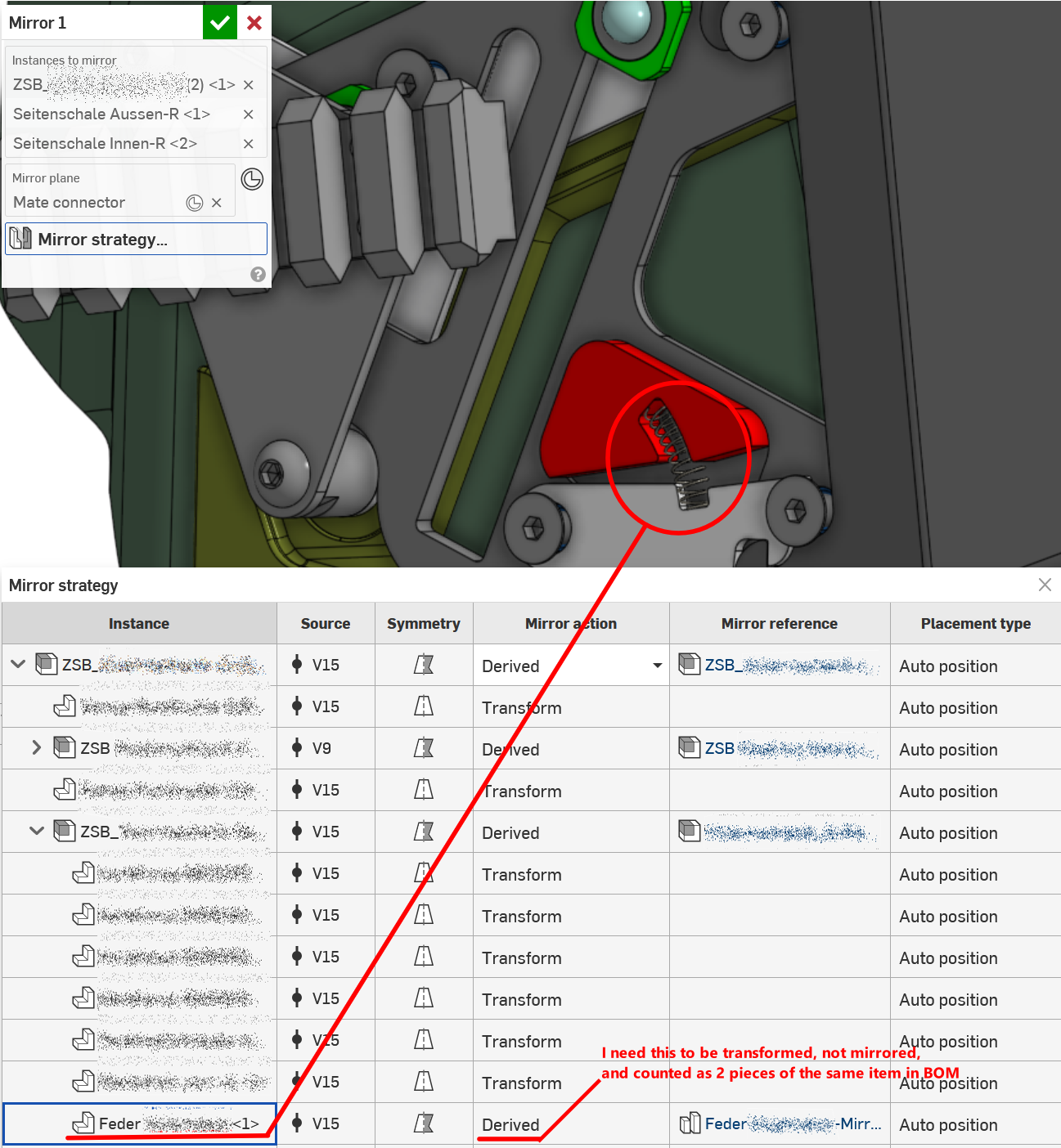
The identical spring exists in the mirrored subassembly of this assembly. Assembly mirror decides it wants to follow a mirror strategy, creating a new left handed spring, when translating it would be the right thing to do. This also creates another item in BOM, which we don't need. I see why the algorithm does this, still, I need to change it. There does not seem to be an override for this, though the Help Files state I need to use the Placement Type dropdown, but there does not seem to exist one such menu for most items. How to handle?
Comments
Make use of the Mirror strategy. Transform moves a copy of a part in a new position. Derive will make a new handed part.
@glen_dewsbury Yepp, that's true, but how to make use of the mirror strategy, if the pulldown menu you screenshot does not appear? Could it be that menu is only available for assemblies, not for subassemblies? (See that little downward pointing triangle? Appears only in table cells with white background, not grey ones.)
In that case, I'd have to mirror subassembly by subassembly, not the whole assembly. Then again, I'd seem to loose the inter-subassembly associativity for some mirrored mates in the process: Some parts in the mirror don't move along. Is that intended behaviour or did I do something strange?
@martin_kopplow
Sub assembly is just a term we are comfortable with. It's really just another assembly.
The pull down is there when I look for it.
Not sure what's going on with parts that don't move along. Can you make a public link to the document?
There is still an issue I see. My sample happened to call for insert of of an assembly that already has assembly mirrored parts. Instead of the little bracket showing that has been mirrored as 2 of each. This has generated a mirror of a mirror that should be 2 of each bracket with a transform for the other 2 more brackets that are left handed not 4 individual brackets.
Think I'll pass this to support and see if they have any suggestions.
Try clicking in the area that you see the arrow in my document. Maybe be it is because of the screen colour you're using. In that case you have have to wait for an answer here or try sending a note to support.
I never use dark mode. that just about pulls my eyes out.
@glen_dewsbury
If I used the term sub-assembly, it was just to say it is not my top level assembly. It appears that the assembly mirror feature does a decent job on a top level assembly (that is to say: the one assembly it is applied to) but cannot deal with multiple levels of assemblies within it.
I don't use dark mode either. It makes me fall asleep all the time ;0) (No, it is rather because I do make heavy use of screenshots for communication and documentation, and the white is just more suitable to paste into documents.) So, it is not because I use dark mode. It is because the "Placement Type" pulldown and the little arrow to open it just don't exist for certain items in the strategy table.
I tried adiffernt approach and just replace the "Feder-Mirrored" part with the original, but the "Replace instance" menu item is also not available. So I'm stuck.
Support? Do you copy? I cannot share this document but could sure knock up a sample.
I've had a response from support. Went back and tried again. Simple statement but got me to rethink the assembly mirror function and use of the mirror strategy. Looks OK now.
https://cad.onshape.com/documents/9a16e90e97ff0f49350854fe/w/8b1147e1bb96ce49e97d63d0/e/49fcbd3e71e59a2bbdb7a345
BTW. If you're still not sure after this example, feel free to make a mock up and share.
On the second mirror I changed the clips from derive to transform and that makes the difference. I swear that failed the first time.😛
The assembly mirror is a pretty cool function.😀
@glen_dewsbury Haha! It did certainly not fail the first time only, in my case. ;0)
It fails because there is an assembly in my assembly in my assembly. Apparently, I need to mirror all the nested (sub-)assemblies one by one, in order to get access to the mirror strategy pulldown. In your sample, there is only one level. That kind of contradicts the general assembly mirror approach or at least my expectations, because I'll now need a bunch of assembly mirror features stacked in my feature tree, where I would love to see only a single one.