Welcome to the Onshape forum! Ask questions and join in the discussions about everything Onshape.
First time visiting? Here are some places to start:- Looking for a certain topic? Check out the categories filter or use Search (upper right).
- Need support? Ask a question to our Community Support category.
- Please submit support tickets for bugs but you can request improvements in the Product Feedback category.
- Be respectful, on topic and if you see a problem, Flag it.
If you would like to contact our Community Manager personally, feel free to send a private message or an email.
How to align images on different planes
 john_tor
Member Posts: 19 ✭
john_tor
Member Posts: 19 ✭
Hi,
I'm trying to perfectly align two images on two different planes (front and top ones), but I'm not sure that I'm doing it the right way:
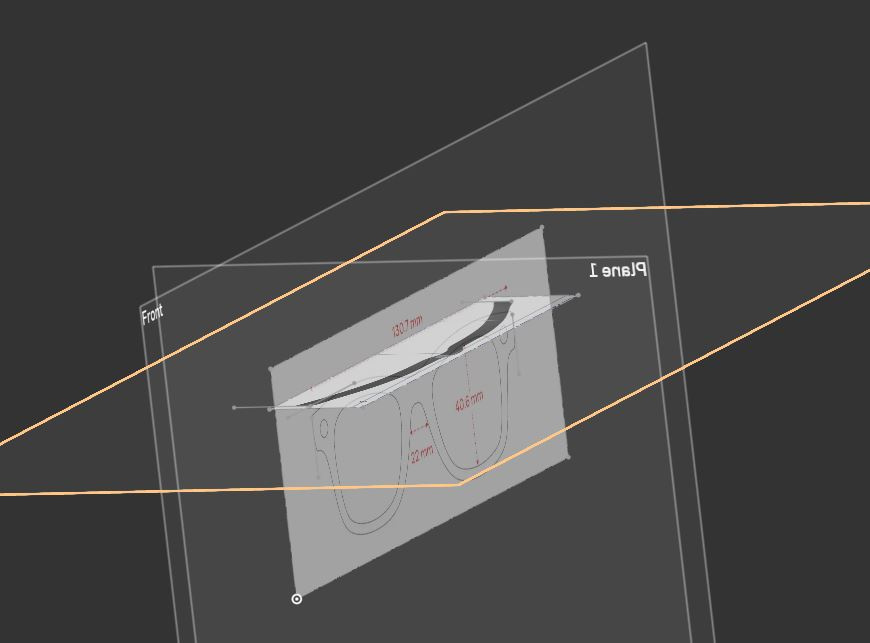
Here is the shared link to the project:
Could you please help me understand the right way to do it?
Thanks
0
Comments
Find a common point and set to the origin will help. Setting scales to make both sketches match size I find a little bit of a pain. Not sure why you felt the need to set up other planes?
https://cad.onshape.com/documents/0a994b2372490057a59902b1/w/4b49d64cb7f894ae0d7cd132/e/be7d949bff4170d7f4b6136d
I was just following this tutorial:
Anyway, I don't think I've understood how you aligned them.
Thanks
Once the sketches were scaled I used a transform to to move the sketches to the origin using points generated in the sketches. No extra planes needed.
You'll notice I used less input points for the splines to get smoother transitions around the frames.
https://cad.onshape.com/documents/0a994b2372490057a59902b1/w/4b49d64cb7f894ae0d7cd132/e/be7d949bff4170d7f4b6136d
Hi Glen
what still puzzles me is this arc:
I didn't understand the criteria of its measures. Sorry, The Video was a bit messy about it.
Thank you again
The arc is a guide for intersect sweep adding to over all shape. That's the shape of the glasses I'm wearing.
I got that, but it doesn't seem to be an accurate measure, I mean it looks to me as it could be of any lenght. Thanks
No it's not an accurate. I't's just a sample and can be locked down any place you like. As to the length, that's some where past the intersect.
Okay. Thank you very much
Have you tried the "pierce" command? I find this very helpful in this sort of situation. It works like a coincident constraint, between two different sketches. Good luck
No, I've never heard of it actually. I'll look it up. Thank you very much.