Welcome to the Onshape forum! Ask questions and join in the discussions about everything Onshape.
First time visiting? Here are some places to start:- Looking for a certain topic? Check out the categories filter or use Search (upper right).
- Need support? Ask a question to our Community Support category.
- Please submit support tickets for bugs but you can request improvements in the Product Feedback category.
- Be respectful, on topic and if you see a problem, Flag it.
If you would like to contact our Community Manager personally, feel free to send a private message or an email.
How to align surface with surface edge?
 stefan_glaser
Member Posts: 2 ✭
stefan_glaser
Member Posts: 2 ✭
Hello,
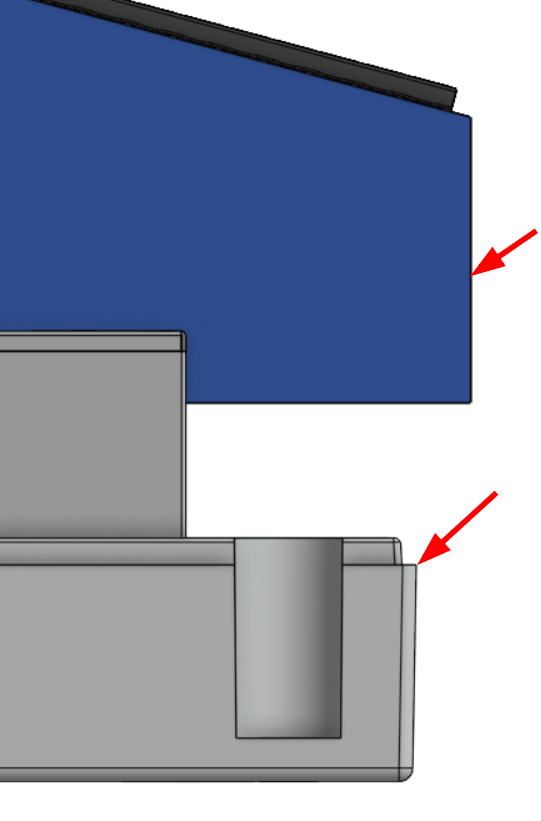
How to vertically align the blue vertical surface (surface is going "into" the screen) with the most right corner of the gray part in an assembly? Note that the grey surface has and angle to it.
Thank you!
Greetings
Stefan
0
Comments
You can create an implicit mate connector on the surface of the gray part which is perpendicular to the screen, and rotate it 90 degrees. That should give you the reference you need to mate the blue part, either with a planar mate or some sort of fasten mate with some offset.
Simon Gatrall | Product Development, Engineering, Design, Onshape | Ex- IDEO, PCH, Unagi, Carbon | LinkedIn
Move face up to entity should do the job.