Welcome to the Onshape forum! Ask questions and join in the discussions about everything Onshape.
First time visiting? Here are some places to start:- Looking for a certain topic? Check out the categories filter or use Search (upper right).
- Need support? Ask a question to our Community Support category.
- Please submit support tickets for bugs but you can request improvements in the Product Feedback category.
- Be respectful, on topic and if you see a problem, Flag it.
If you would like to contact our Community Manager personally, feel free to send a private message or an email.
Weird bump when using loft for airframe
 mikel_morales
Member Posts: 7 ✭
mikel_morales
Member Posts: 7 ✭
Hey there, so I've been running crazy with this problem; I've tried several things without success. So when using the loft feature on this design, first I cannot do it all with just one loft, had to divide it into 2. Also, I end up with a weird bump that I don't know where it comes from on the bottom. Please help me
link: https://cad.onshape.com/documents/d2fa29abe811b0f88b20b1db/w/3a4e91c619c66535e7eba06a/e/ae9da9de42946138083e051f?renderMode=1&uiState=693b4b301d503516d3a52e5f
Best Answer
-
 martin_kopplow
Member Posts: 1,304 PRO
martin_kopplow
Member Posts: 1,304 PRO
Rule of thumb for fuselages: Only build one half of them. Mirror later. Reduces the amount of reference geometry required by 50% and minimizes the likelihood of error dramatically. Build the outer shape only, create the inner shape by means of a thin or shell feature, unless you have good reasons. Don't rely on the cross sections somehow making a good shape on their own: They won't, unless you need a potato. Use guide curves.
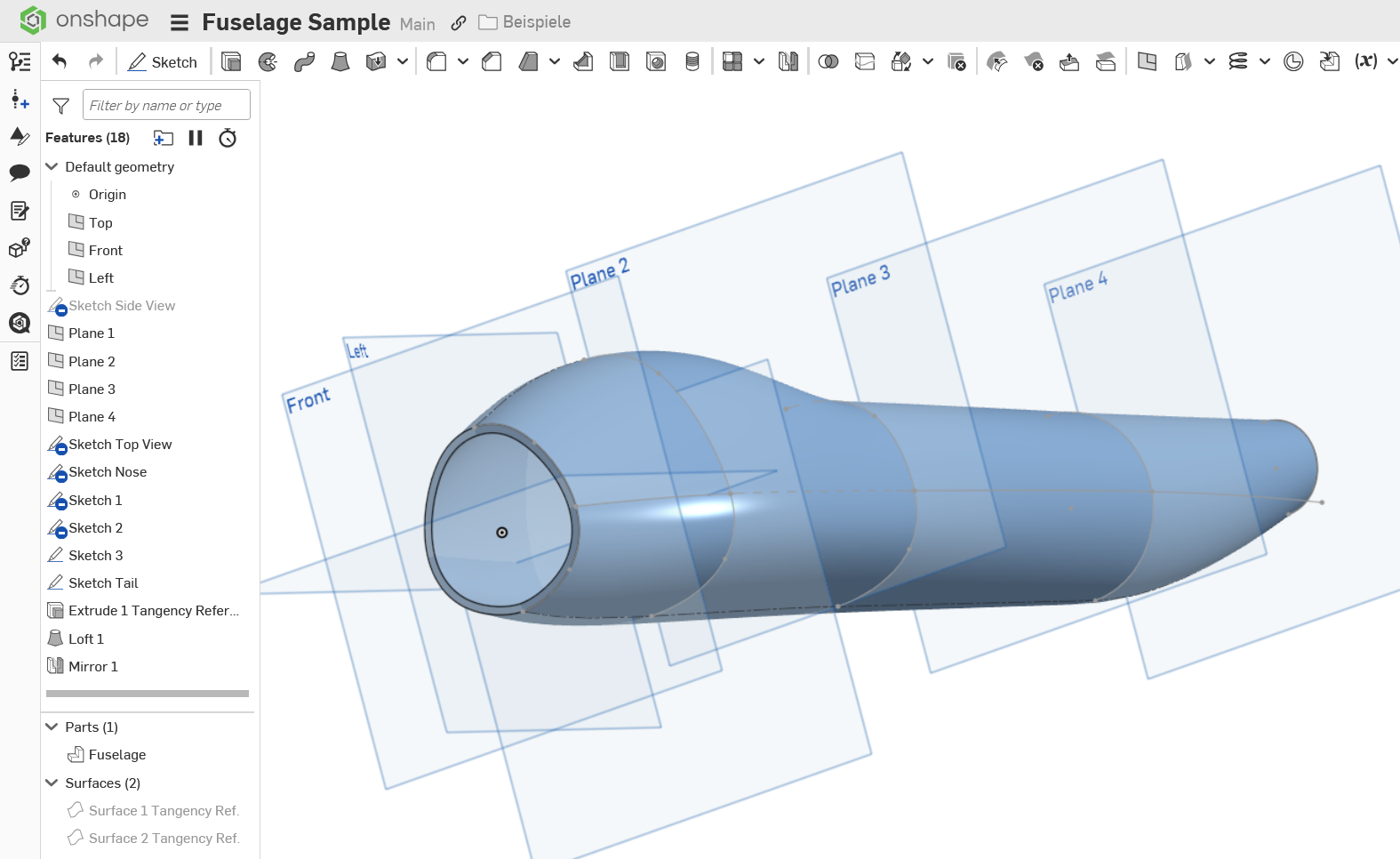
This is a quick and dirty sample with not even all sketches fully constrained, though tangency is taken care of. See how much more control there is? See how it results in one single loft? See how the sides are tangent in the center plane and absolutely symmetrical?
0
Answers
This is the bump i talk about. Forgot to upload the photo from the begining
Your sections have a lot of different numbers of segments which aren't tangent. I'm not exactly sure what you want the result of the loft to be if the cross sections have bumps in them.
Simon Gatrall | Product Development, Engineering, Design, Onshape | Ex- IDEO, PCH, Unagi, Carbon | LinkedIn
Rule of thumb for fuselages: Only build one half of them. Mirror later. Reduces the amount of reference geometry required by 50% and minimizes the likelihood of error dramatically. Build the outer shape only, create the inner shape by means of a thin or shell feature, unless you have good reasons. Don't rely on the cross sections somehow making a good shape on their own: They won't, unless you need a potato. Use guide curves.
https://cad.onshape.com/documents/e287107f927fb105f512901c/w/5654b700258108dd97bc2886/e/c8a29b86c0791f3f4c40f9a1?renderMode=0&tangentEdgeStyle=1&uiState=693bf068c8cd6198768b28f4
This is a quick and dirty sample with not even all sketches fully constrained, though tangency is taken care of. See how much more control there is? See how it results in one single loft? See how the sides are tangent in the center plane and absolutely symmetrical?
https://learn.onshape.com/?hostDomain=cad