Welcome to the Onshape forum! Ask questions and join in the discussions about everything Onshape.
First time visiting? Here are some places to start:- Looking for a certain topic? Check out the categories filter or use Search (upper right).
- Need support? Ask a question to our Community Support category.
- Please submit support tickets for bugs but you can request improvements in the Product Feedback category.
- Be respectful, on topic and if you see a problem, Flag it.
If you would like to contact our Community Manager personally, feel free to send a private message or an email.
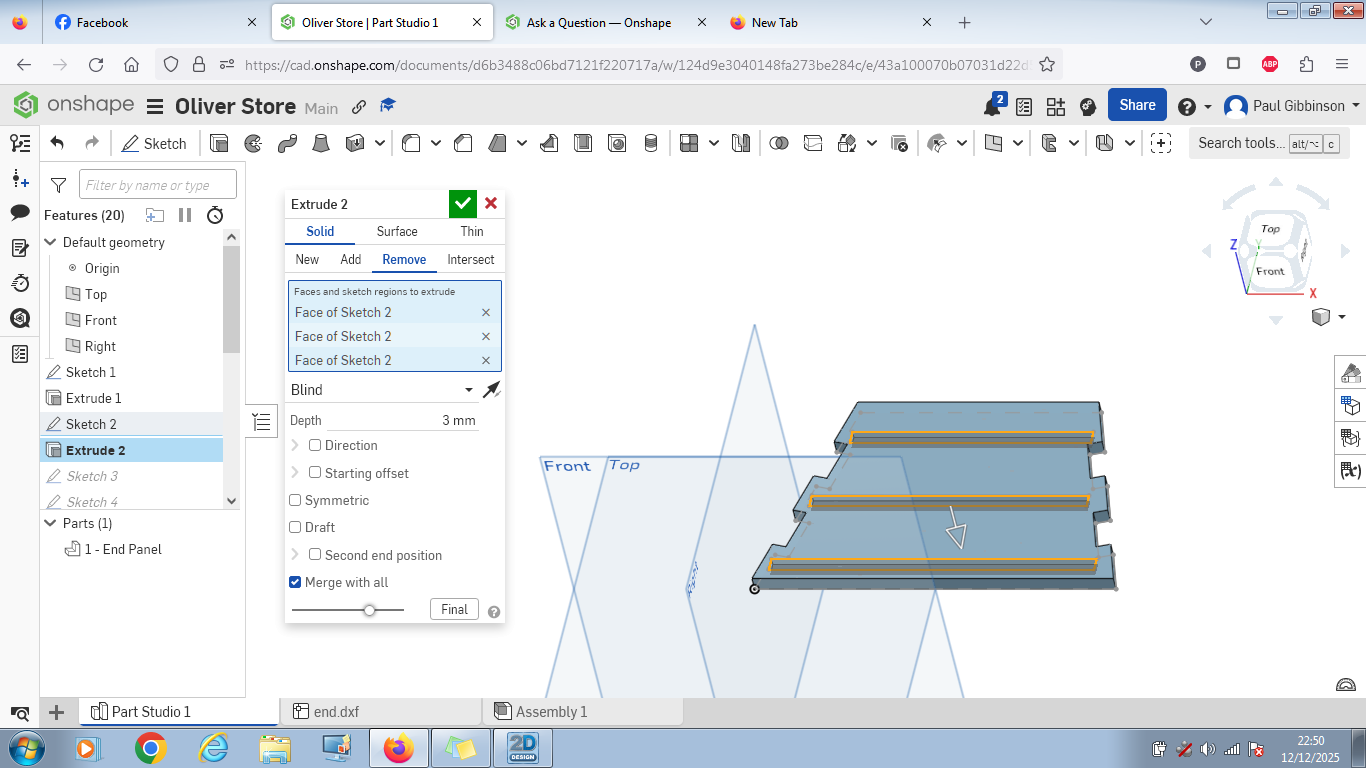
Why is Extrude Remove previewing correctly, then failing, but showing no errors anywhere ?
 paul_gibbinson
Member Posts: 2 ✭
paul_gibbinson
Member Posts: 2 ✭
This should be a really simple project - make a box using flat panels with a couple of shelves inserted into slots. I created an end panel (flat 6mm sheet) and then try to remove 3 slots (3mm deep) by drawing a sketch on the top surface of the panel and then simply extrude remove 3mm down.
Everything previews Ok but when I confirm nothing happens. No errors showing anywhere. tried all the 'Merge with All' and 'Merge Scope' options - still no joy!
All suggestions welcome.
0
Answers
Did you try clicking the arrow to flip the extrude direction?
Edit: Nevermind. I see the sketch is on the face of the part.
You should share a link to your part so we can look at it.
Ramon Yip | glassboard.com