Welcome to the Onshape forum! Ask questions and join in the discussions about everything Onshape.
First time visiting? Here are some places to start:- Looking for a certain topic? Check out the categories filter or use Search (upper right).
- Need support? Ask a question to our Community Support category.
- Please submit support tickets for bugs but you can request improvements in the Product Feedback category.
- Be respectful, on topic and if you see a problem, Flag it.
If you would like to contact our Community Manager personally, feel free to send a private message or an email.
Can this have been done any better?
 daniel_rodríguez_rivero
Member Posts: 12 ✭
daniel_rodríguez_rivero
Member Posts: 12 ✭
Hello, I'm just learning OnShape (and CAD in general) for being able to make some products for my home using 3D printing.
I always have the doubt if something has been done in the right way or if it could have been done any better. The one I want to ask about today is an example:
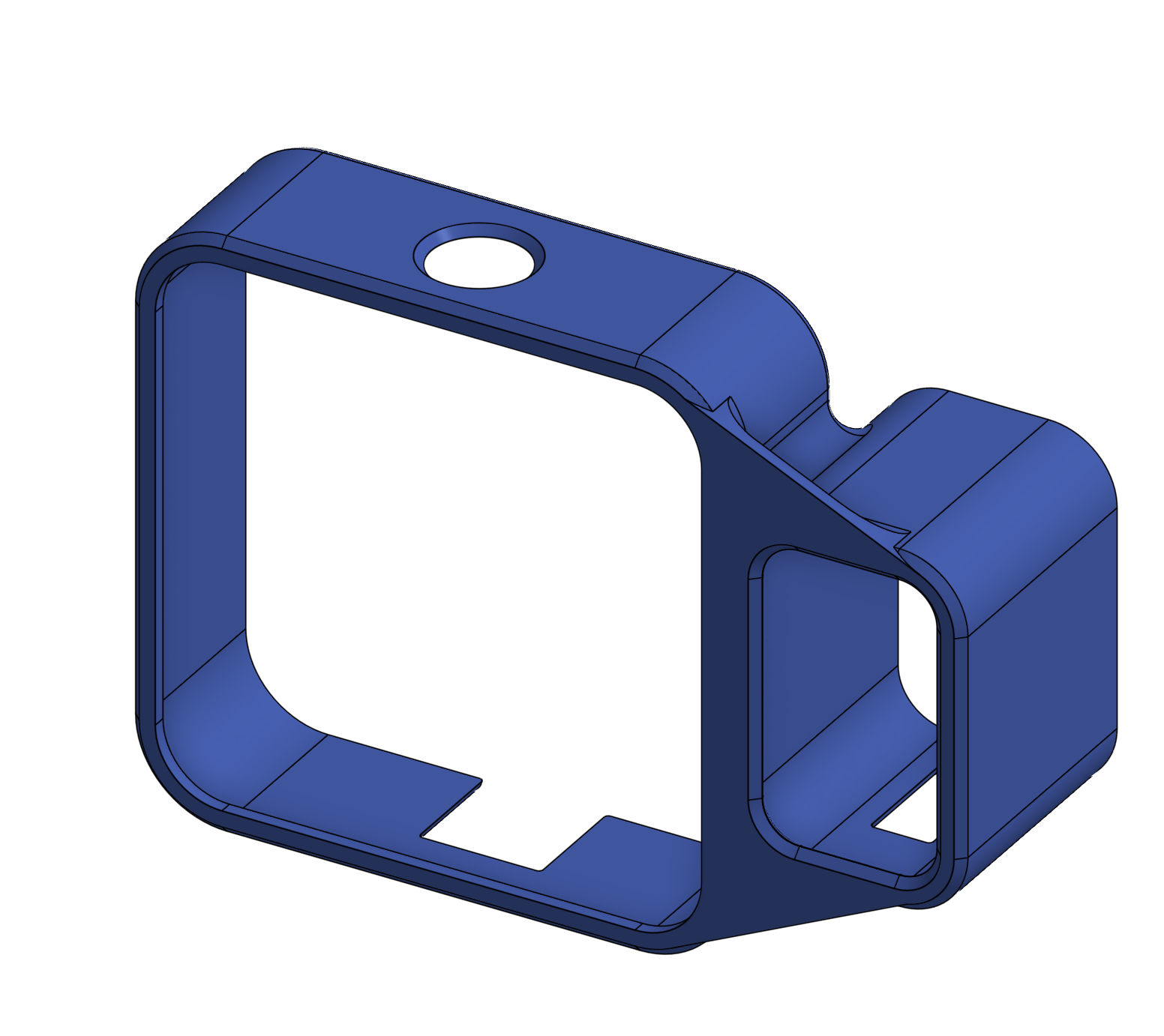
This piece required two reference pictures, so in order to prevent having the area too messy, I divided it into two separate Part Studios. That is my first doubt. Was this the right decission? The final piece needed to be a union of both pieces. However, putting it all together was very easy making use of Derived so this is not that much of a problem.
The main doubt is about how I fused both pieces. Of course, the base is a Boolean union, but then I'm not sure if I made the "plate" that joins both pieces in the right way.
I made a projection of both shapes in a new sketch, traced some lines between them and then I extruded that. Then to make the window of the second piece I have to do a cut extrusion.
Finally, I wanted to fuse the pieces a bit better, so I used face blend, not sure if it is the right tool for the job.
Here is a screenshot in case someone wants to see it without entering the drawing
Comments
I only skimmed through the model, my thoughts…
-It's one piece of plastic when finished, so it would be best to model it all in one part studio. It wouldn't have been too messy, and you can hide the sketch that has the pictures to keep the screen non-cluttered.
-You didn't take advantage of symmetry and the default planes, and drew it at some random place. The origin should be at the middle of the big square.
-You don't need to assign a variable to everything unless you intend to make configurations. If this was a one-off design, just put the dimension in the sketch.
-Some of the rounds end it a knife edge. Was that intentional? That usually is not good for any manufacturing process, including printing.
Q: You didn't take advantage of symmetry and the default planes, and drew it at some random place. The origin should be at the middle of the big square.
Thank you for taking a look at it!
Use Nicks suggestions and I have some more for you. With the available info in the pictures I would not import them. The info can be measured off the parts quite cleanly. Up to you but I wouldn't stretch into 2 part studios. Sweeps to get the initial shape will works well. Any symmetry that can be made use of is good. Myself I always pic something symmetric about the origin if I can. Save any fillets/chamfers to near the end of the feature tree and avoid using in sketches. Much simpler to update/correct later. If you continue with multiple part studios create a variable studio so all variables are available to all studios. With a little more time you could probably use less fillets and chamfers than I did.
https://cad.onshape.com/documents/a1f3d3754ffd0cc424c92c8d/w/0b5d53d60b2833cf7415f282/e/a0ff5479790e1720f997a97f
Except for the curves of the edges. I could have run a couple of test prints, but I already had to do 4 for the holes positions while the fit of everything else was perfect, so I think it was worth it.
I saw the model you shared and saw you used sweeps. I was not aware of that feature and it is an interesting way of build this same shape. Any reason to prefer it to extrussions? Well, I had to use one additional extrusion and a sketch to build the "lip" but so you do. What is the advantage of the sweep?
Thank you for sharing your thoughts and your model!
@daniel_rodríguez_rivero If you weren't aware of Sweep, then you should check out the Learning Pathways. They will save you literally years of trial and error and bad practices.
.
Learn more about the Gospel of Christ ( Here )
CADSharp - We make custom features and integrated Onshape apps! Learn How to FeatureScript Here 🔴
No big preference between extrudes and sweeps. Some times you can gather more detail in a sweep and less extrudes.
I knew they existed, but very vague concept, not familiar with it, like something very far far away in my memory. Thank you for the link, I will be definitely follow it. Thanks