Welcome to the Onshape forum! Ask questions and join in the discussions about everything Onshape.
First time visiting? Here are some places to start:- Looking for a certain topic? Check out the categories filter or use Search (upper right).
- Need support? Ask a question to our Community Support category.
- Please submit support tickets for bugs but you can request improvements in the Product Feedback category.
- Be respectful, on topic and if you see a problem, Flag it.
If you would like to contact our Community Manager personally, feel free to send a private message or an email.
New Dude Having Problems with Copying Parts
 jim_reilly706
Member Posts: 2 ✭
jim_reilly706
Member Posts: 2 ✭
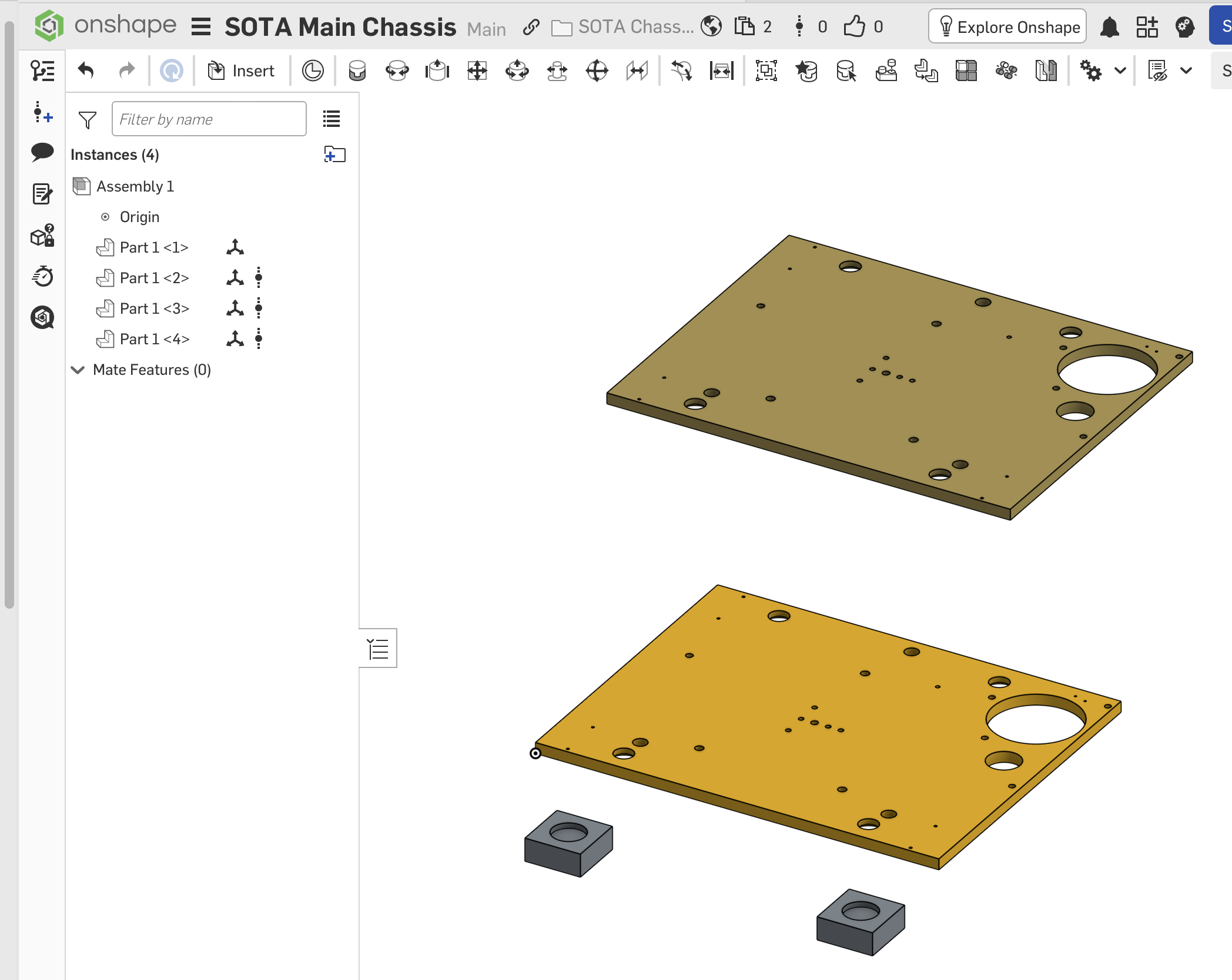
I am new to OnShape but with SolidWorks experience. I am trying to create an assembly of various modeled parts. The main part (SOTA Main Chassis) is a simple 1/2" thick wood part with a hole pattern in it of approx 30 holes of various sizes. Two other pieces assemble onto it with the same hole pattern. My approach was to model the original part then make copies to create each of the other two pieces (one 1/16 thick aluminum, the other 1/8 thick lead). All the individual parts look fine until I pull them into an assembly. The original piece inserts fine. When inserting the second one (1/16 aluminum), it comes in visually as 1/2" thick. I assume I did not copy it correctly. I think I used "Copy Workspace", but I don't remember. I was looking or any selection that looked like it would copy.
The problem may also have to do with the structure of my "parts directory", which frankly I find confusing. I have all the parts in a common folder. But perhaps they need to all be in the same Document, not sure. I am also creating the assembly as a tab within the main part's "workspace".
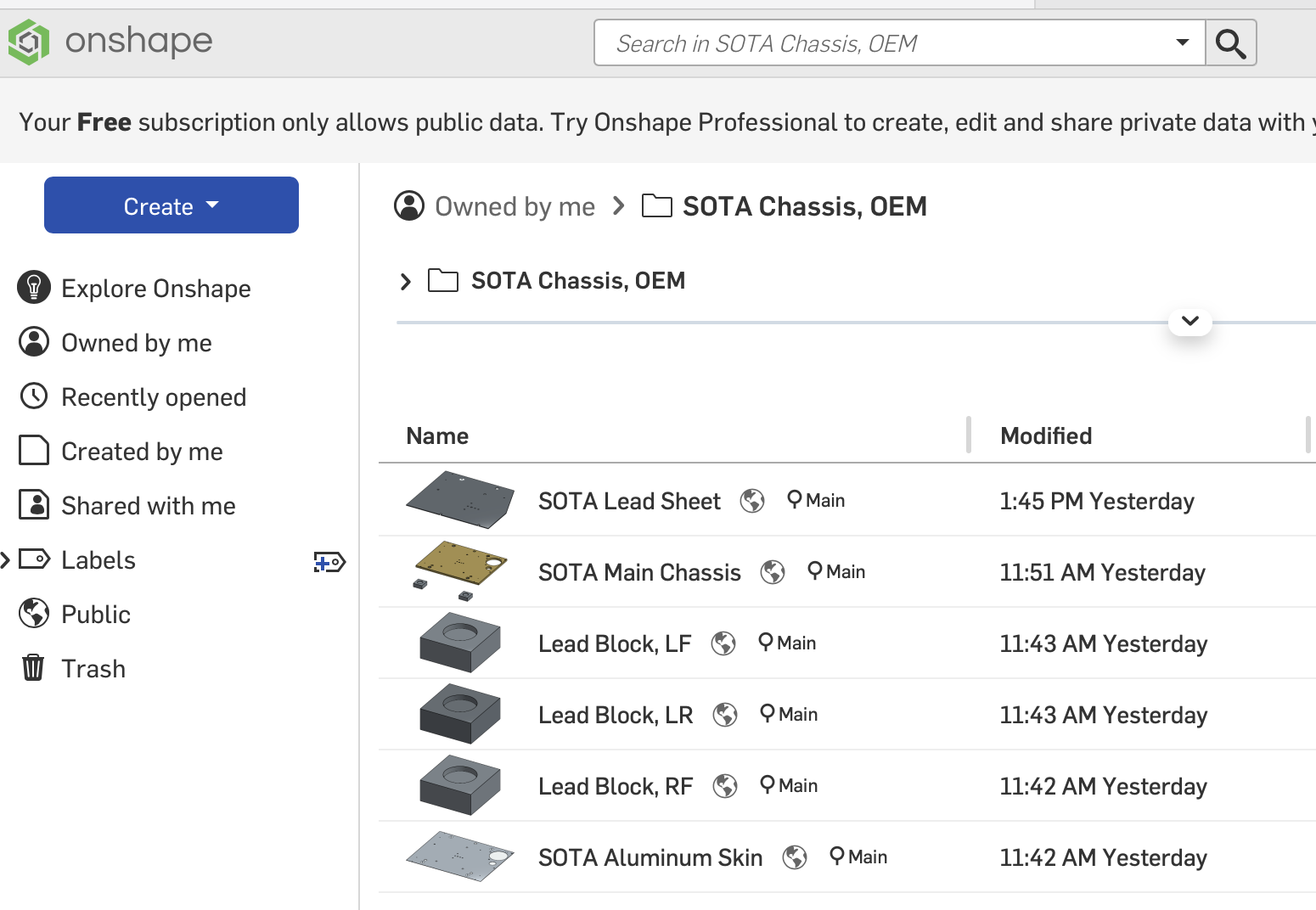
A screen shot is attached of the file structure. It also shows three lead blocks that will also be part of the assembly. I created one followed by two renamed copies. I can get two of them into the assembly but not the third. When they come in they are not named, so I don't know which is which. I'm not sure if the three blocks will be independent of each other or if the two copies will be somehow tied to the original. Once assembled, I need to adjust the hole depth in each block to independently adjust their weights. This entire analysis is to tweak in the weight and CG of the assembly.
So basically three questions: 1) What is the correct way to make independent copies of parts, 2) How do I properly structure a project in On Shape with Documents and Folders and 3) where do I make the assembly, as a tab within a part or as a separate "file"?
Note: In the second screen shot, the large part in the middle was imported as the 1/16 thick aluminum plate. Also notice the lack of part names.
Thanks
Jim
Answers
Might be worth a look at the 'new to onshape' pathway in the learning center.
https://learn.onshape.com/
To organise things. All the parts for that could be in the same document.
Seperate parts, drawings, assemblies, imports can all be organised in the tabs at the bottom of a document. Not one doc per part.
You might be able to make use of multi part studios as well.
If the lead blocks are the same, hard to tell from the screen shot, model once, insert many times into the assembly.
Was going to say as well: these should all be in the same "document", and the plates that share the same holes should either be configurations of the same part of parts created in the same part studio!
"Copy workspace" is going to be a very inefficient way to do this but if you wanted to make it work, inserting parts from a different document requires creating a version so I am guessing you didn't do that after the "copy workspace" and making the changes (so you are only able to insert the part as it was immediately after the "copy workspace" operation.
The blocks also look very similar and could likely just be configurations of a single part…
A bit overkill for the "level" of your project but this is a good one to watch for project organization, especially if you plan on doing more complex thins in Onshape:
https://www.youtube.com/watch?v=pIjq6S8TUME
Noticed you are using the free plan so had a look…
Here's how you can create the Lead sheet part in 40s by using the same part studio as your main chassis:
I would also recommend using the "hole wizard" tool for screw clearance holes etc…
As a SolidWorks user for 10+ years, you really should spend a bit of time looking at the learning center to learn the Onshape interface as it's like nothing else out there, but this is a good thing.
An Onshape document is not a part, but rather a collection of tabs that can contain your parts, assemblies, render environments, cam setups, etc.
Onshape part studios can contain multiple parts, that aren't bodies, but rather actual parts that you can name, assign properties to, create drawings out of. Each individual "body" inside of an Onshape part studio is a part. As such, the reason why your Parts in your assembly are not named is because the parts don't take on the name of the document itself. You need assign names to each one of those parts, much like you would assign a name to a SolidWorks body.
Also, if you really wanted to keep most of your workflow, I would suggest duplicating tabs instead of using Copy workspace. However, it sounds like configurations would suit you better.
Ramon Yip | glassboard.com