Welcome to the Onshape forum! Ask questions and join in the discussions about everything Onshape.
First time visiting? Here are some places to start:- Looking for a certain topic? Check out the categories filter or use Search (upper right).
- Need support? Ask a question to our Community Support category.
- Please submit support tickets for bugs but you can request improvements in the Product Feedback category.
- Be respectful, on topic and if you see a problem, Flag it.
If you would like to contact our Community Manager personally, feel free to send a private message or an email.
Allowing for mate connector selection. What's the correct syntax?
 ry_gb
Member, csevp, pcbaevp Posts: 187 PRO
ry_gb
Member, csevp, pcbaevp Posts: 187 PRO
I'm testing out different query types and wanted to allow for users to select a Mate Connector. However, when I wrote out:Filter" : EntityType.BODY && (…|| BodyType.MATE_CONNECTOR),
the feature dialog doesn't allow for mate connector selection or show the mate connector symbol until I add|| AllowMeshGeometry.NO
as well. Doesn't make a ton of sense to me. Is there anything different I need to do?
Ramon Yip | glassboard.com
Best Answers
-
 Konst_Sh
Member Posts: 141 PRO
Konst_Sh
Member Posts: 141 PRO
Just BodyType.MATE_CONNECTOR alone should work, also use "UIHint":UIHint.PREVENT_CREATING_NEW_MATE_CONNECTOR if you only want explicit mc's to be allowed
0 -
 Matt_Shields
Member, Onshape Employees Posts: 949 PRO
Matt_Shields
Member, Onshape Employees Posts: 949 PRO
This works for me:
annotation { "Name" : "Center", "Filter" : EntityType.VERTEX || BodyType.MATE_CONNECTOR, "MaxNumberOfPicks" : 1 }

definition.centerPoint is Query;
0 -
 MichaelPascoe
Member Posts: 2,818 PRO
MichaelPascoe
Member Posts: 2,818 PRO
Here is a related post that may be useful for you: https://forum.onshape.com/discussion/15736/implicit-mate-connectors-act-differently-than-explicit-ones…
And here is a quick way to get the implicit mate connector button to appear, just ensure there are multiple body options (not just one body filter option) and that MATE_CONNECTOR is one of them:
annotation { "Name" : "myMate", "Filter" : BodyType.MATE_CONNECTOR || BodyType.MATE_CONNECTOR }
definition.myMate is Query;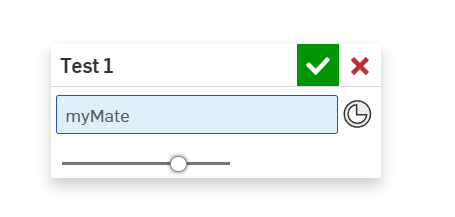
RENDERCAD
rendercad.ai - Photorealistic product rendering.
▚▞▚▞▚▞▚▞▚
________________________________________________________________________0
Answers
Just BodyType.MATE_CONNECTOR alone should work, also use "UIHint":UIHint.PREVENT_CREATING_NEW_MATE_CONNECTOR if you only want explicit mc's to be allowed
This works for me:
annotation { "Name" : "Center", "Filter" : EntityType.VERTEX || BodyType.MATE_CONNECTOR, "MaxNumberOfPicks" : 1 }definition.centerPoint is Query;
Here is a related post that may be useful for you: https://forum.onshape.com/discussion/15736/implicit-mate-connectors-act-differently-than-explicit-ones…
And here is a quick way to get the implicit mate connector button to appear, just ensure there are multiple body options (not just one body filter option) and that MATE_CONNECTOR is one of them:
annotation { "Name" : "myMate", "Filter" : BodyType.MATE_CONNECTOR || BodyType.MATE_CONNECTOR }
definition.myMate is Query;
RENDERCAD
rendercad.ai - Photorealistic product rendering.
▚▞▚▞▚▞▚▞▚
________________________________________________________________________
"multiple body" options. That sounds like the issue I was running into. However, both other answers work as well.
Thanks! @Konst_Sh @Matt_Shields @MichaelPascoe
Ramon Yip | glassboard.com
That's insane that it works like that. Good to know.
Simon Gatrall | Product Development, Engineering, Design, Onshape | Ex- IDEO, PCH, Unagi, Carbon | LinkedIn