Welcome to the Onshape forum! Ask questions and join in the discussions about everything Onshape.
First time visiting? Here are some places to start:- Looking for a certain topic? Check out the categories filter or use Search (upper right).
- Need support? Ask a question to our Community Support category.
- Please submit support tickets for bugs but you can request improvements in the Product Feedback category.
- Be respectful, on topic and if you see a problem, Flag it.
If you would like to contact our Community Manager personally, feel free to send a private message or an email.
STL-Export: Missing certain faces
 martin_kopplow
Member Posts: 1,222 PRO
martin_kopplow
Member Posts: 1,222 PRO
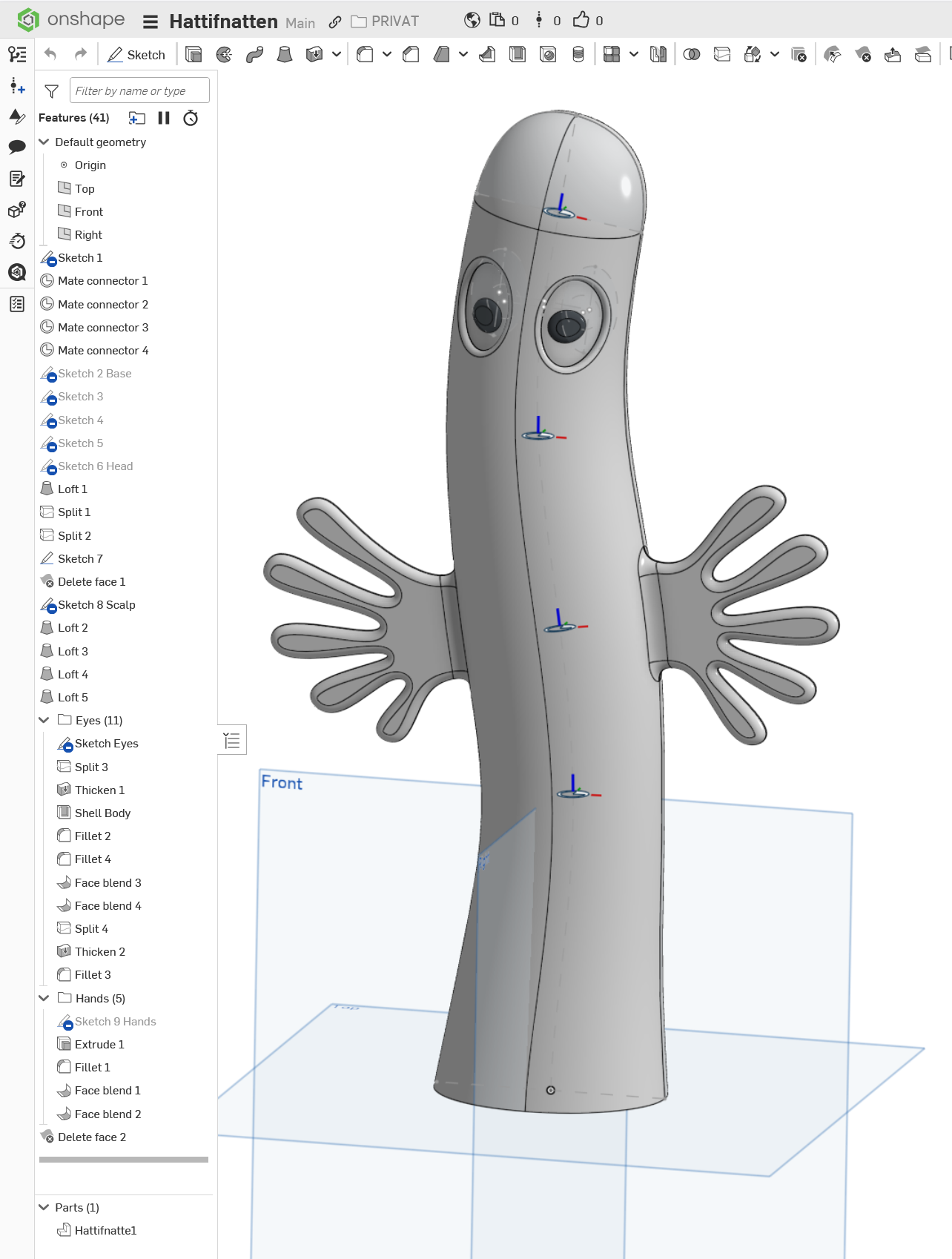
Today I have a highly important and sophisticated thing to print:
I do of course need a bunch of them, in different sizes.
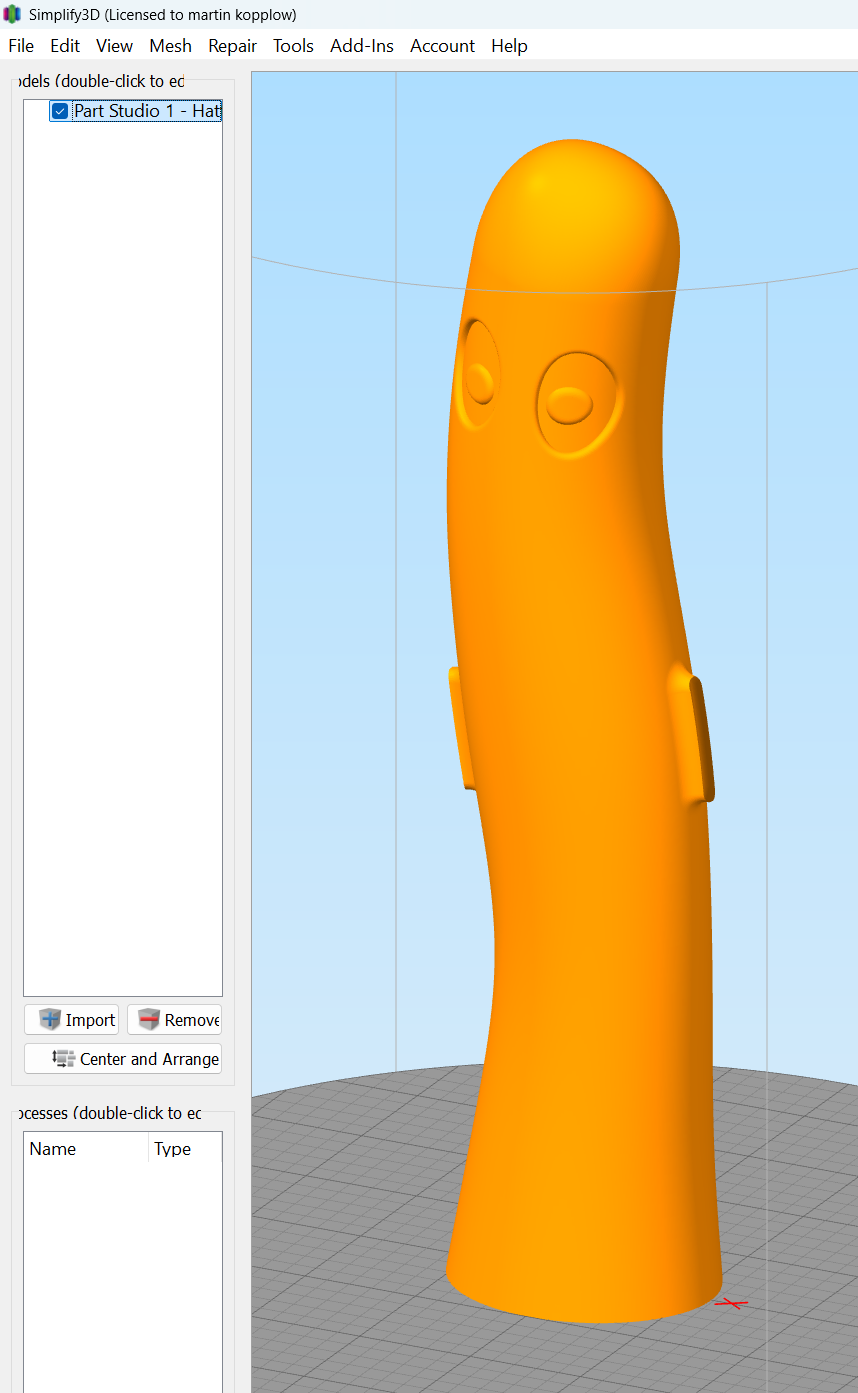
When exporting to STL, however, the 'fingers' don't get exported, and what I see in my slicer (and also an STL viewer) is this. Needless to say it doesn't meet all expectations the target audience might have. Does anyone have an explanation? It appears it could have to do with the face blend used between the body and the hands.
Edit: Nope. If I replace the the face blend with a fillet, it still don't work. It might be the (seemingly simplest) flat hand surface that has issues with the triangulation. What am I not seeing here?
Comments
That is odd. It works fine for me. I'm on Mac and tried it with Bambu Studio.???
A Hattifattener! Great model, I’ve not seen any done as well as this.
Yepp! These creatures are in fact Hattifnattar in their region of origin. But I guess they are known as Hattifatteners in those places where Mumin is known as Moomin. They are strange creatures, no question about that, but that's no good reason not to be printable, right? ;0)
I played around a bit, and it appears that I get results when I lower the resolution settings. I have no clue why that is, though. Maybe because a thunderstorm is coming up soon, or so. I'll try printing a few.
BTW.: The model is at least partly parametric, though probably not very robust. The spine can be wiggled and resized, and the eyes may be moved around to make different looking Hattifnattarna. Eventually, the intention is to print and put LEDs in them to make them glow at night, while they hide between the potted flowers.
It's because the fine setting in the export settings is probably not fine enough for your particular model. I've run into this multiple times and generally just use a custom setting. or export via step and then let my slicer remember how fine to import the step file.
Our sincerest apologies if you can't meet the deadline on such an important project.
But yeah, I can't actually reproduce the badness in PrusaSlicer, regardless of export settings. What settings did you use?
Yeah, the Client is probably going to be angry with me for a long time. ;0)
I used the Simplify3D Slicer, but it wasn't the slicer, it appears. When I re-imported the first STL files into OS, I got an error message (Imported with errors) and I saw the portions of the model were missing in the file itself.
After investigating further, I found that possibly the minimum facet length setting was the issue. I used my standard custom settings for small things. Since I was mainly making bicycle accessory parts recently, I tweaked the settings so they would come out well without making the edge radius areas more complex than the formlabs printer could recreate anyway. I set an angular deviation and chordal tolerance pretty tight and relaxed minimum facet length a bit. Maybe just a bit too far.
Anyway, you never know when Hattinfnattarna will show up, so it might just not be the day today. We'll certainly see some later. ;0)