Welcome to the Onshape forum! Ask questions and join in the discussions about everything Onshape.
First time visiting? Here are some places to start:- Looking for a certain topic? Check out the categories filter or use Search (upper right).
- Need support? Ask a question to our Community Support category.
- Please submit support tickets for bugs but you can request improvements in the Product Feedback category.
- Be respectful, on topic and if you see a problem, Flag it.
If you would like to contact our Community Manager personally, feel free to send a private message or an email.
Use Report, viz(), and dbg() for conditional println and debug visualizations
 jnewth
Member, OS Professional Posts: 118 PRO
jnewth
Member, OS Professional Posts: 118 PRO
Earlier this year I wrote a utility called "Report". The one-sentence description is "Conditional debug visualization and println controlled by feature and not by code".
Here's an intro video: https://www.youtube.com/watch?v=Eu7puEa8Oak
You can find the feature and functions here: https://cad.onshape.com/documents/e2576bfe13aaaabd67b0fe1d/v/4322f20d8f97ab12eeab937c/e/e954caf65d5d66b94f8bb90a
Here's how it works:
1. Import the feature Report in to your toolbar.
2. Import the functions dbg() and viz() in to your custom features.
3. When writing code, use dbg() instead of println and use viz() instead of adding debug entities through debug or addDebugEntities functions.
4. When your custom feature call viz() and dbg() functions instead of println() and debug(), the Report feature will enable the console printing and debug visualization for only the viz() and dbg() calls you want to activate, all controlled by keyword.
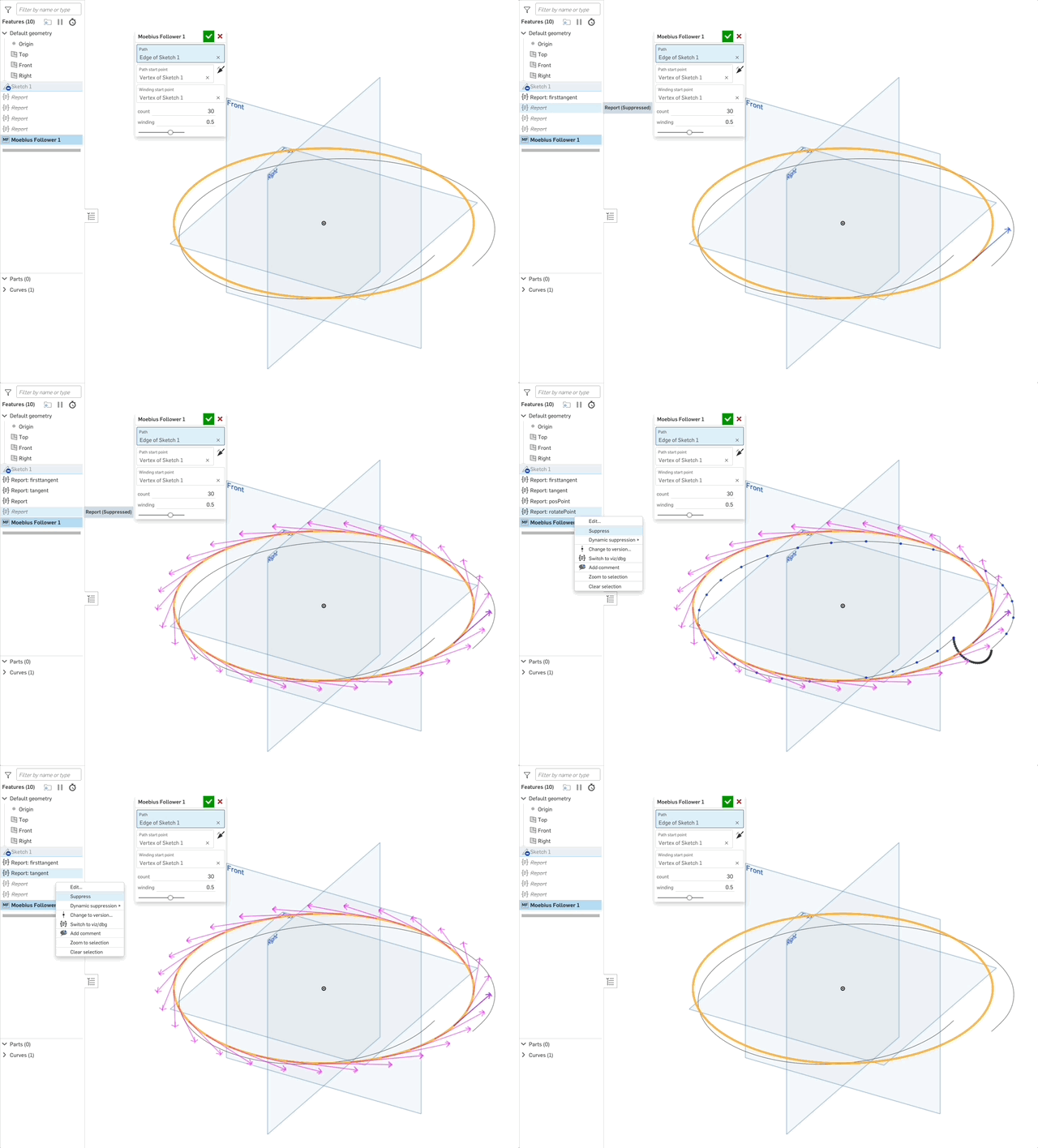
5. Suppress and unsuppress Report features to enable/disable visualization in your custom feature while your custom feature is being edited:
Note: This is very similar to another reporting tool I wrote a while back. I've renamed that tool "Log" as it's much more focused on mimicking logging tools like log4j but otherwise its behavior is unchanged. If that is a better match for your needs you can read about it here: https://forum.onshape.com/discussion/23476/featurescript-writers-stop-using-println-and-start-using-report-new-featurescript-announcement
Let me know what you think!
Also big thanks to my friend and colleague @Ethan_K for encouraging me to polish up and ship Report.
Comments
@jnewth thanks so much for creating and sharing this. It is proving invaluable in a current project I'm working on (as you know!) which otherwise was full of numerous messy debug and println's…
My surface tweening feature is over 2000 lines of code but most of it is diagnostics as I build the core logic.
I wonder how much of that I could scrape out of there using this.
Derek Van Allen | Engineering Consultant | MeddlerI literally just stumbled upon the other video this morning! Great work!
Ramon Yip | glassboard.com
@Derek_Van_Allen_BD That's kind of you to say. I hope that if you start using Report you won't need to scrape it out — you'll be able to leave (at least some of) it in, and just disable it for your users, while re-enabling it when you have to fix something weird that they've done ;)
There are a few other niceties, for example, viz() only adds visualizations, dbg() only writes to the console. The standard library sometimes does both, a behavior I do not care for.
Anyhow, give it a whirl. I use it constantly now in my own code (first step is always "import Report"). I'm curious if others will find it to be as useful as I do. @GregBrown and I were using it to debug some code he's working on, and I think he saw the value of being able to write all the debug he wanted and being able to selectively enable/disable/reenable as he went.
@jnewth theoretically that script is really meant to be a utility function for other scripts to be built on top of so the diagnostics are really only there while I muddle my way through implementation of higher level math concepts than I should have any business getting myself into. Once the foundation is laid there should be fairly little reason to return to the barest basics.
Derek Van Allen | Engineering Consultant | MeddlerThis video is really helpful. I'll be trying this out on my next feature.
The Onsherpa | Reach peak Onshape productivity
www.theonsherpa.com
Greg Brown's video does a great job of demonstrating the utility here: https://www.youtube.com/watch?v=zJ-cJSYZlAw
He's able to leave in all the debugging and visualization he's found helpful and then just suppress it when it's not helpful or gets too busy or isnt what he wants to focus on. Then later he can turn it back on when he's found another failing case that needs analysis.
Would there be an easy way to optionally make the viz() entities persist even when the feature in question is not being edited (through a toggle in the report feature)? For instance, I'd love to show the control polygon of a feature I'm developing while I'm editing an earlier feature with "Final" turned on. I could write a feature to draw control polygons of selected curves I suppose, but I wonder if there's value in persistent viz() stuff on screen?
Simon Gatrall | Product Development, Engineering, Design, Onshape | Ex- IDEO, PCH, Unagi, Carbon | LinkedIn
That's a good idea, @S1mon - I can totally see the value. The simplest implementation I can think of is as you suggest but unfortunately leaves a lot of artifacts floating around in your part and curve lists.
Another way to solve this is obvious in retrospect. I noticed in the last few videos from @GregBrown that he's adding test cases as configurations to inputs before a feature in development. This allows you to easily see whatever feature feedback (including viz/dbg) and things like analysis tools (e.g. curvature, or zebras). With configurations, it's easy to cycle through various inputs and see if the feature is still working.
Say I'm testing a feature like my Edit Curve Plus that takes a curve as an input and can edit them through various control point modifications. I haven't done this yet, but I can imagine getting ChatGPT to generate a table of inputs to drive input curves with all kinds of crazy orientations and parameters. It wouldn't quite be automated fuzz testing, but at least I could quickly cycle through a lot of potentially problematic inputs.
Simon Gatrall | Product Development, Engineering, Design, Onshape | Ex- IDEO, PCH, Unagi, Carbon | LinkedIn
Thanks again @jnewth
Just wanted to bump this thread and say that viz(), dbg() and the Report feature are really making my life a lot easier.
I've been working with Codex to develop some complicated geometry, and I'm playing product/project manager and product tester. I can give it screenshots, but AI still doesn't understand spatial things that well yet. It understands the math behind geometry, but when it gets a sign wrong and something is flipped it's much easier when I can tell it to add viz() or dbg() to a step so I can see what's going on and tell it to fix the issue.
BTW, I really love telling Codex to add the viz() things and it comes up with reasonable names. It's silly, but so much time coding is just thinking of what to call everything.
Simon Gatrall | Product Development, Engineering, Design, Onshape | Ex- IDEO, PCH, Unagi, Carbon | LinkedIn
Glad you're getting use out of it! I have also found it very handy for debugging complex geometry FS, because you want to visualize a lot of stuff but not always the same set and not at the same time. And removing my printouts and visualization is generally a thing I eventually have occasion to regret (when yet another test case breaks). Once you switch over to viz and dbg you dont have to worry about it - just add everything, it's fine.
In my case, Reframe is building a large FS codebase of libraries and custom features used across hundreds (? maybe thousands) of documents. When custom features fail in the field, I dont have to create a doc to then debug or recreate the feature with a 'live' version of the code in order to add printlns and debugs to — I just start sticking Report features in to see what is happening under the hood. It has become a huge help for me.
Makes me happy to hear you're finding some success with it @S1mon. Finally working on that (awesome) plastic boss feature we discussed ;)
@jnewth
I do wish that it was easier to update the Report features in the part studio. I'm sure there are a lot of limitations that you're working around. Here are some of my experiences and thoughts:
@GregBrown
Any way that this functionality could become more of a first party thing in such a way to make it even more powerful?
Simon Gatrall | Product Development, Engineering, Design, Onshape | Ex- IDEO, PCH, Unagi, Carbon | LinkedIn
What FeatureScript really needs imo is a debugger. Until then, there's Report, viz, and dbg. @S1mon thanks so much for engaging with this. Really appreciate the feedback.
I've just discovered that viz() is missing support for lines. It only wants to draw lines with arrows. 🙁
Simon Gatrall | Product Development, Engineering, Design, Onshape | Ex- IDEO, PCH, Unagi, Carbon | LinkedIn
@S1mon Will add. In the meantime use this:
export function viz(context is Context, key is string, start is Vector, end is Vector, color is DebugColor)where
startandendare position vectors in 3space.I see you updated report/viz/dbg to 1.6.2
I see the version notes in the doc, any other things to be aware of?
Simon Gatrall | Product Development, Engineering, Design, Onshape | Ex- IDEO, PCH, Unagi, Carbon | LinkedIn
Just what we discussed:
RELEASE 1.6.2:
1. Can now display arcs and circles
2. Can write debug text in O(n) whereas Onshape-native text is O(n^2)
3. Can now draw lines without arrowheads. The geometric definition of a line has infinite length, so an arrow does make sense BUT if you want a line segment you can specify start and end points and a "O*meter" radius for the arrowhead and you'll get a straight line with no arrowhead.
4. Minimized FS import dependencies to improve speed.