Welcome to the Onshape forum! Ask questions and join in the discussions about everything Onshape.
First time visiting? Here are some places to start:- Looking for a certain topic? Check out the categories filter or use Search (upper right).
- Need support? Ask a question to our Community Support category.
- Please submit support tickets for bugs but you can request improvements in the Product Feedback category.
- Be respectful, on topic and if you see a problem, Flag it.
If you would like to contact our Community Manager personally, feel free to send a private message or an email.
revolute mate / tangent mate interactions
 ron_moise
Member Posts: 6 EDU
ron_moise
Member Posts: 6 EDU
Hello everyone, I am trying to simulate a pretty basic engine mechanic, but I got met with this:
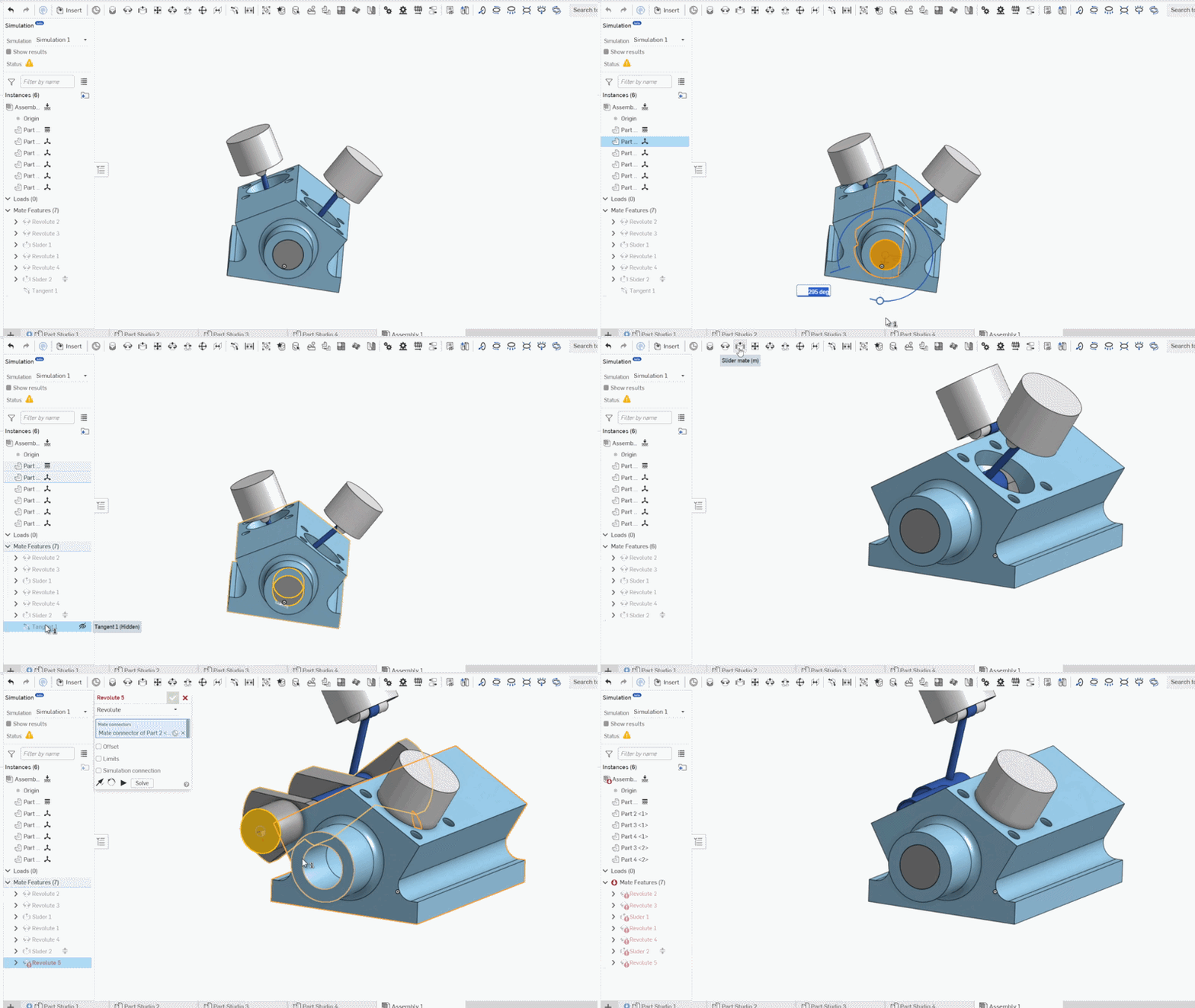
If someone knows why the mate reacts in such a way, it would be helpful. 🙏
I wish to use the "Revolute mate" so I can use the "Animate" to simulate it's movement.
Tagged:
0
Best Answer
-
 eric_pesty
Member, pcbaevp Posts: 2,557 PRO
eric_pesty
Member, pcbaevp Posts: 2,557 PRO
Switch your revolute to a cylindrical: it's over-constraining the axial movement of the crankshaft that is locked by the pistons. Or may better would be to change the connecting rod-crankshaft mates to cylindrical (assuming they are set to revolutes)
1
Answers
Switch your revolute to a cylindrical: it's over-constraining the axial movement of the crankshaft that is locked by the pistons. Or may better would be to change the connecting rod-crankshaft mates to cylindrical (assuming they are set to revolutes)
Thank you man, changing it to cylindrical work perfectfully.
do you know why tho? like why did it need a z-axe's motion?
cylindrical lets motion in z axis and rotation about z.. revolute only allows rotation about z happen. if you're model isn't perfect then there are cases where allowing motion along z will allow that motions to happen the way you want. In this case it looks like your pistons are slider mates and your connecting rods are revolute mate to the crankshaft. So your crank is automatically locked along the axis by definition of the slider and revolute combined.. If your crank shaft isn't aligned perfectly with where your pistons need to move… assigning a revolute to the end it will break it because your crank to rod revolute mates already lock in that direction and its trying to shift the crank to line up with the block.. setting the crank to rod mates to cylinder would have also likely allowed you to assign a revolute mate to the crank and block.. Clear as mud?
It's more of an overconstraint issue.
In 2D, in the sketcher, you can have four lines connected. And each intersection you can tell it to be perpendicular. Technically you don't need one of those perpendicular constraints to get a rectangle, but the sketcher is usually lenient about such things. In 3D, in assembly mode, anything like this is generally overconstraining. It comes down to the math being subject to floating point error issues and it doesn't matter if your model is "perfect", the computer math still has challenges.
So you're better off constraining the least number of degrees of freedom which will still work.
Simon Gatrall | Product Development, Engineering, Design, Onshape | Ex- IDEO, PCH, Unagi, Carbon | LinkedIn