Welcome to the Onshape forum! Ask questions and join in the discussions about everything Onshape.
First time visiting? Here are some places to start:- Looking for a certain topic? Check out the categories filter or use Search (upper right).
- Need support? Ask a question to our Community Support category.
- Please submit support tickets for bugs but you can request improvements in the Product Feedback category.
- Be respectful, on topic and if you see a problem, Flag it.
If you would like to contact our Community Manager personally, feel free to send a private message or an email.
Challenge: Find the Unconstrainity!
 brandon_nichols678
Member Posts: 9 ✭✭
brandon_nichols678
Member Posts: 9 ✭✭
Considered titling this one 'Picking Flyspecks Out of Pepper', but settled on something more descriptive.
Spent the better part of an hour trying to find the unconstrained entity on the sketch below.
Some eagle eyed youngsters whose retinal cones haven't been burned-out by 40 years of screen time might be able to instantly see this one.
But there needs to be a better way!
• One suggestion is to simply provide a 'lock the sketch' option
• Another is to provide a 'filter by unconstrained entities' option
• Still another would be to color-code the sort list black blue and red
Now to be fair, perhaps the list IS color-coded, for the entities listed.
But right here is the issue, namely the offending entity is NOT listed!!!
Perhaps I'm missing a better strategy than essentially disassembling the sketch piece by piece?
Thanks in advance, and see below for location of the 'unconstrainity'…
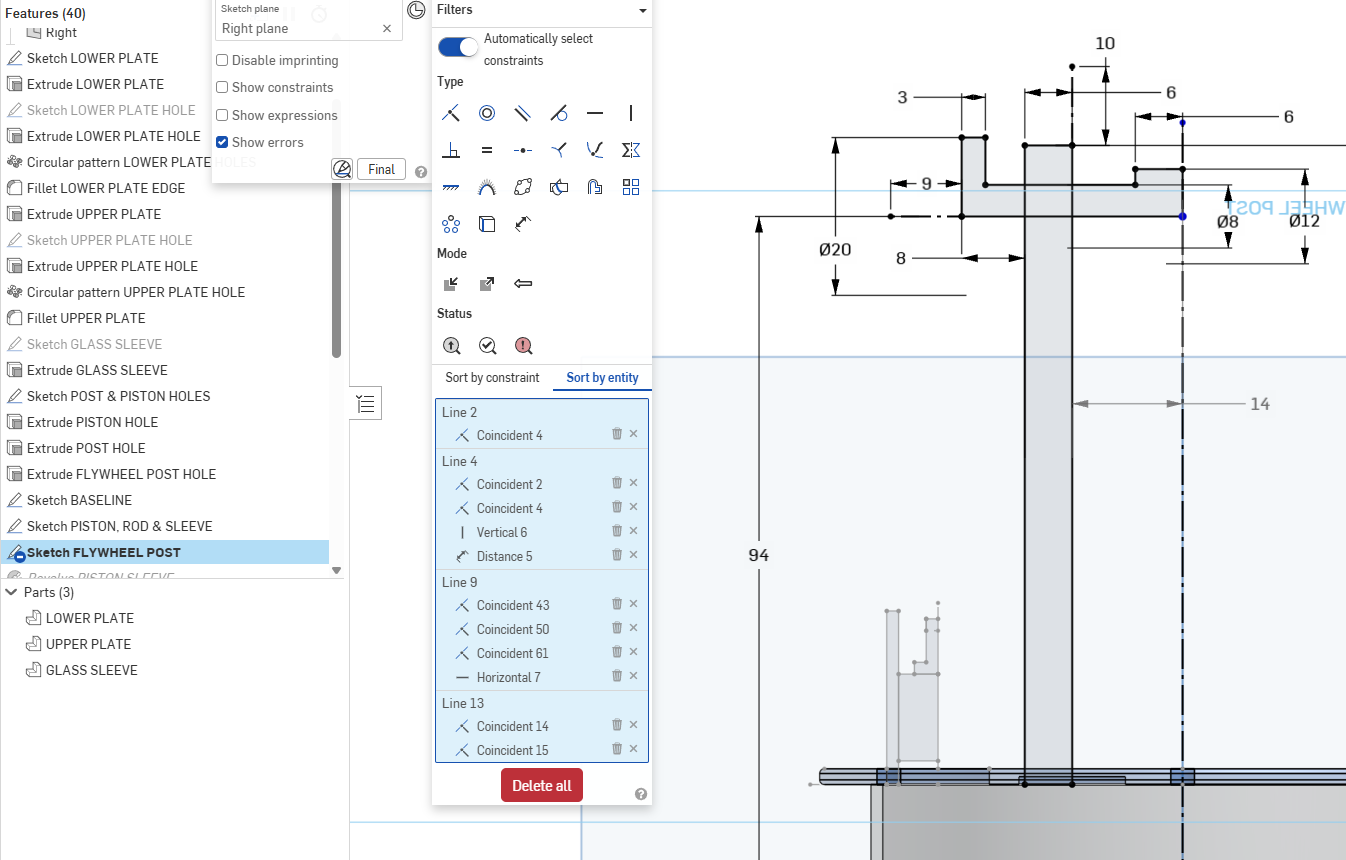
So at the lower right corner shown below, there is an unconstrained, explicitly-defined point concurrent to the implied line-connection point.
Sometimes I can convince myself it's slightly blue, but in a complicated sketch this could be a real bugger to find using a search-pepper-for-flyspecks strategy.
So another potential improvement idea would be to sort the entity list by the number of constraints assigned to the entity, and of course include explicitly-defined points as entities.
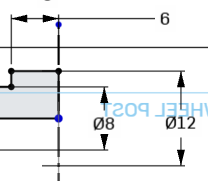
Presuming I haven't completely missed something, I may eventually post this as suggested 'sketch diagnostics' improvement(s)
Comments
Well, even though I can clearly see it in your screen shot, I agree that dark blue is not the wisest choice when it comes to unconstrained points colour. I suggested earlier to give all unconstrained points a red halo while the diagnostic floating palette is open, or on pressing the "show unconstrained" button. That would make life easier for most of us.
I would definitely support changes to make it easier to find/select/delete random unconstrained points like this.
I will note that switching to dark mode (even just temporarily) does make these &$%*&#! points easier to see.
Simon Gatrall | Product Development, Engineering, Design, Onshape | Ex- IDEO, PCH, Unagi, Carbon | LinkedIn
A suggestion as old as the hills. Customized contrained and unconstrained colors would greatly reduce the number of times this comes up.
It is not only about colour. Points can sit on top of each other, with the unconstrained one being the lowest. No chance to see no matter the colour. It will be necessary to make unconstrained points at least some pixels larger than constrained ones, or have them radiate a bit of colour onto their surroundings, hence my proposal with the halo. Problem solved:
I'd agree with halo's. We all need angels in our lives. That idea could be extended to do duplicate entities that lay exactly on top of each other. or a tool like the constraint manager to find such entities.