Welcome to the Onshape forum! Ask questions and join in the discussions about everything Onshape.
First time visiting? Here are some places to start:- Looking for a certain topic? Check out the categories filter or use Search (upper right).
- Need support? Ask a question to our Community Support category.
- Please submit support tickets for bugs but you can request improvements in the Product Feedback category.
- Be respectful, on topic and if you see a problem, Flag it.
If you would like to contact our Community Manager personally, feel free to send a private message or an email.
How to duplicate a document using the IOS 26 app
 mitch_b708
Member Posts: 20 ✭✭
mitch_b708
Member Posts: 20 ✭✭
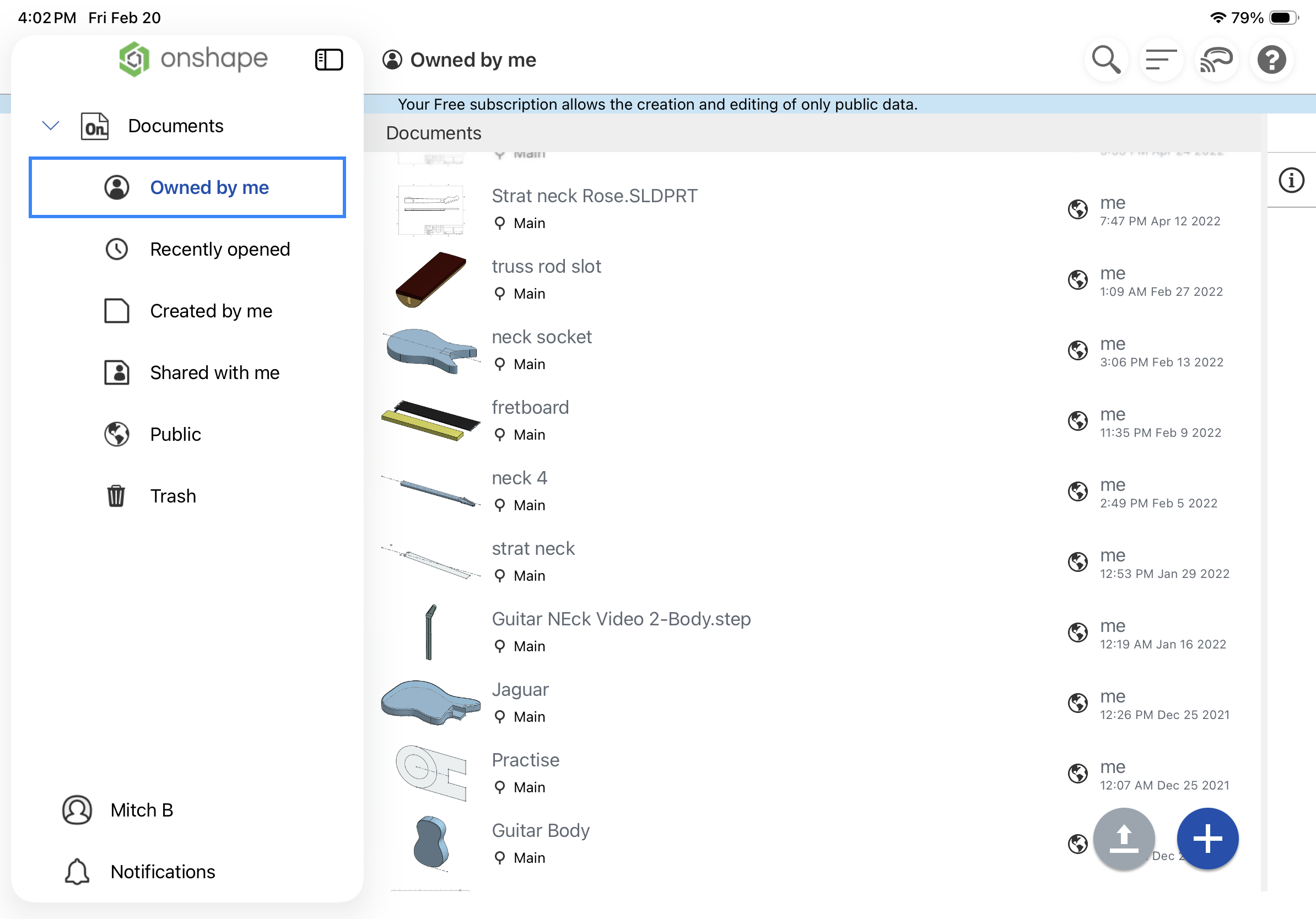
I’d like to duplicate, or save a copy of a document I’m working on. I seem to recall, this was easily done from the documents page. However, on the documents page I don't see a three dot menu, a long press menu or any other options associated with a document in the list. The only option I found was a swipe left that contained a delete option
I updated to IOS 26 a few weeks ago. Not sure if that caused the problem. I’ve tried to turn off the new IOS 26 feature for windowing, and have tried deleting and reinstalling the app.
Am I going crazy? I know I have made copies many times in the past.
Here’s what my documents page looks like:
Thanks
Mitch
Comments
I figured out a way to make a copy of a document: