Welcome to the Onshape forum! Ask questions and join in the discussions about everything Onshape.
First time visiting? Here are some places to start:- Looking for a certain topic? Check out the categories filter or use Search (upper right).
- Need support? Ask a question to our Community Support category.
- Please submit support tickets for bugs but you can request improvements in the Product Feedback category.
- Be respectful, on topic and if you see a problem, Flag it.
If you would like to contact our Community Manager personally, feel free to send a private message or an email.
Version Branching: On-Demand Assembly Configuration / Variants?
 brandon_nichols678
Member Posts: 15 ✭✭
brandon_nichols678
Member Posts: 15 ✭✭
Greetings All,
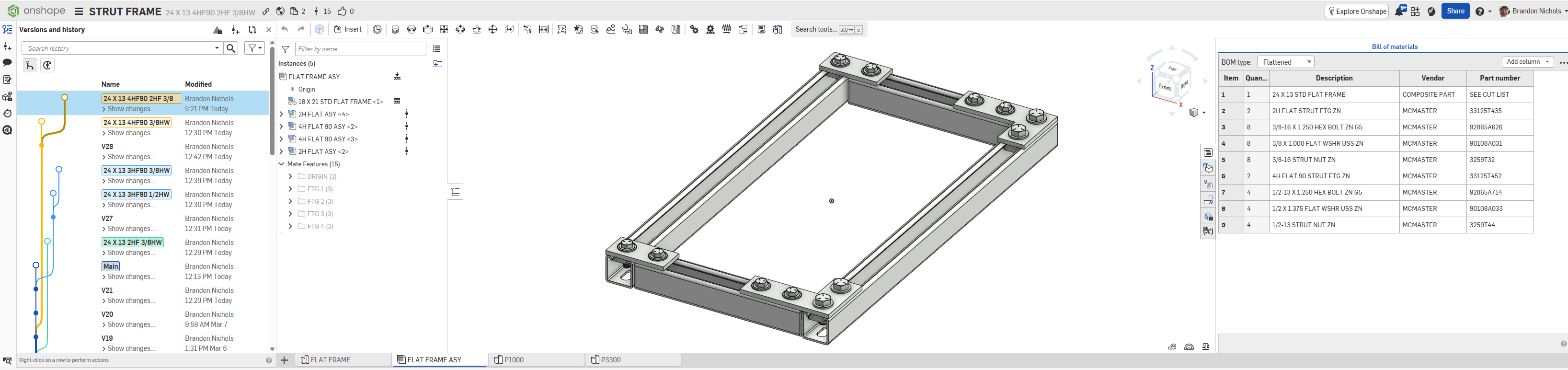
Am I doing this right?
Seems too easy, gotta be a downside!
- Use 'Version Branching' to derive assembly configs / variants as needed?
- Performance issues?
- Any limit to the number or depth of branches?
- Where are the booby-traps?
Insights for a Catia and Solidworks noob much appreciated!
File is HERE
Thanks in advance
Brandon W. Nichols, PE
Seattle, Washington
0
Comments
Versions and revisions (if you have Pro or Enterprise) are for release management.
Branching is for trying out different ideas, and later merging or closing off the branches if they are not useful. It's awkward to have multiple active branches of the "same" part.
More what you want is some combination of configurations or derive with top down design.
Simon Gatrall | Product Development, Engineering, Design, Onshape | Ex- IDEO, PCH, Unagi, Carbon | LinkedIn
One of my team members made a document that was branched like 30 different ways instead of using configurations and I had to bust out my TVA equipment to prune all of the irrelevant timelines when we finally decided which direction the project was going. While the document had no real performance issues from all the branching, it required severe mental overhead to wrap your head around all the time travel and multiverse shenanigans that were going on across all the variations to get it all back into one canonical stream.
Derek Van Allen | Engineering Consultant | MeddlerConfigurations are 100% the way to go for this. Configurations in Onshape actually work as expected (no experience with Catia but looking at you SW…) and are easy to maintain as you don't need to worry about what "random" things are going to break or end up in the wrong config when you make changes to your assembly.
You also get to leverage the power of having multiple configuration inputs, which makes it sooo much easier to manage and maintain large sets of configurations. You can also get quite granular by limiting the range of config options based on earlier selections using the "visibility conditions". It gets a lot harder to keep track of things when you generate many branches as you are effectively creating "copies"
One workflow I like to use is what I call the "master" configurable model. The idea is to set that up with configuration variables (not lists or checkboxes) so that it is effectively infinitely configurable, and then derive (or insert if it's a sub-assembly) somewhere with a configuration list.
This way you can create a new "listed" configuration by just adding a row to your table and setting the values for your derived/inserted part.
If you like video tutorial, this 3 part series might of interest as I think it might be fairly relevant, especially parts 2 and 3:
https://www.youtube.com/watch?v=fsaw9MeNIzkVery simple example with the frame assembly here:
https://cad.onshape.com/documents/51afdb6e53ee0b8ae409b61e/w/eeb8bfcda23536a115fffb13/e/fb6636ef99a217934da8edcb?configuration=List_EJO4cUw4gnfbUv%3D_15x16&renderMode=0&tangentEdgeStyle=1&rightPanel=configPanel&uiState=69af86a6b5cccfc89c520b6c
And here's a part studio example where a single "Master" part is used in three different part studios to generate various desired "sets" of options.
https://cad.onshape.com/documents/d2d3382aa18189471db96624/w/bfdb4819bc7e743e462a92ad/e/257db9494bc229d5216ec85f?configuration=Height%3D0.012700000000000001%2Bmeter%3BLength%3D0.050800000000000005%2Bmeter%3BScaleFactor%3D1.0%3BW%3D0.025400000000000002%2Bmeter&renderMode=0&tangentEdgeStyle=1&uiState=69af8855d3a05dd9d4ed7bfa
Master:
Adjustable height only:
Standard sizes:
Set shapes with scale factor:
Etc…