Welcome to the Onshape forum! Ask questions and join in the discussions about everything Onshape.
First time visiting? Here are some places to start:- Looking for a certain topic? Check out the categories filter or use Search (upper right).
- Need support? Ask a question to our Community Support category.
- Please submit support tickets for bugs but you can request improvements in the Product Feedback category.
- Be respectful, on topic and if you see a problem, Flag it.
If you would like to contact our Community Manager personally, feel free to send a private message or an email.
Custom Feature: Custom Font Text
 bladec
Member Posts: 26 ✭✭
bladec
Member Posts: 26 ✭✭
This feature is a fork of the Text feature and allows you to upload custom fonts to use with it.
How To
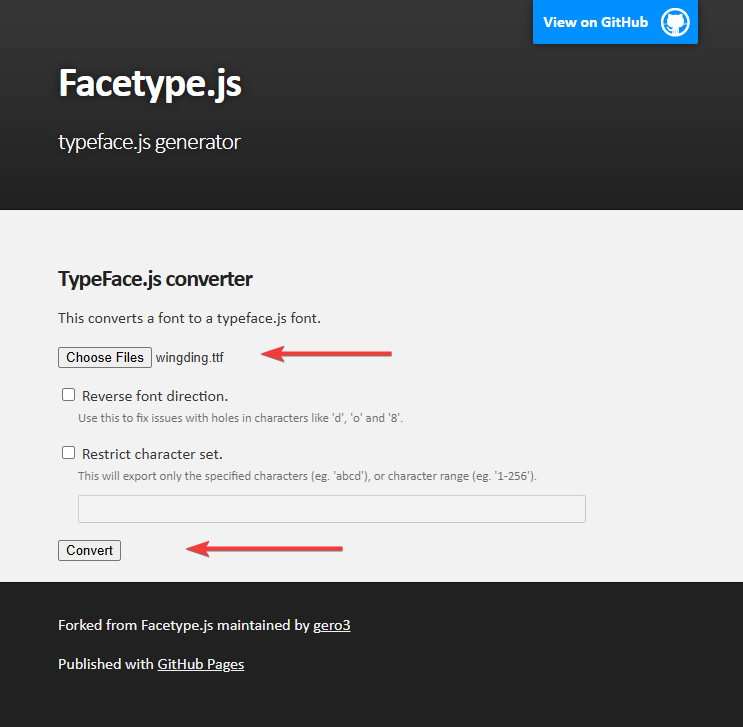
- Visit to convert a TTF font to a JSON file.
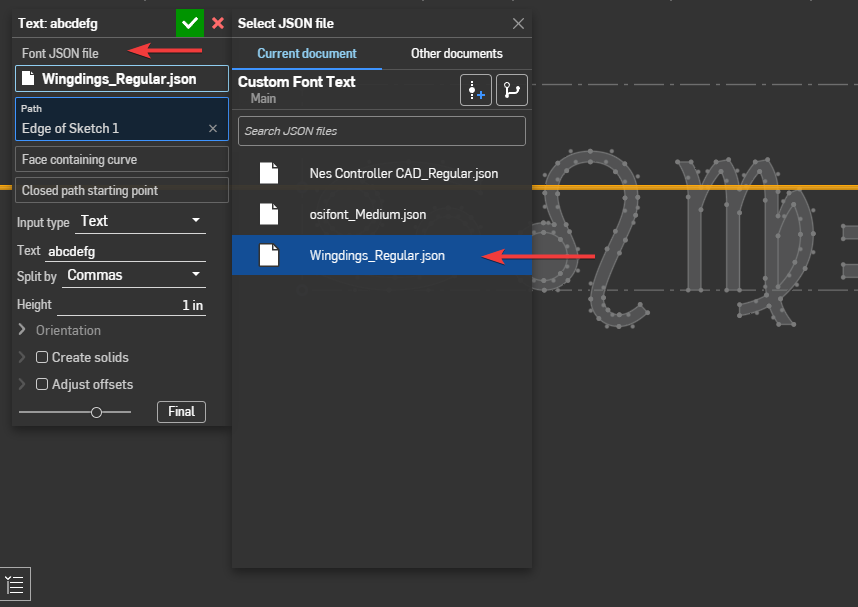
- Import the JSON file into your document.
- Add a Custom Font Text feature and select the JSON file
- Configure the rest of the Custom Font Text feature like you would the Text feature.
Todo
- Improve kerning support. Only basic x axis kerning is supported.
- Add ligature support.
- Improve language support. Low priority unless there is a demand for it.
If your font doesn't work or doesn't look right
Post the TTF, optionally include a document and I'll take a look. I'll prioritize fixes for fonts that people want to use.
Looking for feedback on these
Construction bounding box
You'll probably notice that for a lot of fonts the characters are much smaller than the construction rectangle. I was thinking of an option called "fit to height" to resize the text so that the largest character was the specified Height option. This would cause the text size to be unstable as the height would change as you add and remove characters.
Characters outside the construction rectangle
The bottom edge of the rectangle is the baseline. Some characters such as "g" will go below it. Would you prefer characters stay within the construction rectangle? A separate horizontal construction line could be added for the baseline.
Comments
Wingdings support in Onshape is my current favorite feature of 2026 and it's not close.
Derek Van Allen | Engineering Consultant | Meddler@bladec you may want to add your custom font support to the fontpicker predicate directly. This way anyone who builds a text-based feature can leverage your custom font work:
https://forum.onshape.com/discussion/23475/new-featurescript-predicate-fontpicker
This looks very interesting but I noticed all the the examples in the linked doc appear broken…
@bladec when I wrote the original Text (what you're forking from) I created the Examples folder as a set of unit tests. If they all "look good" and/or match the "reference image" after I've made code changes, then I have (some) confidence that I haven't made any regressions. Perhaps worthwhile going through and figuring out what broke? Though I suspect it's all the same error and you'll be able to fix it quickly! But also: add a few examples that exercise your new functionality and use this as your unit testing as you expand on this feature.
They just needed a font selected. Fixed them on main. https://cad.onshape.com/documents/0268281ab84da24693d00fc3/v/13d06c05d860ecc243ce0d53/e/25bee37a96bbb121f9037a74
Do you mean have a predicate that lets you swap between built-in and custom fonts. That variable would then be passed to sketchText() so that the person adding this to their featurescript doesn't need to do anything special to get both built-in fonts and custom fonts?
@bladec Thank you for sharing!
I could really use a font which is a stick figure, meaning single lines. Is that possible to achieve?
Thanks,
@ben_partouch ive been working on something similar. What do you need? What do you mean specifically when you want a "single lines"? Does that mean each character is a single line, a collection of straight lines, or only simple lines and arcs or constant cross section (like what you get with a single diameter cutter when following the path) or something else? Ive been trying to bake it in to an annotation tool:
My goal when creating such a font was to make it "machinable" (either embossed or debossed) and so long as you use the font you know you won't get weird collisions or problems. The font is called "Machinable". But I ended up turning it in to other things over time.
There's an IR for single line fonts:
Here's a very very deep dive into the font I want to see available:
https://aresluna.org/the-hardest-working-font-in-manhattan/
Simon Gatrall | Product Development, Engineering, Design, Onshape | Ex- IDEO, PCH, Unagi, Carbon | LinkedIn
Assuming you mean open contours, that's not supported by TTF. However this custom feature technically doesn't care about contours being closed. I could add support for converting SVG fonts to JSON which would allow for this if that is what you are looking for.
I added support for converting SVGs to the web page. I tested it with some of these single stroke fonts. https://gitlab.com/oskay/svg-fonts/
I couldn't find a good way to make my own. Fontforge doesn't support them. Inkscape's old typography extension kind of supports them but is quite broken. Inkscape's new svg font editor doesn't support them. When making my own for testing I ended up closing each contour and manually editing the SVG by hand to open them.
Query variables+ makes it pretty easy to work with the edges to do stuff like this. I'm sure if I spent some more time on it I could smooth out those corners. https://cad.onshape.com/documents/54c2b2dbcad2d9a233387ec4/w/6e033d1b75f8eff1c3e5dc94/e/b6e63f55cf8d7f7b6b134a1b