Welcome to the Onshape forum! Ask questions and join in the discussions about everything Onshape.
First time visiting? Here are some places to start:- Looking for a certain topic? Check out the categories filter or use Search (upper right).
- Need support? Ask a question to our Community Support category.
- Please submit support tickets for bugs but you can request improvements in the Product Feedback category.
- Be respectful, on topic and if you see a problem, Flag it.
If you would like to contact our Community Manager personally, feel free to send a private message or an email.
Tapped hole with counterbore
 CAD3D_design
Member Posts: 11 PRO
CAD3D_design
Member Posts: 11 PRO
Hi all,
A simple one i hope.
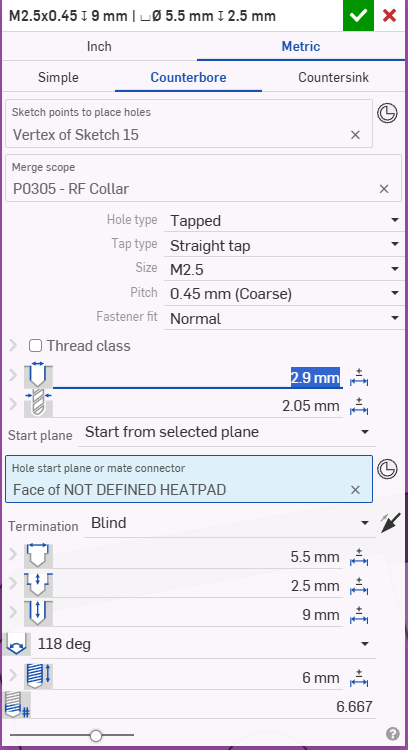
I'm creating a tapped hole with a counterbore. As per below.
I would like to know what the 2.9mm highlighted blue controls. I want the counterbore to be 2.7mm but when i try and changing the 5.5mm counterbore diameter to 2.7mm, the 2.9mm goes red indicating an error. I can get around this by changing the 2.9mm to less than 2.7mm. I'm just wondering what the 2.9mm (blue) controls on the model / drawing.
Cheers
Pete
Tagged:
0
Comments
That number is the clearance hole for the screw. The 5.5 is the counterbore diameter.
Simon Gatrall | Product Development, Engineering, Design, Onshape | Ex- IDEO, PCH, Unagi, Carbon | LinkedIn
Does it have any impact on the 3d model or drawing when creating a tapped hole with a counterbore?
Yes, depending on where your hole feature starts in comparison to the part. Normally yes. I think it might be possible to start the feature in a place where the counterbore will effectively disappear.
Simon Gatrall | Product Development, Engineering, Design, Onshape | Ex- IDEO, PCH, Unagi, Carbon | LinkedIn
You cannot make the counterbore smaller than the hole clearance indicated by the highlighted number. The clearance is controlled by the "Fastener Fit" setting directly above. AFAIR "Normal" relates to 0,2mm radial clearance =2,9mm for a M2.5 threaded hole.