How to prompt update of featurescript version in a workspace?

Onshape rocks, but this seems strange.
I'm prevented from merging a Part Studio from an "old" version in a document into my currently active workspace in that same document because the old version is newer than the current workspace.
If I make a new document and add a Feature Studio, I get "FeatureScript 2945;" (that might be a crude way to check the version — I haven't learned much about using featurescript directly yet)
If, in the document that I'm working on, I make a new branch from the "old" version I want to merge from then add a Feature Studio to that new branch, I get "FeatureScript 2931;" There was no offer to update that branch, so I suppose that reflects the featurescript version in the version I want to merge from.
If, in the same document, I add a Feature Studio to the workspace I've been working in most recently — the workspace I want to merge into — I get "FeatureScript 2909;" which is indeed older than the "old" version I want to merge from.
?.
I've read in …
… advice to create a new branch from the old version to prompt an update in the new branch then merge from the updated new branch. That makes sense in that context, but that's not my problem. The branch I'm working in was created by branching from an older version without any prompt to update, and creating a new branch now from that branch prompts no option to update. If I branch from the current workspace and add a new Feature Studio in the new branch, there is no offer to update and I still get version 2909.
How can I prompt Onshape to update the workspace I'm currently working in? (and a branch from the version I want to merge from, if the versions have to match exactly?)
Best Answer
-
not sure if this is quite what you're asking for or quite the fix for your problem, but a useful thing Ive recently learned about is:
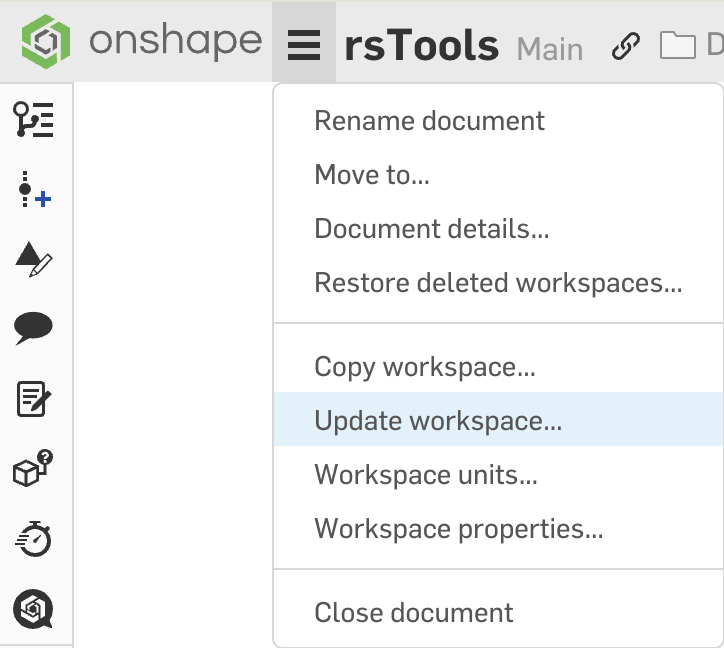
Maybe you can use this to force the document on an old version to upgrade to something mergeable? If you get this working, please post and explain how the situation resolved.
1
Answers
-
not sure if this is quite what you're asking for or quite the fix for your problem, but a useful thing Ive recently learned about is:
Maybe you can use this to force the document on an old version to upgrade to something mergeable? If you get this working, please post and explain how the situation resolved.
1 -
That looks like exactly the right answer. Thanks!
Not very hidden, I just didn't succeed in finding it.
I haven't actually done the merge that motivated the question, but if there's any more trouble with that I expect it will be a different question.
(edit to add: merge done. very helpful. thanks again!)
1