Welcome to the Onshape forum! Ask questions and join in the discussions about everything Onshape.
First time visiting? Here are some places to start:- Looking for a certain topic? Check out the categories filter or use Search (upper right).
- Need support? Ask a question to our Community Support category.
- Please submit support tickets for bugs but you can request improvements in the Product Feedback category.
- Be respectful, on topic and if you see a problem, Flag it.
If you would like to contact our Community Manager personally, feel free to send a private message or an email.
Moving Energy Chain / Cable Track

florian
✭✭✭
Hi!
I was just trying to get my head around how to create a moving energy chain in Onshape. In its easiest form something like this:
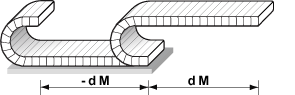
The whole shape is very regular. Of course it could be done "easily" with rotary mate in the joints limited to the maximum angle. But that would be quite tedious. What are our current options?

I was just trying to get my head around how to create a moving energy chain in Onshape. In its easiest form something like this:
The whole shape is very regular. Of course it could be done "easily" with rotary mate in the joints limited to the maximum angle. But that would be quite tedious. What are our current options?
- Part Studio => Pattern along sketch line controlled by variables (so the total length stays the same.
- Same as 1 but in context? But it does not update the PS when you move the assembly. But it could be updated, right?
- Assembling everything in an Assembly (started this with the first few joints for testing)
- Something useful with feature script to auto pattern "along a line" in the assembly.
0
Best Answer
-
I have built cable carriers like this before and it does work. The trick is to build a dummy part (an obround) that the links are mated to - works very well. Of course, that was before Managed In-Context and the next time i have to build one, i will create a single part based on the assembly position (in context). If i need to update it at any time, i will simply update the context - the main benefit is the absence of computational overhead until i need to update it.Philip Thomas - Onshape5


Answers
-
Most of the energy chains I have done have typicalls being static and show the state at the start and end positions.
In other programs I would create the parts and link then together in the assembly. In onshape I might try to create a sketch with points where the sections are and use replicate to auto populate the parts in a assembly.
If you want full movement I would import the part into the parts studio and add a mate connectors. Theb in the assemble use snap and rotation mate to joint the parts together.2 -
I have built cable carriers like this before and it does work. The trick is to build a dummy part (an obround) that the links are mated to - works very well. Of course, that was before Managed In-Context and the next time i have to build one, i will create a single part based on the assembly position (in context). If i need to update it at any time, i will simply update the context - the main benefit is the absence of computational overhead until i need to update it.Philip Thomas - Onshape5
-
Thank you!
@philip_thomas that is a good way. With being able to recall versions an put different versions into drawings this is easy enough for now.
@carl_von_ayres I like the two end positions style as well. However I have 12 end positions depending on the product for 1 chain length. That might get a bit messy.
0 -
https://youtu.be/oj641vM6RA4
https://cad.onshape.com/documents/d40f5136cf73e5f7c4501627/w/41bb89af34b99c46ea64870f/e/5e0be2eeb769ac672738e538
something like this @philip_thomas ?
you may want to mute the video...0 -
@john_mcclary - Not bad!
Here are a couple of examples that might stir the creative juices.
The real time example is obviously fiddly to build and slow to solve (complexity).
The Managed In-Context example is simpler to build and faster to solve (just update the context whenever you need a solution)
https://cad.onshape.com/documents/7aef7a09827d003f884c3cca/w/99c06602423584341085b649/e/3b3e94909e98c793235d7526 Philip Thomas - Onshape0
 -
Here's my version - pull the arrow to make it move!
https://cad.onshape.com/documents/eb014ae849908dd1567b654c/w/ac8e8094f75706347ddea16d/e/ea97c3a384c30531e46e0a8e
Senior Director, Technical Services, EMEA11 -
0
-
Yikes, that's rather good. (That's English for awsome BTW.)
Nice work Mr. Cooke.
Did you 3D model the rivets or is that a sneaky look at a new SM feature?
Owen S.
Business Systems and Configuration Controller
HWM-Water Ltd0 -
-
Good point.
Business Systems and Configuration Controller
HWM-Water Ltd0 -
0
-
Thanks, but I have an an intrinsic hatred of any fastening method that can't be undone for service or upgrade work.john_mcclary said: Now a RivNut FS, that sounds like a nice FS project
Owen S.
Business Systems and Configuration Controller
HWM-Water Ltd1 -
@NeilCooke ... very clever. I notice that trying to drag the moving end link/bracket gets wonky (calculation intensive?)...and the linear relationship between the sketch and the moving bracket is not 1:1. So...how would you mate this in an assembly to have the chain follow another movable part (i.e. actuator carriage)? Would you have to do a gear mate from the carriage to the sketch line and figure out the ratio?
0 -
Although the fully dynamic carrier is a pretty and nice to have in the model I found that it dragged our assembly regen time wayyyy down. I would recommend just using configurations in the different known positions that you want to show.1
-
I played around with mating @NeilCooke's echain with a slide/actuator. There are probably better/faster methods, but this seemed to work with good performance.
In the echain assy, I had to replace the Fix of the Start Link with a fasten mate to keep it positioned properly relative to the slider mate when you insert this into the upper level assembly (Fix goes away at upper level).
I fixed the actuator base and the start link in the upper level.
I then created a 2:1 linear relation between the echain slider mate and the actuator slider mate.
After that, it works well (no noticeable performance difference compared to echain alone).
https://cad.onshape.com/documents/7cc175f8d6e311a7ff97a6fc/w/dee11f53c0929ee1920b606f/e/fa8d8be65e7c31be650cff4b
1 -
0
-
@Malcolm_Daniel
That IS nice work.
Would you mind allowing us to Copy your document (it's currently set to View Only without permission to copy)?
It's a very helpful assembly to be able to use in our equipment development too.0 -
@romeograham ... i just made it public, which should allow you to copy it
1 -
-
Thank you for the great example. How would you go about changing the length? I would like to build one that would be configurable for different projects. Or at least just being able to tinker with stroke length during the design. (I'm new to Onshape so forgive me if it's an obvious answer)2







