Welcome to the Onshape forum! Ask questions and join in the discussions about everything Onshape.
First time visiting? Here are some places to start:- Looking for a certain topic? Check out the categories filter or use Search (upper right).
- Need support? Ask a question to our Community Support category.
- Please submit support tickets for bugs but you can request improvements in the Product Feedback category.
- Be respectful, on topic and if you see a problem, Flag it.
If you would like to contact our Community Manager personally, feel free to send a private message or an email.
Sketch scaling

michael_kline
Member Posts: 21 ✭✭
There have been several posts asking about sketch scaling, but most of them have not been touched in a while. I was looking to see if anyone has created a faster work around than starting a new sketch with all of the dimensions based on a variable called "scale factor".
As seen in the attached, I have a fairly complex shape that I would like to scale down to the part I copied it into from the part I drew it in. The sketch has already been modified for scaling, including making the gaps wider and lowering the amount of detail involved. I have also rotated it to the correct angle, but that is a simple transformation.
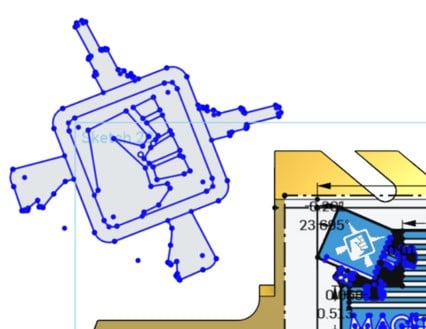
As seen in the attached, I have a fairly complex shape that I would like to scale down to the part I copied it into from the part I drew it in. The sketch has already been modified for scaling, including making the gaps wider and lowering the amount of detail involved. I have also rotated it to the correct angle, but that is a simple transformation.
0
Answers
-
Today if a quick re-scale of the sketch wasn't giving desired results I'd probably still resort to scaling the solid part rather than messing with the sketch. Possibly using a measure distance feature to grab an initial reference so we know what to scale it by.Owen S.Business Systems and Configuration Controller
HWM-Water Ltd0 -
Sketch scaling with parameters is almost impossible (for anything other than the simplest of profiles). It works well when there are NO parameters - other than the one you add to control a known dimension. The best solution for scaling complex profiles is exactly as Owen says, extrude the profile and then scale the part. At that point you can re-extract the edges to a new sketch and make any additional modifications as needed.
Quick Tip - now that sketches can have as a parent a mate connector - it is now possible to move/derive sketches to different planes and angles very easily - WAHOO!!! Philip Thomas - Onshape0


