Welcome to the Onshape forum! Ask questions and join in the discussions about everything Onshape.
First time visiting? Here are some places to start:- Looking for a certain topic? Check out the categories filter or use Search (upper right).
- Need support? Ask a question to our Community Support category.
- Please submit support tickets for bugs but you can request improvements in the Product Feedback category.
- Be respectful, on topic and if you see a problem, Flag it.
If you would like to contact our Community Manager personally, feel free to send a private message or an email.
Improvements to Onshape - July 8th, 2019


CAD IMPROVEMENTS
MOVE BOUNDARY
Move Boundary can take surfaces and extend them outwards, cut a surface back, or un-trim a surface with the use of various end conditions. You can also extend and cut back a surface simultaneously depending on the end conditions and selections made.CURVATURE VISUALIZATION IMPROVEMENTS
The Show Curvature dialog now gives you the options to display curvature combs, the minimum radius of an edge, curve or sketch entity, and inflection points along 2D splines in a sketch.TABLE PERFORMANCE
The performance of large configuration tables has been improved with this update. The most noticeable change is the decrease in time it takes to open a large configuration table as well as scroll through the table. Configuration tables can also be collapsed to help condense larger lists.CUSTOM FEATURE ICONS
Custom features now support icons for users to be able to differentiate between the many powerful features they are taking advantage of in both the toolbar and feature list. In the past having the two features Beams and Belt would show the same “Be” icon making it hard to tell which is which in the toolbar. Custom features will still be ordered alphabetically in the toolbar. Documentation on how to specify a custom feature icon can be found here. The Beams, Belt, and Spur Gear custom features have examples of this implementation today.


COMMAND SEARCH FOR CUSTOM FEATURES
Searching for a custom feature to use will now be easier through the command search. For those with a large collection of custom features, open up the command search and start typing the name of the custom feature you want to utilize. Like any other feature, the command search will show you the closest options with the ability to open that custom feature right away.
DRAWING VIEW UPDATE
A drawing will now automatically update, if the drawing is out-of-date, after a new view of the same reference is placed. Previously, the drawing would remain out-of-date requiring the user to manually update the drawing so that all views are in sync.GEOMETRIC TOLERANCE STANDARDS IMPROVEMENT
When dragging away from a dimension, the geometric tolerance automatically gains a leader and remains inline with the dimension. For ISO and ANSI standards, this means the geometric tolerance will always be horizontally aligned regardless of the setting in the drawing properties.
PERMISSION CHANGES TO DELETE A WORKSPACE
The ability to delete a document workspace now requires the ‘Delete’ permission instead of just the ‘Edit’ permission for that document. For a full breakdown of sharing permissions and what they impact, take a look at our help documentation.

ENTERPRISE IMPROVEMENTS
ADMIN ENTERPRISE SIGN-IN CONTROL
Enterprise administrators can now enforce signing in through the established single sign-on (SSO) provider by disabling the Onshape password sign-in. Administrators will see this option when establishing their SSO provider. See our help documentation for more information on configuring integrations with identity providers.

GLOBAL PERMISSION FOR WORKSPACE DELETION
The ability to delete a workspace (branch) will now be tied to the ‘Permanently delete’ global permission. Deleting documents and workspaces are the two ways to remove information and are now both controlled through this global permission.
CONTROL ACCESS TO CLOUD INTEGRATIONS
Enterprise administrators will be able to control whether or not users can see and use an integration provider, such as Google Drive and Dropbox. Under the company settings, administrators will now see a section for integrations where they decide which integrations are seen by the Enterprise as well as which users and teams have access to the integration.
Please take a moment to try out these new features and improvements and leave your comments below. For a detailed list of all the changes in this update, please see the changelog.
Remember: The updates listed here are now live for all users when creating new Documents and over the next few days these features will also be available in Documents created before the date of this update.
Comments
-
Awesome update!
It is really nice that we can use our own icons! 2
2 -
Great update! Move Boundary is a huge step forward for surfacing! Also love the ability to search custom features and give them icons. Seeing the min radius of curves is also a big one, though the more important thing to know (for me) is the min radius of a surface or face since it determines an offset or shell failure. All-in-all, really excited about this update.
2 -
Custom feature icons YeahhhUn saludo,
Eduardo Magdalena C2i Change 2 improve ☑ ¿Por qué no organizamos una reunión online?
Partner de PTC - Onshape Averigua a quién conocemos en común6 -
Exciting new surface and curvature abilities. Thanks.
But why do these introductory videos have to be SO short? One of those boundary examples is quite unnecessarily fast - at least 12 clicks in under 10 seconds. Is it a race? I see no merit in these videos being so speedy.
Please tell the experts to slow down an bit when they are demonstrating! If I could follow it that fast, I wouldn't need the video in the first place.
And it seems its getting worse when I compare with a couple of years ago. The commands get more powerful, yet the demos are getting faster.1 -
These videos are a tough balance between speed and depth but if you find they are too fast you can always change the video playback speed! Just click the gear icon and then select Speed:

Tim Rice | User Experience | Support
Onshape, Inc.3 -
Woot! Custom Feature Icons, Custom Feature Search!

1 -
Thanks for that Tim. Yes I understand they are not in depth tutorials, but quite honestly, the speed of the first video above is a bit ridiculous.TimRice said:These videos are a tough balance between speed and depth but if you find they are too fast you can always change the video playback speed! Just click the gear icon and then select Speed:
If the video was just 10 seconds longer it would be so much easier to follow.5 -
Would it be worth mentioning that custom feature icons can also be used for parameters
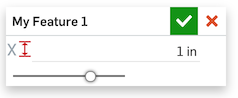
(This is from the linked documentation above)5 -
Cool
There is another improvement that worth to mention:
Show part thumbnails when using search
Un saludo,
Eduardo Magdalena C2i Change 2 improve ☑ ¿Por qué no organizamos una reunión online?
Partner de PTC - Onshape Averigua a quién conocemos en común10 -
+1SledDriver said:Exciting new surface and curvature abilities. Thanks.
But why do these introductory videos have to be SO short? One of those boundary examples is quite unnecessarily fast - at least 12 clicks in under 10 seconds. Is it a race? I see no merit in these videos being so speedy.
Please tell the experts to slow down an bit when they are demonstrating! If I could follow it that fast, I wouldn't need the video in the first place.
And it seems its getting worse when I compare with a couple of years ago. The commands get more powerful, yet the demos are getting faster.0 -
@SledDriver @larry_hawes Thanks for the feedback on video speed. We will definitely take this into consideration. These posts are mainly to draw your attention to what's been added as a summary so that you can start to look at and utilize the tools added. It is not meant to be fully educational as we could spend a lot of time covering every single possibility for each of these features. With that said, we tend to come out with more educational information soon after the features are pushed. I would recommend looking at the help documentation as that goes over the steps to use each feature. I will also be hosting a webinar (as we do regularly) to cover the new features and functionality in more detail: https://www.onshape.com/learn/webinars1
-
Thanks Bradley,
Not sure about @SledDriver's opinion but I don't think he or I are asking for a 10 minute tutorial on each new feature but perhaps a little more than one minute and one example.
BTW the help files are very helpful and underutilized by at least myself. They clarified the new 'boundary' feature with an example that was, at least for me, easier to understand.
Thanks again1 -
Good day! Will the auto-snap feature be disabled in the Sketch? There are instances when it is very severely hampered0
-
@dangerenok
You can hold the shift key to suppress sketch inferencing:
https://cad.onshape.com/help/Content/inferencing.htm
Can you describe some situations where it is harming your workflow?Jake Rosenfeld - Modeling Team2 -
@Jake_Rosenfeld ... omg... I've been struggling with that forever... Thank you! Can't tell you how often I thought the inferencing was too sensitive. Now that I know I can suppress it at will, I'm glad it's sensitive, now that I have control
5 -
Awesome, thanks again for the improvements.
@MBartlett21 looking forward to seeing all your icons come onboard.
2 -
Custom icons! Now I have to figure out how to represent my features in icon-size.
Arul Suresh
PhD, Mechanical Engineering, Stanford University2 -
@S1mon - here are the currently supported SSO providers. If your Enterprise would like us to support another identity provider, we are more than happy to talk to your Enterprise admin - please have them reach out to their account representative. The good news is that so far we have been able to accommodate all requests!

Philip Thomas - Onshape0 -
Un saludo,
Eduardo Magdalena C2i Change 2 improve ☑ ¿Por qué no organizamos una reunión online?
Partner de PTC - Onshape Averigua a quién conocemos en común3 -
When you use the tool of "Transformation" binding not disabledJake_Rosenfeld said:@dangerenok
You can hold the shift key to suppress sketch inferencing:
https://cad.onshape.com/help/Content/inferencing.htm
Can you describe some situations where it is harming your workflow?
2 -
@dangerenok
Remember to keep your sketches as simple as possible for best performance. Share things into separate sketches and use 'USE' to snap reference figures between sketches. This way you can hide/show needed sketches and have better control over your model.//rami4 -
Great update once again - though I would expect to see color by face and color by feature before custom icons..
 //rami2
 -
These are nice updates. Makes me wish that we did more with surfacing at my job...
Bravo...!
1 -
3dcad said:Great update once again - though I would expect to see color by face and color by feature before custom icons..Yeah, I too wish that we could control color of individual surfaces, but they *are* working on it. I also would like to see the ability to attach an image to a surface as well, and have it move seamlessly into an assembly too. Custom icons are great, but I would also like to see all the associated script files added to the software so that one doesn't have to go hunting for them. I can appreciate at least that one can write code for things if you need to. Not that I'm the least bit capable of doing that...0
-
Loving the custom Icons, great work folks. Now to find the most obnoxious colours to use, just because we can
 Business Systems and Configuration Controller
HWM-Water Ltd1 -
Hot Pink & Lime Green across the boardowen_sparks said:Loving the custom Icons, great work folks. Now to find the most obnoxious colours to use, just because we can1 -
@owen_sparks
@john_mcclary
You guys are why the custom icons for features are turned down to greyscale. Go wild with parameter icons though
Ilya Baran \ VP, Architecture and FeatureScript \ Onshape Inc8 -
ilya_baran said:@owen_sparks
@john_mcclary
You guys are why the custom icons for features are turned down to greyscale. Go wild with parameter icons though
2 -
MOTHER NO-FUN-AT-AT-ALL-STERS!!!
Business Systems and Configuration Controller
HWM-Water Ltd0












 https://youtu.be/p3AL8UcvSzs

