Improvements to Onshape - November 18th, 2020

Lindsay_Early
Member, Onshape Employees, Developers Posts: 26 
It's November! We are near the end of 2020, but we are not slowing down. This release includes a number of frequently requested features including markup! Lets take a look.

CAD IMPROVEMENTS
ABILITY TO APPLY MARKUP TO COMMENTS
Markup is now available in the Comments section of Onshape.EXPLODE LINE FORMAT IN DRAWINGS
Control explode line weight and color in Drawing properties > Views > All views.SECTION VIEW OPTIONS
When you add a Section view to a section view, you can choose whether to cut the base geometry or cut the already sectioned geometry with a toggle.
MOBILE IMPROVEMENTS
IOS INSERT IMAGES FROM MOBILE DEVICE
Now you can import local images or take an image from your camera for import into Onshape on an iOS mobile device.ENTERPRISE IMPROVEMENTS
COMPANY SETTINGS
Enterprise administrators can see how many full and light subscriptions have been purchased as well as how many are in use. Go to Enterprise settings > Users and they are listed at the top.

The number and type of subscriptions purchased also show under My account > Subscription.

Please take a moment to try out these new features and improvements and leave your comments below. For a detailed list of all the changes in this update, please see the changelog.
Remember: The updates listed here are now live for all users when creating new Documents and over the next few days these features will also be available in Documents created before the date of this update.
Remember: The updates listed here are now live for all users when creating new Documents and over the next few days these features will also be available in Documents created before the date of this update.
10
Comments
-
We will make use of all of these (probably Markups most of all). Thank you.5
-
Very nice group of improvements!
2 -
Yeah! mark ups are much appreciated.
And another 'did not know I needed that' - photos on mobile have all kinds of uses. Nice work Onshape team.
www.accuratepattern.com2 -
Markup will be so, so incredibly useful, especially for brainstorming and design reviews while everything is remote! Lately, for brainstorming, we've been following each other and then waving our mouse around to trace shapes over the model. This will make it much easier to communicate what we're thinking, and in the process, it will automatically make sure that we document our ideas!
It would be wonderful if you could follow another user into the markup environment and collaborate on scribbling stuff (but I realize that adds a lot of complexity to the feature!). Also, having an eraser in addition to undo would also be very nice.Get in touch: contact@alnis.dev | My personal site: https://alnis.dev
@alnis is my personal account. @alnis_ptc is my official PTC account.0 -
A+ on markups
Thank you for that!
Edit:
"A" on Markups, I took it down a notch because there is still room for improvement.
Because this is simply a screenshot of the current view. Can you add mark-up to all tabs?
Right now we have an Onshape document that is full of released PDFs.
It would be nice if they could mark up (red-line) the PDFs using this markup tool.
Because our release procedures require us to mark qty/initial/date every page, we need to export to PDF, then import the PDFs as the controlled document.
We also have a single document that holds all release PDFs currently in production for a one stop source of all active project drawings. It be nice if they could red-line these as we are attempting to go paperless (ahem, paperless here means PDF doesn't get printed ) not to be confused with 'drawingless')
0 -
Markups is the best feature for my needs since sheetmetal tools was added. Christmas has come early. Thanks!!!0
-
Thank you Onshape!! Markups are a major improvement for our team communication0
-
Really like the simplicity of markups! It does need an erase and delete.0
-
Markups will be very useful. Awesome!0
-
Markups are awesome, look forward to using that.
Adding images will be great for when on-site and need to add some photos for details on a project. I have been taking photos then transferring to a computer when I get back to the office and then uploading to Onshape for use and sharing. It will speed up communication to the team!1 -
Yes, markups! That will resolve some improvement requests I've written over the years.. Also section of a section for those really tricky views.. yay 😀0
-
Thankyou markups has been much needed and will save me from screenshots and uploading.0
-
Thank you for these great updates. The markups is great.0
-
Is anyone else able to use a pen-tablet (like a wacom) while using free hand tool in markup?
It doesn't let me draw (at least with XP-PEN tablet)
I'm getting different results in chrome/edge/firefox
in chrome and edge you can't see my cursor during the screen recording, but you can is firefox, i did the same action in all three.
In all I can select the pencil tool with the stylus but ink doesn't draw in all three.
Odd how edge will bounce the screen like i'm swiping down on a tablet browser.
0 -
After doing one markup the icon disappears and I can't work out how to do a second one? Am I missing something?

0 -
Markup only seems to appear on Assemblies / PartStudios / Drawings.Ben_Tek_Pac said:After doing one markup the icon disappears and I can't work out how to do a second one? Am I missing something?
I noticed you need to let the drawing finish loading before the icon appears0 -
not working for me either, I can only put dots on the page, looks like measles! The page just goes up and down when I try to write.
 john_mcclary said:Is anyone else able to use a pen-tablet (like a wacom) while using free hand tool in markup?
It doesn't let me draw (at least with XP-PEN tablet)
I'm getting different results in chrome/edge/firefox
in chrome and edge you can't see my cursor during the screen recording, but you can is firefox, i did the same action in all three.
In all I can select the pencil tool with the stylus but ink doesn't draw in all three.
Odd how edge will bounce the screen like i'm swiping down on a tablet browser.
1 -
I put together my old laptop to check if it works there since it has a touchscreen. It works in FireFox but not in Chrome in Pop!_OS 19.10 on a Dell Inspiron 15r (I know 19.10 is dangerously out of date, I just haven't used it lately so I haven't bothered with updating). I think it's because the touchscreen isn't properly supported in FireFox with this configuration since swiping on other pages selects text/content instead of scrolling. Screen recording of touchscreen working with markup:
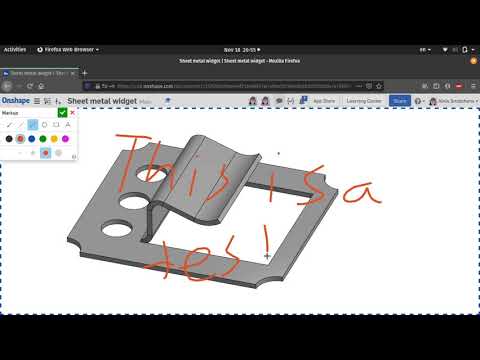 https://youtu.be/yYsAnO3-8pw
I think the problem is that the touch inputs are intercepted by the browser as page controls (e.g. scroll, back/forward, etc.) rather than being passed into the markup area. I think this article might have some relevant information, but I'm not sure since I'm by no means a web developer.Get in touch: contact@alnis.dev | My personal site: https://alnis.dev
@alnis is my personal account. @alnis_ptc is my official PTC account.0 -
I love how easy it is now to get a photograph into Onshape
 0
0 -
That's a 2 click operation
At the bottom there is a Menu when you hit the + button
click 1 import and insert a Photo
click 2 open Photo in Onshape
0 -
@john_mcclary - I've got a Samsung laptop with S-pen. I'm not able to get the s-pen to work with the freehand tool (or any of the other tools, really). I tested in Chrome and chromium based edge. It's unfortunate. It would have been really nice to at least be able to draw with a finger on the touchscreen.
I know there are some technical difficulties in handling touch inputs through the browser that have been mentioned when someone brings up using touch to manipulate views... but other apps seem to have figured this out. I know I've seen apps where you can draw with your finger and I've also seen apps where you can manipulate a 3D view with your finger.
With iPads becoming as powerful as computers and computers taking on tablet form-factors, there's a lot of opportunity for improvement around interacting with the 3D environment.
0 -
Yea, but I'm not using a tablet or touchscreen, I'm trying to use a pen-tablettim_hess427 said:@john_mcclary - I've got a Samsung laptop with S-pen. I'm not able to get the s-pen to work with the freehand tool (or any of the other tools, really). I tested in Chrome and chromium based edge. It's unfortunate. It would have been really nice to at least be able to draw with a finger on the touchscreen.
I know there are some technical difficulties in handling touch inputs through the browser that have been mentioned when someone brings up using touch to manipulate views... but other apps seem to have figured this out. I know I've seen apps where you can draw with your finger and I've also seen apps where you can manipulate a 3D view with your finger.
With iPads becoming as powerful as computers and computers taking on tablet form-factors, there's a lot of opportunity for improvement around interacting with the 3D environment.
which usually makes a stylus event (at least in .net)
So I'm not sure what the browser limitation will be.
I know edge INK tools work fine, that's how I sign and date PDFs.
PeteYodis created a support ticket for this, hopefully Onshape will be able to address this eventually0 -
Hi john_mcclary,john_mcclary said:Is anyone else able to use a pen-tablet (like a wacom) while using free hand tool in markup?
It doesn't let me draw (at least with XP-PEN tablet)
I'm getting different results in chrome/edge/firefox
in chrome and edge you can't see my cursor during the screen recording, but you can is firefox, i did the same action in all three.
In all I can select the pencil tool with the stylus but ink doesn't draw in all three.
Odd how edge will bounce the screen like i'm swiping down on a tablet browser.
Touch inputs are handled differently from mouse clicks in a browser. We've discussed in the past but currently do not support touch inputs in Onshape's web app beyond what browsers do natively. I would recommend sending in an improvement request for touch inputs so it can help us prioritize.Jake RamsleyDirector of Quality Engineering & Release Manager onshape.com0 -
that is on the list.bill_schnoebelen said:Really like the simplicity of markups! It does need an erase and delete.Lou Gallo
Sr. Director of Product Definition. UX and Support3 -
jakeramsley said:
Hi john_mcclary,john_mcclary said:Is anyone else able to use a pen-tablet (like a wacom) while using free hand tool in markup?
It doesn't let me draw (at least with XP-PEN tablet)
I'm getting different results in chrome/edge/firefox
in chrome and edge you can't see my cursor during the screen recording, but you can is firefox, i did the same action in all three.
In all I can select the pencil tool with the stylus but ink doesn't draw in all three.
Odd how edge will bounce the screen like i'm swiping down on a tablet browser.
Touch inputs are handled differently from mouse clicks in a browser. We've discussed in the past but currently do not support touch inputs in Onshape's web app beyond what browsers do natively. I would recommend sending in an improvement request for touch inputs so it can help us prioritize.
This is not "touch" as far as i know, I think that is a different event (or I could be wrong)
But as you can see, the pen does work natively in the browser, just not in the comment area.
I am on a ticket now though, I just wanted to see if anyone else had success or it was just my drivers or something.
According to Alnis, he got it to work on a touchscreen though. So there was a glimmer of hope
0 -
Cant use stylus to draw only mouse or touch pad on computer :'0
-
"Touch" is the event name that browsers use, which is what I was referring to:john_mcclary said:jakeramsley said:
Hi john_mcclary,john_mcclary said:Is anyone else able to use a pen-tablet (like a wacom) while using free hand tool in markup?
It doesn't let me draw (at least with XP-PEN tablet)
I'm getting different results in chrome/edge/firefox
in chrome and edge you can't see my cursor during the screen recording, but you can is firefox, i did the same action in all three.
In all I can select the pencil tool with the stylus but ink doesn't draw in all three.
Odd how edge will bounce the screen like i'm swiping down on a tablet browser.
Touch inputs are handled differently from mouse clicks in a browser. We've discussed in the past but currently do not support touch inputs in Onshape's web app beyond what browsers do natively. I would recommend sending in an improvement request for touch inputs so it can help us prioritize.
This is not "touch" as far as i know, I think that is a different event (or I could be wrong)
But as you can see, the pen does work natively in the browser, just not in the comment area.
I am on a ticket now though, I just wanted to see if anyone else had success or it was just my drivers or something.
According to Alnis, he got it to work on a touchscreen though. So there was a glimmer of hope
https://developer.mozilla.org/en-US/docs/Web/API/Touch_events
It's the event that gets sent to the browser when either finger touches or stylus pens are used to interact in the browser. Browsers like Chrome and Firefox have some implicit handling of the events but unless implemented explicitly there is large possibility that they do not work the way desired. This is why we'd currently say we do not support touch in our web app and that our iOS/Android apps have been built natively to handle these gestures.Jake RamsleyDirector of Quality Engineering & Release Manager onshape.com0 -
This might be coincidental, but as of this morning Dark Reader properly displays the color palette.... if y'all had a hand in it, thank you!
 ** Edit 09 Dec: oops....spoke too soon. Color inversion is back
 Design Engineer | Anerdgy AG1
 -
Is there a future plan with images? Sorting, slideshow, tiled image view, grouping/albums?
One thing certain about pictures is you always take too many and never have enough.
0 -
You can do a google slides and use the link tab app if you want to do slide shows
Or import a ssideshow as pdf.
1