How to design hair brush

anna_pir
Member Posts: 14 ✭
hello there,
would like a tutorial showing how to design/create hair brush
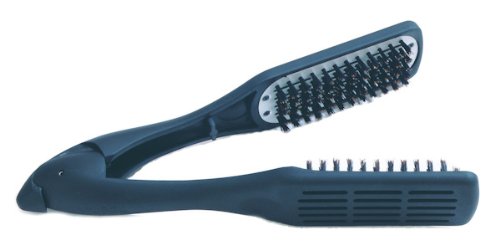
Pls see the image , cause I need to design something like that which will be open at 45 degree, whill have spring between 2 parts
Tagged:
0
Best Answers
-
Hi @anna_pir have you tried the Feature Linear pattern command ?

https://cad.onshape.com/help/#linearpattern.htm?Highlight=linear pattern
Nicolas Ariza V.
Indaer -- Aircraft Lifecycle Solutions1


Answers
-
-
Have you started a doc? If you have, I can help, I will private message you my email so you can add me in to edit.
Bruce1 -
I am a bigginer, but I did some work and gave it on dwg format0
-
"Beginer"
 0
-
We all have to start somewhere and having a product you want to design forces you to find way you can model it. I'd suggest first getting familiar with sketching on planes in Onshape, then practice the various modelling tools to understand what each one does. Your Hair brush will need a little more than basic skills but sure you will get there. Try the Onshape Tutorials as well, Good luck and feel free to share me in. Bruce1
-
Bruce & Anna-
Please post how you set this up, I'm sure many can benefit from your discoveries.
Me, I would:
-design the brush in it's closed state in a part studio
-my first sketch would be on the top plane
Anna, good luck, you're in good hands with Bruce.
1 -
Ok, but how can I create and multipy the brush "teeth" easily, in many cad s there is an option to multiply the obejtc in desired direction0
-
Hi @anna_pir have you tried the Feature Linear pattern command ?
https://cad.onshape.com/help/#linearpattern.htm?Highlight=linear pattern
Nicolas Ariza V.
Indaer -- Aircraft Lifecycle Solutions1 -
U mean I can select one tooth of brush and than click on command and then?
By the way in which format i should convert the dwg to be able to work on it throu onshape?
thanks!0 -
You can't get 2d drawings into Onshape yet. Hopefully it will be in real soon.
I'd be starting from a new sketch, that way you will have full control1 -
Ok, thanks. Is there any tutorial for linear pattern command?0
-
ok, i shared the file with u, but i did nothing there)) , i was hoping to continue my design from my dwg file,but no luck 0
-
I have added layout sketch in for the rough shape. Using the dimensions you can drive the sketch to the size you want.
Are you happy working in inches? you can change to metric if you want.
I also uploaded billy's image into the doc for a reference. you could so do this with your drawing but will not be able to get it into the Onshape part studio.1 -
1
-
-
thank u very much yes, i a happy!brucebartlett said:I have added layout sketch in for the rough shape. Using the dimensions you can drive the sketch to the size you want.
Are you happy working in inches? you can change to metric if you want.
I also uploaded billy's image into the doc for a reference. you could so do this with your drawing but will not be able to get it into the Onshape part studio.0 -
and also, is there a way to make the brush teeth pointy?anna_pir said:0 -
-
Hi @anna_pir I`ve made the Doc public you can copy it and make the desired changes :
https://cad.onshape.com/documents/4614845d6ad942fc91d01558/w/3e1847d5d3d144c399a9bfea/e/c89b28a5dae14ac99eddc543
Not sure how your design is but if you want to make a brush teeth pointy you can use for example the revolve command:
1. Draw the profile you want to revolve:
2. Use the revolve command
Nicolas Ariza V.
Indaer -- Aircraft Lifecycle Solutions1 -
thank u again
0