Welcome to the Onshape forum! Ask questions and join in the discussions about everything Onshape.
First time visiting? Here are some places to start:- Looking for a certain topic? Check out the categories filter or use Search (upper right).
- Need support? Ask a question to our Community Support category.
- Please submit support tickets for bugs but you can request improvements in the Product Feedback category.
- Be respectful, on topic and if you see a problem, Flag it.
If you would like to contact our Community Manager personally, feel free to send a private message or an email.
Pattern

Piotr_Posmyk
Member Posts: 2 ✭
I have a question about the Linear pattern feature.
I found an interesting video on Youtube:
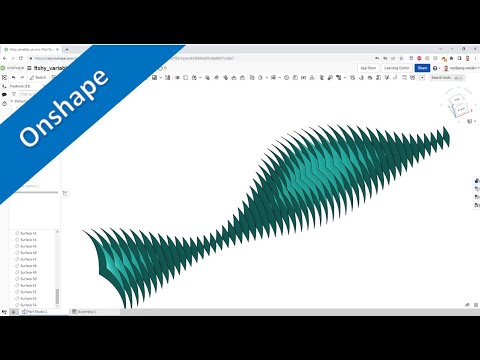 https://www.youtube.com/watch?v=DuZNr6E8OIw&t=23s
I created a similar part:
https://cad.onshape.com/documents/28b6a17ea0fde5adff45fd89/w/a0615eb10d678a5ed5610847/e/79dd9cd61e010ab4aa0d6a71
Could someone explain it:
Why the formed array is not symmetrical about the X-Y plane? In the sketch of Revolve feature there is symmetry with respect to X-axis, why this symmetry is not maintained in the sketches of Pattern's instances? The symmetry of the array with respect to X-Z is maintained.
Why the formed array is not symmetrical about the X-Y plane? In the sketch of Revolve feature there is symmetry with respect to X-axis, why this symmetry is not maintained in the sketches of Pattern's instances? The symmetry of the array with respect to X-Z is maintained.
0
Best Answers
-
I noticed that your sketch isn't constrained to be symmetric. However, fixing that doesn't fix the lack of XY symmetry. It seems that the patterned sketches don't respect the symmetric constraint placed on the upper and lower construction lines. However, if you remove the symmetry and instead replace it with a horizontal line connected to the arc midpoint, the pattern surfaces look as expected. It shouldn't matter, but it does ¯\_(ツ)_/¯
https://cad.onshape.com/documents/222ca838b9324929223d7a54/w/c8c53e48d363f4a0cd1ac67a/e/d9765d036a451bf112e8cb38
2 -
Patterned sketches do not regenerate external refs - this is a limitation from my first “What’s New” post in Jan 2016. OuchSenior Director, Technical Services, EMEA2



Answers
-
I noticed that your sketch isn't constrained to be symmetric. However, fixing that doesn't fix the lack of XY symmetry. It seems that the patterned sketches don't respect the symmetric constraint placed on the upper and lower construction lines. However, if you remove the symmetry and instead replace it with a horizontal line connected to the arc midpoint, the pattern surfaces look as expected. It shouldn't matter, but it does ¯\_(ツ)_/¯
https://cad.onshape.com/documents/222ca838b9324929223d7a54/w/c8c53e48d363f4a0cd1ac67a/e/d9765d036a451bf112e8cb38
2 -
@mahir Perhaps it is copying the sketch and breaking the external references. Then leaving the sketch where it was last positioned.

RENDERCAD
rendercad.ai - Photorealistic product rendering.
▚▞▚▞▚▞▚▞▚
________________________________________________________________________0 -
@MichaelPascoe That seems feasible if not ill advised on OS' part. Generally, it's considered a good thing to design sketches using reference features (planes, origin). Not sure why OS would purposely break those refs. At least knowing this allows one to create a seemingly well behaved result by keeping the sketch constraints self-contained.0
-
@mahir
I used to only mirror with planes while in sketches. Now, I try to always use construction lines. Self contained sketches with the exception of a few constrained construction lines, are easier to fix when the references are broken. It also makes it easier to copy and paste sketches to a new document.
RENDERCAD
rendercad.ai - Photorealistic product rendering.
▚▞▚▞▚▞▚▞▚
________________________________________________________________________0 -
Patterned sketches do not regenerate external refs - this is a limitation from my first “What’s New” post in Jan 2016. OuchSenior Director, Technical Services, EMEA2
-
I would call it a compromise, rather than a limitation. If we were to keep external constraints when patterning sketches, a linear pattern of a sketch that has, say, an external constraint to a point (that's not being patterned) would not be able to create identical duplicates of the sketch (unless the pattern direction was normal to the sketch plane). And since a large portion of sketches have some external constraints, and a large portion of the time, when patterning you just want identical duplicates, we felt it was better to drop those constraints than to try to cater to the more esoteric patterning situations.Ilya Baran \ VP, Architecture and FeatureScript \ Onshape Inc1
-
@ilya_baran
This compromise makes a certain amount of sense for many situations, but it would be great if this was an option in patterning. I've had to do use much more complex sets of features which didn't have sketches in order to work around this. Much like we have the "apply per instance" option, it would be nice to have some way to make the sketches more independent.Simon Gatrall | Product Development, Engineering, Design, Onshape | Ex- IDEO, PCH, Unagi, Carbon | LinkedIn
2


