Welcome to the Onshape forum! Ask questions and join in the discussions about everything Onshape.
First time visiting? Here are some places to start:- Looking for a certain topic? Check out the categories filter or use Search (upper right).
- Need support? Ask a question to our Community Support category.
- Please submit support tickets for bugs but you can request improvements in the Product Feedback category.
- Be respectful, on topic and if you see a problem, Flag it.
If you would like to contact our Community Manager personally, feel free to send a private message or an email.
Improvements to Onshape - August 5th, 2022


We’ve made changes to the overall merge strategy (Selective Merge) to improve the workflow! And don’t forget to check out other improvements to sheet metal, surfacing and drawings and more!
GENERAL IMPROVEMENTS
SELECTIVE MERGE
When working with lots of branches and lots of changes across many different Part Studios, Assemblies, Drawings and other tabs, it is sometimes difficult to know exactly what the effect of a merge will have on your document.
Now when you start a merge operation, Onshape will provide you with a new interface to help you understand the effects of merging one branch with another. This will make it possible to allow for selective, per tab merge operations.
BEZIER CURVE
In addition to the Spline through points feature in Sketches, Onshape now includes Bezier curves for more precise control over curvature and curve quality. Bezier curves are created by sketching a control polygon that can be driven with constraints and dimensions to create smoother geometry for more complex surfacing tasks.
TRIMMING OF STAND-ALONE SKETCH POINTS
The Trim command in Sketch now lets you delete stand-alone sketch points by clicking or dragging.

ICON FOR FAILED FEATURES
At the top of the Features list there is now an icon that indicates if there are features with regeneration errors in the feature list. When hovering over the icon, the number of failed features is displayed and clicking on the icon filters the Features list. This saves time, especially with longer feature lists, where regeneration errors may not be visible or easy to find.
SORTING THE CONTENT OF BOM COLUMNS
The BOM columns can be sorted in numerical or alphabetical order by double-clicking on the column header.

PARTIAL FLANGE
The Sheet metal Flange feature now includes options for partial flange creation. Partial flanges are not created over the entire length of an edge, but have an offset from each corner of the selected edge or chain of edges.CLAMPED END CONDITIONS FOR RULED SURFACE
The Ruled surface feature now gives you more control over end conditions. If the cubic interpolation option is enabled, the end edges now have clamped end conditions. When mirroring such a surface, the result is an absolutely continuous surface and tangential edge transition.
CENTERED OPTION IN ASSEMBLY LINEAR PATTERN
Linear patterns in Assemblies now include a Centered option to create symmetric patterns of Parts and Subassemblies.

KEEP TOOLS OPTION FOR BOOLEAN UNION
The Boolean/Union feature now includes a Keep tools option. Instead of uniting parts or surfaces and removing them from the parts list, you can now use the Keep tools option to reuse them in other downstream modeling operations.DRAWING IMPROVEMENTS
NEW GD&T SYMBOLS
Two new GD&T symbols for Continuous feature and Spotface have been added. These can be found in the dropdown menu for symbols in dimensions and annotations.
FLAG NOTES
Flag notes are a method of cross-referencing one area or annotation on a drawing to a list of notes. If a numbered list type is used in notes, the notes can then be flagged to reference other references on the drawing. This helps to communicate information clearly.
FORMAT PAINTER
The Format painter tool provides the ability to transfer the style from an existing annotation to other annotations on the drawing. This is much faster than opening the Styles fly-out menu for each annotation and manually adjusting the styles.

DIAMETER AND RADIUS DIMENSION STYLE
For radius and diameter dimensions, there is now a new option under the Dimension Styles fly-out menu to change the dimension line. For diameter dimensions, the dimension line can be changed to double arrows inside or outside the geometry being dimensioned. For radii, the dimension line can be extended to the center point with arrows inside or outside the geometry being dimensioned.

MOBILE IMPROVEMENTS
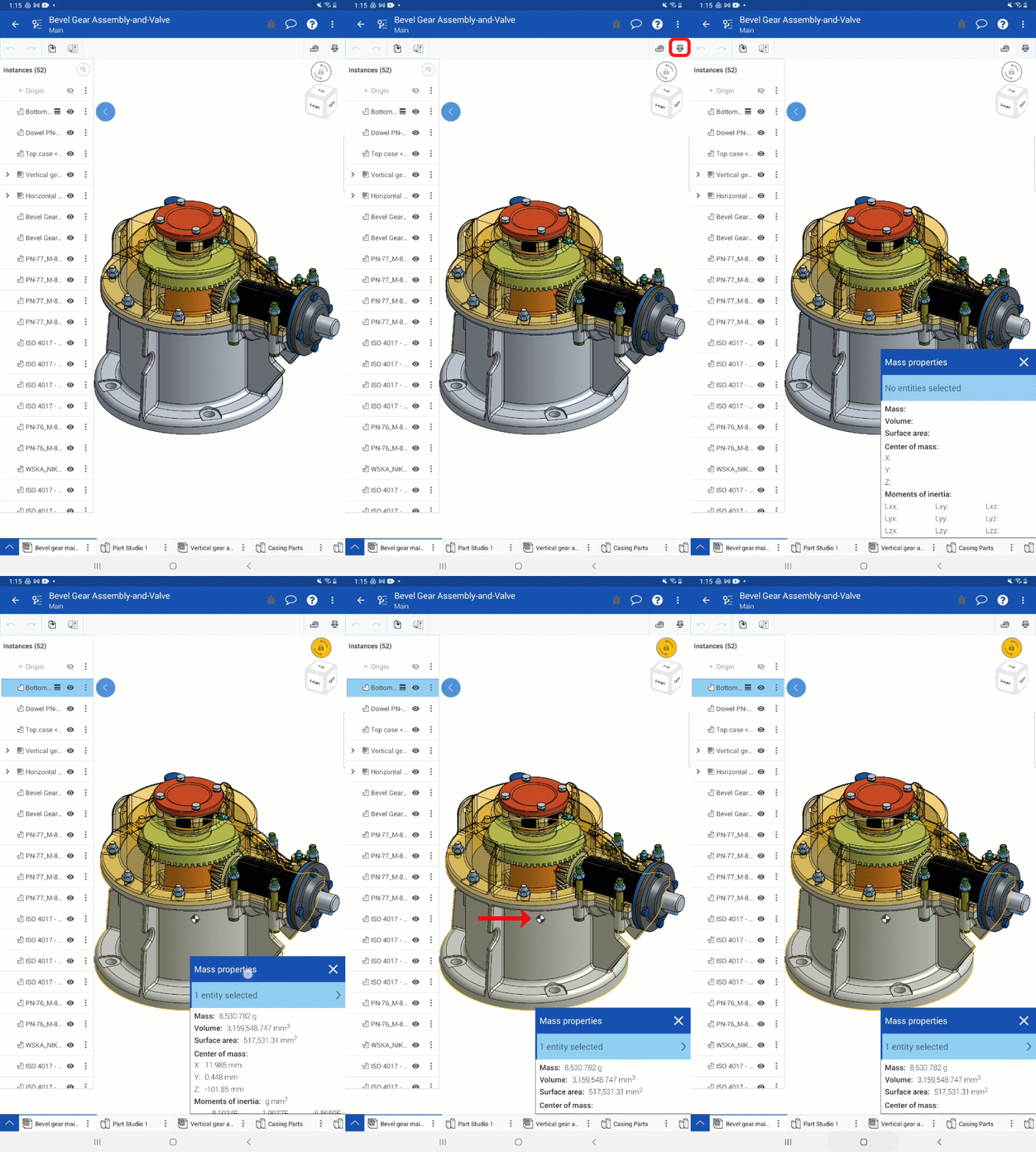
ANDROID: SHOW CENTER OF MASS
The Center of mass can now be displayed in the graphics area.
ANDROID: DISPLAY STATES
Display states can now be viewed, created, modified or deleted.
iOS: USER INTERFACE IMPROVEMENTS
A change has been made to how the display of the context menus appear in iOS, notably, the support of icons in the context menus is now available.

LEARNING CENTER IMPROVEMENTS
There have been several video updates to existing courses in the Onshape Learning Center, including:
Onshape Assemblies course
Updates to the Hiding and Showing Techniques in Assemblies video includes hiding and showing components with shortcut keys Y and Shift+Y.
Document Management course
An update to the Creating Folders video showcases new functionality with folder breadcrumbs in the folder overflow menu.
Frames Fundamentals course
An update to the Frames Drawings video includes changing cut-list table configuration.
Detailed Drawings course
An update to the Creating Tables video includes improvements to table row and column sizing.
Inserting Views video now showcases the addition of dragging to copy views.
- An update to the markup video to explore how to remove markups.
Remember: The updates listed here are now live for all users when creating new Documents. Over the next few days, these features will also be available in Documents created before this update.
Comments
-
-
These are good.1
-
Selective Merge?! That's awesome!
3 -
Awesome update, sorting BOM columns, made my day!1
-
Is that a sheet metal enhancement I see???? Nice! Keep them coming!9
-
Senior Director, Technical Services, EMEA1
-
PARTIAL FLANGE, Thumbs up
2 -

1 -
Well done again. OS is defently the baet CAD system our there now. love it3
-
Yes Please keep the sheet metal enhancements coming!NeilCooke said: 4
4 -
Selective merge... Awesome!!
Lots of great improvements in this update. Great work!
Un saludo,
Eduardo Magdalena C2i Change 2 improve ☑ ¿Por qué no organizamos una reunión online?
Partner de PTC - Onshape Averigua a quién conocemos en común0 -
What a great update....Bezier Curves and BOM sorting just 2 of the new improvements that will make CAD life even better...thank you0
-
The new Merge controls look very powerful. Nice rendering at the end of the vid btw. (Would love to know the material/appearance settings. Please can you share?) BOM sorting is fantastic and great drawing improvements too! Flags & Format Painter are an extremely welcome addition. Thanks for the update!
0 -
wow to everything! this is a huge update!So happy about selective merge. Now maybe I won't be so scared to create branches and merges on actual production work.Bezier curves!failed feature icon, so sweetsorting BOM, this is going to save me so much time checking my properties are filled in correctly!Partial Flanges, YES! no more cut extrude or move face workaroundsassembly pattern center, actually kind of suprised it wasn't there at launch. glad to have it nowflag notes, that's awesome! definitely will find uses for that!format painter! one of those tools I always missed, glad to see it!Android updates.. LOL Android has been largely neglected as far as updates go. So naturally, the same day I switched to iPhone there is the first Android update in years hahaha the irony!you've all outdone yourselves Onshape team!this is like Christmas in July.. Uhh.. August.. dang, y'all just missed it
 3
3 -
I want to give a shout-out to our wonderful interns! Several of the above improvements, including selective merge, were written by interns (supervised by full-time developers, and working closely with UX and QA, of course). They're the reason we get to have Christmas in August Ilya Baran \ VP, Architecture and FeatureScript \ Onshape Inc27
-
Partial Flanges!!!! YES !
2 -
Wow!
What a huge update - wonderful work folks! Many important improvements we've been wanting for a long time.
0 -
great job interns!3
-
Great improvements. Thank you0
-
There is a lot here and I am really loving it. Selective merge!? Very unexpected. I'm hoping this means we will be able to bring a tab that was deleted back into the document now without destroying other things or having to copy the tab and break the internal id's.bryan_lagrange said:Is that a sheet metal enhancement I see???? Nice! Keep them coming!1 -
There was already a way to do this (with a temporary branch and a restore) but it wasn't "obvious"... This should make things a lot easier!shawn_crocker said:There is a lot here and I am really loving it. Selective merge!? Very unexpected. I'm hoping this means we will be able to bring a tab that was deleted back into the document now without destroying other things or having to copy the tab and break the internal id's.
One use case where it will be really nice is when working on multiple parallel branch (concept exploration for example), where you might create or import a new part in one branch and also want to try it in the other but can't merge the whole thing), this will mean you can just bring it in without being restricted to using a version or whatever.
The partial flange will really be useful to avoid cases where a full length flange resulted in a collision so you had to first do a temporary move, etc...
I agree there are a lot of really useful things in this update!
0 -
I hope selecting merge will be an understandable and useful feature
0 -
As I exclaimed earlier, finally adding Béziers is a huge deal. I'm very happy overall with the functionality. I have found a bunch of small and possibly larger improvements which would help make them more powerful. Here's a list of improvement requests:
Raise/lower degree (keeping the same shape when possible) of Béziers
Allow Béziers to pick up tangency or even curvature constraints automatically when sketching
Allow tangent arc to pick up the tangency of a Bézier spline
Allow extension of Béziers when using edge
Allow box selection of Bézier control polygon sides
Update curvature plot in realtime for Béziers in sketches
Allow sketch transform tool to work on Bézier control points
Add convenient way to turn Bézier control polygon into sketch reference linesSimon Gatrall | Product Development, Engineering, Design, Onshape | Ex- IDEO, PCH, Unagi, Carbon | LinkedIn
0 -
S1mon,S1mon said:As I exclaimed earlier, finally adding Béziers is a huge deal. I'm very happy overall with the functionality. I have found a bunch of small and possibly larger improvements which would help make them more powerful. Here's a list of improvement requests:
Raise/lower degree (keeping the same shape when possible) of Béziers
Allow Béziers to pick up tangency or even curvature constraints automatically when sketching
Allow tangent arc to pick up the tangency of a Bézier spline
Allow extension of Béziers when using edge
Allow box selection of Bézier control polygon sides
Update curvature plot in realtime for Béziers in sketches
Allow sketch transform tool to work on Bézier control points
Add convenient way to turn Bézier control polygon into sketch reference lines
Thanks for your comments. As you point out this is a) a big deal and b) only the beginning. We definitely have it in our roadmap to extend on Beziers in many of the ways you mentioned, but we also wanted to get it out there in its current form as there is already a ton of value to be had. I have read (and appreciate) all your comments on this and related topics, and look forward to more of your thoughts.2 -
Best update ever!!
0 -
Go interns! Selective merge is huge. Thanks y'all
Design Engineer | Anerdgy AG0 -
This will change some workflows! Thanks Onshape team!
RENDERCAD
rendercad.ai - Photorealistic product rendering.
▚▞▚▞▚▞▚▞▚
________________________________________________________________________0 -
What's New LiveStream slated for 9:00am Eastern US time: Join us for live reactions and demos
LinkedIn: https://www.linkedin.com/video/event/urn:li:ugcPost:6962354689573060609/
YouTube: https://www.youtube.com/watch?v=1a-ujpSQXd0
Twitch:
Twitter: https://twitter.com/mlaflechecad
Regards,Mike LaFleche @mlaflecheCAD1 -
Love this! So many good feature updates!0