Welcome to the Onshape forum! Ask questions and join in the discussions about everything Onshape.
First time visiting? Here are some places to start:- Looking for a certain topic? Check out the categories filter or use Search (upper right).
- Need support? Ask a question to our Community Support category.
- Please submit support tickets for bugs but you can request improvements in the Product Feedback category.
- Be respectful, on topic and if you see a problem, Flag it.
If you would like to contact our Community Manager personally, feel free to send a private message or an email.
Improvements to Onshape - June 12th, 2023



GENERAL IMPROVEMENTS
TRIM CURVE
You can now trim (or extend) a curve.VARIABLES IN SKETCH PATTERN INSTANCE COUNTS
You can now assign a Variable to a Sketch pattern instance count.STANDARD CONTENT METADATA
You can now edit more properties associated with Standard content. In the past, the only editable properties associated with Standard content were Part number and Description.NEW SKETCH TEXT FONTS
20 New Sketch text fonts have been added with this update. Click "Show" below to see the list.Allerta
Balthazar
Baumans
Bebas Neue
Comic Neue
Courier Prime
Didact Gothic
M PLUS Rounded 1c
Michroma
Oswald
Poppins
PT Sans
Rajdhani
Roboto
Ropa Sans
Source Sans Pro
Sofia Sans
Orbitron
Inconsolata
Inter
HOLE FEATURE IMPROVEMENTS
New termination conditions have been added to Hole feature including "Up to next" and "Up to entity."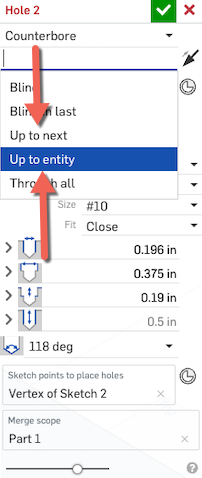
JOIN ADJACENT SURFACES
You will find a new import option to "Join adjacent surfaces." This new option allows you to simplify imported parts with many adjoining surfaces by merging them together during import.
PERFORMANCE INDICATOR IMPROVEMENTS
New icons have been added to the Performance panel to alert you to poorly performing Part Studios.
DRAWING IMPROVEMENTS
DRAWING DIMENSION IMPROVEMENTS
Drawing dimensions with bent leaders now have an adjustable jog point at the bend.PROFESSIONAL IMPROVEMENTS
NUMBERING SCHEMES
You can now define Numbering schemes and auto-generate Part numbers for Items and Standard content.RENDER STUDIO IMPROVEMENTS
NEW RENDER STUDIO APPEARANCES
Nearly 900 new Appearances were added to Render Studio with this update, including many popular and useful new metals, fabrics, paints, and plastics.TESSELLATION QUALITY
When creating or updating a Render Studio scene, you can now use the per-part tessellation quality set in each part’s Appearance panel in its Part Studio, giving you a greater degree of tessellation quality control. This is the default setting. Prior to this update the Part Studio and Render Studio tessellation settings were independent of each other.
ARENA CONNECTION IMPROVEMENTS
SUPPORT FOR STANDARD CONTENT AND ITEMS
Standard content and Items can now be synced with Arena PLM.Please take a moment to try out these new features and improvements and leave your comments below. For a detailed list of all the changes in this update, please see the changelog.
Remember: The updates listed here are now live for all users when creating new Documents. Over the next few days, these features will also be available in Documents created before this update.Comments
-
Wow, that’s a “banger”! Well done team, lots of great stuff.3
-
Wow. This is a nice set of improvements which covers many different areas. Looking forward to trying out the curve trim/extend tool and the sketch pattern variable usage as well as the standard content metadata. (and fonts, and rendering materials, and....)
Simon Gatrall | Product Development, Engineering, Design, Onshape | Ex- IDEO, PCH, Unagi, Carbon | LinkedIn
2 -
There's a whole lot of stuff I'm going to like using in this one, but one in particular catches my eye. Does "Join adjacent surfaces" mean it can turn all the triangular facets of mesh objects into surfaces? Even if it's all just flat surfaces with the coplanar ones merged together, that'd be a huge help when importing data from such files.
0 -
love the improvements! looking forward to test the "join adjacent surfaces"1
-
Variables in sketch patterns and sketch text font additions are great, will be using those two very regularly.
Thanks for another great set of updates.3 -
very happy with the 'Trim/Extend' Curve feature!
I see a great future ahead for this 'Help point' functionality.
That would also be great in e.g. "split" (to define which one part is the 'original' and which is 'new'.)1 -
Outstanding Update. Great work.1
-
That's an awesome update. Thank you guys!1
-
That Sketch Array was a big deal when I first started using onshape. Awesome to see variables implemented.
And we're finally starting to see some fonts!!! Is this fore-shadowing??
2 -
Great update!
The ability to add categories to standard content will be very useful!
1 -
Great improvemets
Hole feature including "Up to next" and "Up to entity" deserves a videoNothing noteworthy in the code review this time ;-)Un saludo,
Eduardo Magdalena C2i Change 2 improve ☑ ¿Por qué no organizamos una reunión online?
Partner de PTC - Onshape Averigua a quién conocemos en común3 -
Join Richard Doyle (The User Group Guy) and Mike LaFleche (The Professor) as we react to the latest Onshape update.
3 pm Eastern US time, Tuesday, Jun 13, 2023.
https://www.linkedin.com/video/event/urn:li:ugcPost:7074335519291109376/
https://www.youtube.com/live/OLpjScwSE7s?feature=share
Regards,Mike LaFleche @mlaflecheCAD5 -
Nice updates.
I like we can now edit all the properties of standard content.
Except I had to promote one of my users to admin, since that was the only way they could edit now.
3 -
Great job guys!1
-
VARIABLES IN SKETCH PATTERN INSTANCE COUNTS
I am soooo glad this is available now! I have really wanted this since 2020!2 -
Variables in sketch pattern instance count! Thank you!1
-
<sigh> Still no Arial font. Great updates otherwise!
2 -
Nice rebound!0
-
Great update!0
-
I've had a little time to play with the extend curve feature, and it is not at all what I would have hoped for [1]. The results are not desirable for good surfacing. With a very simple degree-3 Bézier, Onshape adds a bunch of complexity to the curve, flattening out the curvature with multiple spans and only G2 continuity. It's very possible to extend such a curve in a way that naturally follows the curvature without losing the original shape.
Here's a very simple degree-3 curve:
If I extend it in Onshape with curvature set, I get this:
Contrast this with the behavior in Plasticity (this is also possible in Alias or Rhino or many other tools):
Here's the Onshape and Plasticity curves overlayed:
Here's a link to the Onshape document (with the Plasticity version imported for review).
[1]:
https://forum.onshape.com/discussion/20345/direct-modeling-extend-trim-for-curves-surfaces-which-maintains-the-existing-degree
https://forum.onshape.com/discussion/18824/allow-extension-of-beziers-when-using-edgeSimon Gatrall | Product Development, Engineering, Design, Onshape | Ex- IDEO, PCH, Unagi, Carbon | LinkedIn
7 -
I have been waiting for this ability to modify Onshape drawing dimension leaders for 2+ years now. This is a fantastic change that all engineers at my company are celebrating. To whoever at Onshape prioritizes the updates: please focus on drawings above all else. engineers need greater customization/control of onshape drawings.4
-
On the plus side of this release, the sketch pattern variables are pretty cool. You can do things like delete instances or make elements of them construction and the sketch pattern will remember those changes regardless of the quantity variable. What it can't do is set a dimension to the last element and have that always be the last element regardless of the quantity. You can set up the math to divide an overall length so you can space things nicely.


Simon Gatrall | Product Development, Engineering, Design, Onshape | Ex- IDEO, PCH, Unagi, Carbon | LinkedIn
3 -
The Onshape team is on a roll!
- Variables in Sketch Pattern !
- New Sketch Text Fonts ! !
- Numbering Schemes ! ! !
- New Render Studio Materials ! ! ! !

RENDERCAD
rendercad.ai - Photorealistic product rendering.
▚▞▚▞▚▞▚▞▚
________________________________________________________________________1 -
Great update! Thank you. All improvements to drawings are much appreciated!
 1
1 -
Un saludo,
Eduardo Magdalena C2i Change 2 improve ☑ ¿Por qué no organizamos una reunión online?
Partner de PTC - Onshape Averigua a quién conocemos en común1 -
john_mcclary said:Nice updates.
I like we can now edit all the properties of standard content.
Except I had to promote one of my users to admin, since that was the only way they could edit now.
Did they create an improvement request for this? I think it is better to have a permission that you grand to your users.
0 -
john_mcclary said:Nice updates.
I like we can now edit all the properties of standard content.
Except I had to promote one of my users to admin, since that was the only way they could edit now.@john_mcclary - not sure whether you are on Pro or Enterprise, but within Enterprise I have an explicit permissions setting under the Global Permissions menu for this which can be assigned to individuals or groups. I created a new group "Standard Content Managers" for this:
1 -
I see some small changes have been added to the hole tool. Those are nice features, but what about hole tolerances in the feature? Being able to add press or clearance dowel tolerances, so they come through in the detailing, is something that is really missing here. Hopefully you guys will be able to add some features like that in the future.1
-
Yes, we're working on it.michael_vanende said:john_mcclary said:Nice updates.
I like we can now edit all the properties of standard content.
Except I had to promote one of my users to admin, since that was the only way they could edit now.
Did they create an improvement request for this? I think it is better to have a permission that you grand to your users.
We don't have dowel pins in holes today. It is on the radar for sure.Lynx_232 said:I see some small changes have been added to the hole tool. Those are nice features, but what about hole tolerances in the feature? Being able to add press or clearance dowel tolerances, so they come through in the detailing, is something that is really missing here. Hopefully you guys will be able to add some features like that in the future.Support & QA1 -
Pro, but Onshape support has created a ticket. Thanksphilip_7 said:john_mcclary said:Nice updates.
I like we can now edit all the properties of standard content.
Except I had to promote one of my users to admin, since that was the only way they could edit now.@john_mcclary - not sure whether you are on Pro or Enterprise, but within Enterprise I have an explicit permissions setting under the Global Permissions menu for this which can be assigned to individuals or groups. I created a new group "Standard Content Managers" for this:1













 https://youtu.be/blEWuWGt5sI