Welcome to the Onshape forum! Ask questions and join in the discussions about everything Onshape.
First time visiting? Here are some places to start:- Looking for a certain topic? Check out the categories filter or use Search (upper right).
- Need support? Ask a question to our Community Support category.
- Please submit support tickets for bugs but you can request improvements in the Product Feedback category.
- Be respectful, on topic and if you see a problem, Flag it.
If you would like to contact our Community Manager personally, feel free to send a private message or an email.
Improvements to Onshape - September 22nd, 2023
Comments
-
Exporting the flat patterns is great, but really of limited use if it you can't export the flat pattern with features that are added after the "finish sheet metal" feature. We have found ourselves exporting STEP files into "other CAD programs" to get flat patterns that represent the finished part. Can you investigate flattening parts further down the development path/feature tree?0
-
The purpose of "finish sheet-metal" is for this very reason.Simon_Kozin said:Exporting the flat patterns is great, but really of limited use if it you can't export the flat pattern with features that are added after the "finish sheet metal" feature. We have found ourselves exporting STEP files into "other CAD programs" to get flat patterns that represent the finished part. Can you investigate flattening parts further down the development path/feature tree?
Once you finish the sheet-metal part the flat pattern will not change.
This way you can add counter sinks or emboss.
if you want features to show up in the flat pattern, move those features above the finish sheet-metal feature.
There are some features that won't accept active sheet-metal parts, so if you are using finish sheet-metal as a workaround for that issue, then you may need to come up with another way to create your part, then convert it to sheet-metal last.
0 -
Yes, I totally understand that. We try to "finish sheet metal" relatively early so this becomes an issue. We also have some complicated sheet metal parts with countersunk holes and other features. (Separately, Hopefully down the road they add embossing features to Onshape and this would probably necesitate a more advanced flat pattern generator). We have tried to send out flat pattern parts to vendors but in many circumstances we aren't able to get a flat pattern that fully represents the finished part. -- [added comment 16-Oct] For example I just remembered you can't mirror features in a non-finished sheet metal part. That is a pretty big hole.2
-
En este enlace podéis ver las Novedades de Onshape en español:
 https://youtu.be/xI3VE4hPYR4
🕒 Más vale tarde que nunca
Onshape no para y a veces es difícil seguirles el ritmo, especialmente cuando se acumula mucho trabajo, como suele pasar a la vuelta de vacaciones.
🕒 Better late than never
Onshape never stops, and sometimes it's hard to keep up, especially when work piles up, as often happens when returning from vacation.
Un saludo,
Eduardo Magdalena C2i Change 2 improve ☑ ¿Por qué no organizamos una reunión online?
Partner de PTC - Onshape Averigua a quién conocemos en común1 -
Is there any way to not include the new Tolerance column to the Inspection table? For our company's setup, it's redundant information since the upper & lower limits are already displayed. It's now just taking up precious drawing real estate.0
-
@Kyle_Burt There will be company level controls for inspection table columns, but not yet.0
-
How does the section view measuring work? I can't seem to replicat this?0
-
You need to select the measure tool first, and then it will compute the edges, and then you can select them. If you have a really complex assembly, it may take a little while for the section edges to be calculated.Chris_D_Mentes_001 said:How does the section view measuring work? I can't seem to replicat this?Simon Gatrall | Product Development, Engineering, Design, Onshape | Ex- IDEO, PCH, Unagi, Carbon | LinkedIn
1 -
It would be nice to adjust the window size of an feature dialog also vertically.1
-
I'm realizing that the window resizing is only for feature dialogs so far. There are so many other places where the restrictive size of the tiny dialogs are terrible for usability. Here's a dialog to update an instance. There's no way to read the full text of the two version names. I just get "..." for both, and can't expand the dialog. Mouse-over doesn't help in this case either.
What's the point of writing descriptive version names if we don't have a way of seeing the information later when we need it most?
The most comical part of this is after the version updates, there's a brief time where the little success message at the top of the window actually displays the full name of the new version.
Simon Gatrall | Product Development, Engineering, Design, Onshape | Ex- IDEO, PCH, Unagi, Carbon | LinkedIn
1 -
https://forum.onshape.com/discussion/comment/95560/#Comment_95560S1mon said:I'm realizing that the window resizing is only for feature dialogs so far. There are so many other places...
2 -
If I am doing my math correct....Isn't almost bingo time @john_mcclary?
3 -
holy crap, already!1
-
It's super nice that we can now resize the feature dialog. But why only horizontally? For the selection area we also need vertical resizing.
Best regards,
Axel Kollmenter1 -
Some very nice changes with this one. Love the "Hold Line" especially.
0 -
@Kyle_Burt Take a look now:PeteYodis said:@Kyle_Burt There will be company level controls for inspection table columns, but not yet.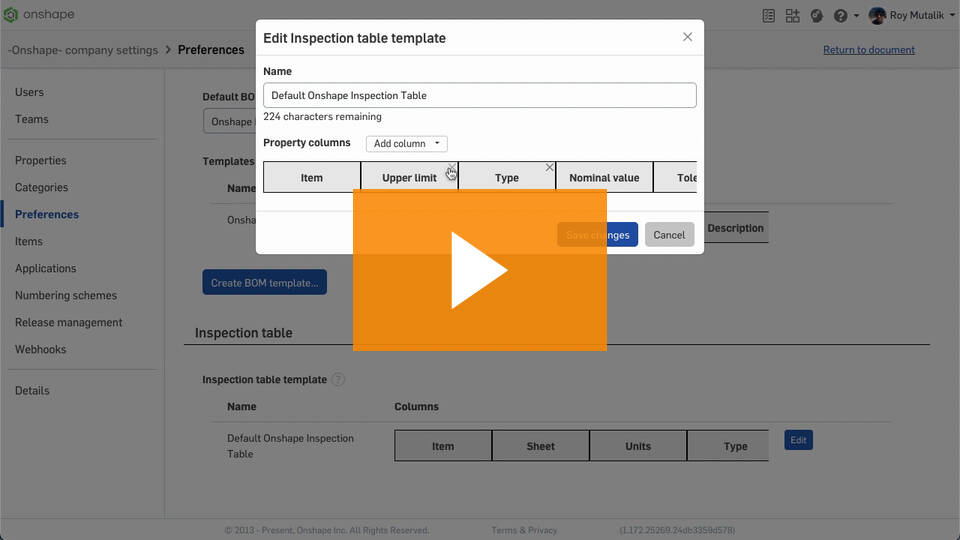 2
2