Welcome to the Onshape forum! Ask questions and join in the discussions about everything Onshape.
First time visiting? Here are some places to start:- Looking for a certain topic? Check out the categories filter or use Search (upper right).
- Need support? Ask a question to our Community Support category.
- Please submit support tickets for bugs but you can request improvements in the Product Feedback category.
- Be respectful, on topic and if you see a problem, Flag it.
If you would like to contact our Community Manager personally, feel free to send a private message or an email.
Improvements to Onshape - November 6th, 2023

Roy_Mutalik
Member, Onshape Employees Posts: 41 
It's already November! We may be nearing the end of the year, but there's no end in sight for meaningful Onshape updates! Let's jump right in.
SPECIFY FOLDER ON CREATE
You can now directly create a document or folder anywhere within your Onshape folder structure, without having to navigate into the folder first.


Note: Bend Allowance or Deduction is not applicable for Hem features at this time.
You can now move the Rollback bar using the arrow keys on your keyboard. This makes it easy to step through a part to understand how it was built.
Several new keyboard shortcuts have been added for sketch constraints which previously did not have any assigned. Please expand below for the full listing.
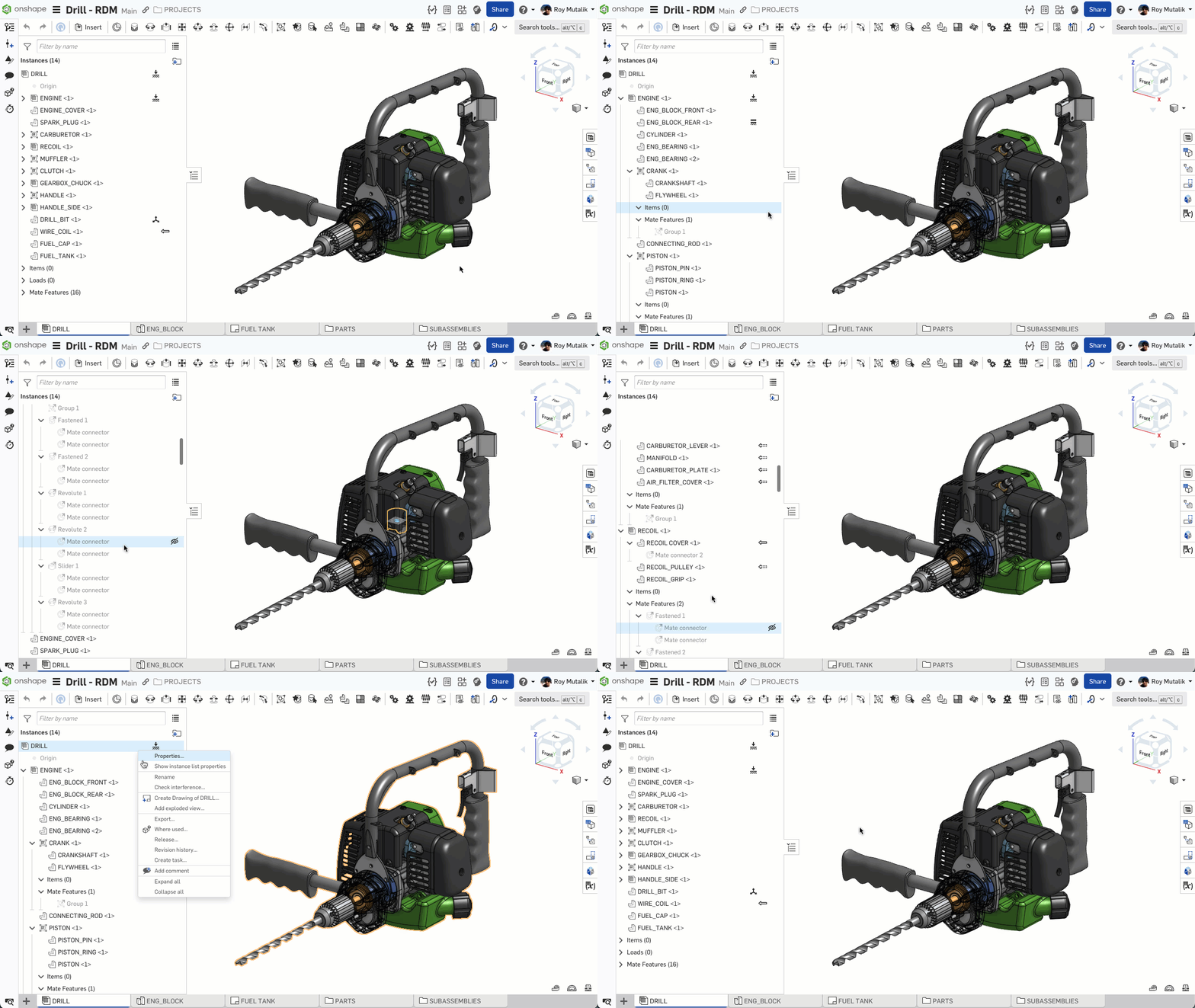
EXPAND OR COLLAPSE ALL NODES IN INSTANCE LIST
You may now expand or collapse all Assembly nodes, from a right-click of the top level Assembly line item in the Assembly Instances list.
GENERAL IMPROVEMENTS
SPECIFY FOLDER ON CREATE
You can now directly create a document or folder anywhere within your Onshape folder structure, without having to navigate into the folder first.EXPORT OPTION FROM PRODUCT LIST VIEW
You will now find the option to export directly from a right-click within the List viewSECTION VIEW FACE MEASUREMENT
You can now measure the cut-face of a Section view from the Measure tool.PART STUDIOS
DEFINE PLANE BY TANGENT
A new Tangent definition option has been added to the Plane feature.SHEET METAL - BEND DEDUCTION AND BEND ALLOWANCE
You may now define sheet metal bends using a Bend Allowance or a Bend Deduction in the Sheet metal model feature, and edit their values in the Sheet metal table.Note: Bend Allowance or Deduction is not applicable for Hem features at this time.
MOVE ROLLBACK - KEYBOARD SHORTCUT
You can now move the Rollback bar using the arrow keys on your keyboard. This makes it easy to step through a part to understand how it was built.
NEW KEYBOARD SHORTCUTS FOR SKETCH CONSTRAINTS
Several new keyboard shortcuts have been added for sketch constraints which previously did not have any assigned. Please expand below for the full listing.Concentric - shift+o
Perpendicular - shift+l
Midpoint - shift+m
Normal - shift+k
Pierce - shift+g
Symmetric - shift+q
Fix - shift+j
Curvature - shift+u
Perpendicular - shift+l
Midpoint - shift+m
Normal - shift+k
Pierce - shift+g
Symmetric - shift+q
Fix - shift+j
Curvature - shift+u
ASSEMBLY IMPROVEMENTS
EXPAND OR COLLAPSE ALL NODES IN INSTANCE LIST
You may now expand or collapse all Assembly nodes, from a right-click of the top level Assembly line item in the Assembly Instances list.DRAWING IMPROVEMENTS
INSPECTION TABLE CUSTOMIZATION
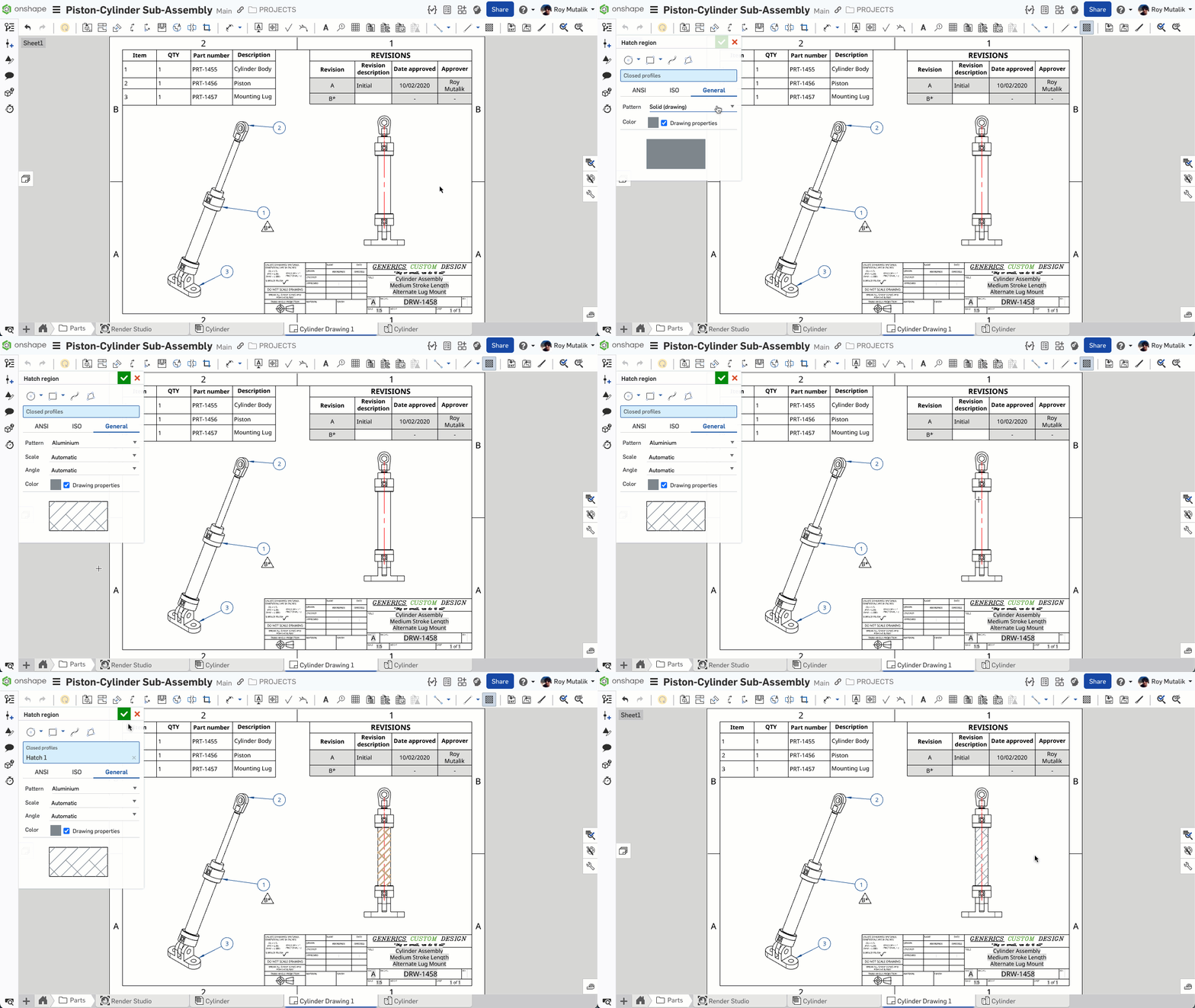
You can now customize which property columns are shown on a Drawing Inspection table.HATCH NON-PLANAR FACES
You may now add hatch to non-planar regions in Onshape Drawings.ENTERPRISE IMPROVEMENTS
ANALYTICS - COUNT OF PENDING RELEASES IN RELEASE ACTIVITY
The Release Activity dashboard now also shows Pending Releases, in addition to Approved, Rejected and Obsoleted.LEARNING CENTER IMPROVEMENTS
COURSE UPDATE - NAVIGATING ONSHAPE
Navigating Onshape has been updated to focus on the core features of the Onshape user interface, while including new interactive content. Learn how to navigate and organize your documents, and set key preferences to enhance your Onshape experience.Please take a moment to try out these new features and improvements and leave your comments below. For a detailed list of all the changes in this update, please see the changelog.
Remember: The updates listed here are now live for all users when creating new Documents. Over the next few days, these features will also be available in Documents created before this update.5
Comments
-
Is it wrong that I'm most excited by the keyboard shortcuts for all constraints, roll forward/back and the expand/collapse all?I could really use an expand/collapse all for the feature tree.
Simon Gatrall | Product Development, Engineering, Design, Onshape | Ex- IDEO, PCH, Unagi, Carbon | LinkedIn
14 -
Not wrong at all! I have wanted a symmetric keyboard shortcut forever!S1mon said:Is it wrong that I'm most excited by the keyboard shortcuts for all constraints, roll forward/back and the expand/collapse all?I could really use an expand/collapse all for the feature tree.2 -
Good round of updates. Nice to see it was ready for my birthday.
 4
4 -
Not sure about the default assignments but that can be fixed... I'll definitely be using some of these!S1mon said:Is it wrong that I'm most excited by the keyboard shortcuts for all constraints, roll forward/back and the expand/collapse all?I could really use an expand/collapse all for the feature tree.
Exporting from the list view seems like a useful option, unfortunate that you can't select multiple items at once (yet?) as that's the first thing I tried!
I can already here the complaints about not having the moment of inertial calculation in the new section measure (so close...)!
Found this in the changelog: "Allow reattaching failed centermarks in Drawings", definitely will be using this...4 -
More Keyboard shortcuts and Section Measureing!!! Absolute WIN!!!2
-
Tangentially related, Onshape is the best!6
-
Good stuff !!//rami2
-
I kept looking for this What's new Notification , waoh , whats amazing new features here , I love Tangent plane most5
-
Great Stuff. I like the expand and collapse of all nodes in the instance list.1
-
Keyboard shortcuts for all constraints? Wow, awesome! Now I can finally use custom shortcuts to change them for left hand use only.
Relinking broken centermarks is also great improvement, thanks for this one. Will be much easier to repair broken drawing after replacing model.4 -
!Making documents and folders hap-hazardly without a plan can lead into serious problem
0 -
I like the export option from the list view. Would be nice to also get that option from search results. I think exporting is often done by light cad users and I somehow feel like the list view is overly involved for these type of users. Most people are very familiar with just typing into a search, seeing what they want and them simply being able to export that thing they want. Measuring form sectioned planes is a big win!1
-
Great improvements! My favourites are the tangent plane and the specified folders.
1 -
Nice updates
I've been waiting a long time for Expand/Collapse all on the assembly tree!
I'm always happy to see more keyboard shortcuts!
Rollback bar with the arrow keys is going to be very helpful
So will tangent plane creation
1 -
plane by tangent useful addition for me)1
-
Spécification du dossier à la création d'un document, mesure sur une vue de coupe et création d'un plan tangeant sont définitievement mes améliorations préférées!
J'ai remarqué dans le "Changelog" qu'on peut désormais ré-attacher des marques de centre sur un dessin... Bravo!
Beau travail Onshape! 👍2 -
New keyboard shortcuts for all sketch constraints

2 -
Quality improvements team! Thanks! I especially like the shortcuts and roll bar update.
Tangent plane, awesome!

RENDERCAD
rendercad.ai - Photorealistic product rendering.
▚▞▚▞▚▞▚▞▚
________________________________________________________________________2 -
Great stuff, Linking the shortcuts for assemblies.
1 -
Love the improvements. The cross section area, the moving the roll back bar with the arrow keys, and collapsing the areas. Great work.1
-
Great improvements!0
-
I don't see "Tangent" in the plane creation drop-down.0
-
Please see the last sentence of the OP.aleksei_volynskov said:I don't see "Tangent" in the plane creation drop-down.Senior Director, Technical Services, EMEA1 -
Have you noticed? The color blue is slowly leaving Onshape.. is this because black will be the new blue...? Any guesses?

 john_mcclary put me down for BINGO if they add a dark mode
4 -
I'm kind of surprised they didn't make the button PTC green...1
-
Tangent planes and customizable inspection tables!1
-
Export from List View is great for Light Users, who now don't need to be trained how to open and understand Release Candidates to get what they need for Latest Revision data.
Tangent Plane is great, and the Inspection Table improvements mean we can have the 2 or 3 layouts we need for First Article and routine inspection paperwork ready to roll. Inspection Items are now mature enough for us to properly implement.
Thanks Onshape!
3 -
Awesome update! Really happy to see the tangent plane option being a native feature now. However, I noticed that it doesn't support selection to faces created in features such as loft like the tangent plane FeatureScript that Lou Gallo created (FeatureScript Tangent plane | Tangent plane instruction.pdf (onshape.com)). Will this be added at some point?2
-
Tangent plane creation and section view face measurement will be quite helpful in my workflows, thank you!0
-
Awesome improvements this time! Thank you!
Best regards,
Axel Kollmenter2