Welcome to the Onshape forum! Ask questions and join in the discussions about everything Onshape.
First time visiting? Here are some places to start:- Looking for a certain topic? Check out the categories filter or use Search (upper right).
- Need support? Ask a question to our Community Support category.
- Please submit support tickets for bugs but you can request improvements in the Product Feedback category.
- Be respectful, on topic and if you see a problem, Flag it.
If you would like to contact our Community Manager personally, feel free to send a private message or an email.
Best Of
Join Onshape’s Newest User Group—Women Who CAD

Onshape user groups are a great way to build relationships with other users. We are excited to announce that Onshape is forming a new user group — Women Who CAD!
The mission of this group is to promote inclusion and diversity amongst the Onshape users and make sure everyone feels welcome in our community.
Our first virtual meetup will be January 5th @ 6pm ET. We are also still looking for a user group leader.
If you would like to join or know of others who may be interested please reach out to usergroups@onshape.com or reply to this forum and we will connect with you. Onshape will provide video technology for the virtual meetings and will help with technical sessions and/or Partner presentations. We will continue to offer support after the pandemic has passed.
We can’t wait to see you in January! Here is the signup link and the preliminary agenda:
5:45pm to 6:05pm - Optional networking
6:05pm to 6:20pm - Featured Speaker Elise Moss
6:20pm to 6:40pm - Onshape Technical Session by Katie Huffman
6:40pm to 6:50pm - Break/Questions
6:50pm to 7:15pm - Onshape Technical Session by Lindsay Early and Jenny Johnson
7:15pm to 7:30pm - Closing remarks, leadership search
7:30pm to 8:00pm - Networking/Leadership discussion
https://us02web.zoom.us/meeting/register/tZwtdOitqz4uGNLt1AUIPCrwPNkPnuL-OMvw
 Katie_Gosbee
Re: Can I download an entire folder( which I have been shared with) from a team ?
Onshape is a cloud computer that stores a gigantic database.
What look like Folders are just containers that hold the URLs of a bunch of documents that you stick in there. (or something like that)
And Onshape Documents are not files, they are containers that hold objects such as PartStudios, Assemblies, Drawings, and can also store Files that have been imported.
So there is no format that you can download an Onshape document in, because only Onshape can read and interpret it.
Instead your only option is to export the contents of each document individually.
------------------------
Also, what purpose do you need to store the data offline?
Typically all I do is drag and drop the URL to a folder, which gives the appearance of saving to disk.


Improvements to Onshape - November 18th, 2020
CAD IMPROVEMENTS
ABILITY TO APPLY MARKUP TO COMMENTS
Markup is now available in the Comments section of Onshape.EXPLODE LINE FORMAT IN DRAWINGS
Control explode line weight and color in Drawing properties > Views > All views.SECTION VIEW OPTIONS
When you add a Section view to a section view, you can choose whether to cut the base geometry or cut the already sectioned geometry with a toggle.
MOBILE IMPROVEMENTS
IOS INSERT IMAGES FROM MOBILE DEVICE
Now you can import local images or take an image from your camera for import into Onshape on an iOS mobile device.ENTERPRISE IMPROVEMENTS
COMPANY SETTINGS
Enterprise administrators can see how many full and light subscriptions have been purchased as well as how many are in use. Go to Enterprise settings > Users and they are listed at the top.

The number and type of subscriptions purchased also show under My account > Subscription.

Remember: The updates listed here are now live for all users when creating new Documents and over the next few days these features will also be available in Documents created before the date of this update.

Re: Improvements to Onshape - November 18th, 2020
 Theo_R
Re: How to make a hidden object not show up in Drawings?

Re: Miura Fold in Onshape

- use surface bodies at first to get the mates correct. When using Mate Connectors for mates, Onshape doesn't care about your rounded edges, but they may make it difficult to select the right edges for the Mate Connectors. Surfaces will make the early work of figuring out the Mates much simpler
- use the least-restrictive Mate types possible. For my sub assembly (4 panels, like yours) I used 3 Revolute mates and 1 Ball Mate.
- When you assemble the sub assemblies together, continue to try to use the least-restrictive mates where possible....
- When placing new sub assemblies into your Main Assembly - use the Group to (temporarily) freeze your sub assemblies so they can't fold while you're trying to apply mates to the existing parts. Remember to delete the Group before you add all the mates, or try to drag your assembly to check the motion. You can also suppress/unsupress a Group on your first sub assembly while mating - this will effectively freeze all motion while you apply mates.
Good luck!

Re: Miura Fold in Onshape

I used a combination of revolute and cylindrical mates to get it working. When i used all revolute it would become overconstrained, which I assume has something to do with Onshape's internal tolerance since it should work in a perfectly precise world. Using some cylindrical constraints loosens it up a bit.


New Video: branches and merges without the guesswork
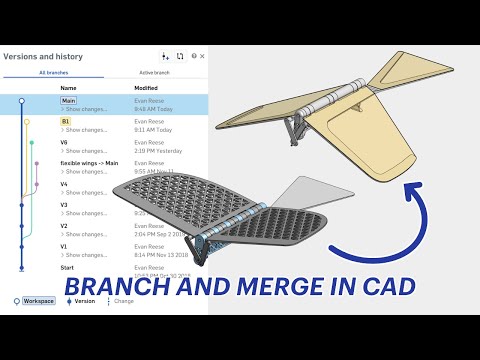 https://youtu.be/XjdaRcD0faQ
Re: Show History in Edu Version?
Copied documents do not copy history. The only way that you can tell if it was a copied document is if the version called 'Start' is empty or not.
You should be able to view changes that the student made if you go `> show changes` below the 'Main' workspace.