Welcome to the Onshape forum! Ask questions and join in the discussions about everything Onshape.
First time visiting? Here are some places to start:- Looking for a certain topic? Check out the categories filter or use Search (upper right).
- Need support? Ask a question to our Community Support category.
- Please submit support tickets for bugs but you can request improvements in the Product Feedback category.
- Be respectful, on topic and if you see a problem, Flag it.
If you would like to contact our Community Manager personally, feel free to send a private message or an email.
Best Of
Re: is it possible to lock a branch from edits for all but specified users?
You could derive into another document and do work there which has different permissions.
You can also consider using Workspace Protection to make Main something that can't be edited, only merged or branched.
It really depends on what the ultimate problem is that you're trying to solve. I assume you trust these users, but you don't want them to mistakenly screw something up?
 S1mon
S1mon
Re: Imported STEP file parts piled up in origin.
In a file-based CAD system all the parts are created around their own origin in their own part file, then the assembly transforms them to the correct location. Onshape simply follows that rule,. You can import all parts into a Part Studio, but you won't get the assembly hierarchy. It's ugly, but does it matter?

when a sketch is not fully defined, is there a way to change the highlight from blue
I have a difficult time discerning blue from black in the user interface. It would be nice to be able to have those issues highlighted in an easier color.

Notes, The Least Loved Part of Onshape
I have to say, putting in standard drawing notes that don't look terrible, is one of the hardest and least rewarding parts of Onshape. The formatting tools are slow, buggy and clearly only tested with limited scripted interactions. The preview (before you close editing) is completely different than the real note display. Flag notes completely blow up the line spacing, especially a default sized triangle note. And trying to manage bulleted lists under a numbered note is extremely twitchy.
We want this:
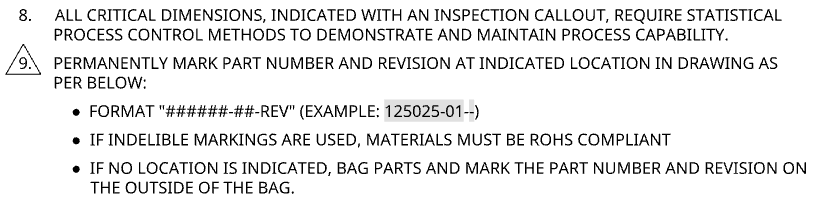
When we create a drawing template, we can carefully noodle around with the formatting tools and set the triangle flag to "tight" spacing to get this. When we export to a DWT, the triangle gets converted to lines which are pasted behind the text, so it's no longer parametric and linked. WTF!?!
If we're being more accurate, flag notes shouldn't have periods in them. Creo, Inventor, etc can do this. This isn't rocket science.
S1mon
Re: MCMASTER 2 ONSHAPE
Ideally the Onshape standard content could be linked automatically to matching McMaster PNs, this would solve a lot of this already…
I think I have an improvement request for mates to automatically pick up a mate connector with the same name when doing an assembly "replace", I think this sort of functionality would be required to get around changing face IDs.

Re: How to create a team not associated with your current classroom? How to create a second classroom?
From your note on the bottom, I realized that the reason I had an educator plan was because another educator added me to their robotics classroom. Thus, I didn't have "my own classroom" and I ended up applying to be an educator and creating a second classroom that way.
Re: New Custom Feature: EZ Wire
@martin_kopplow I now have full triad manipulators for the wire points, but the manip is in global xyz. I need to figure out how to orient it aligned with the wire, and remap the transformation of the manipulator to each point's coordsys. could be working at some point, but this is by far my most complex FS, so it's taking some time.



Re: Sketch could not be solved - Maximum size sketch
I think using a variable in a dimension isn't a "constraint" so shouldn't count towards towards the limit (although now that I think about it I'm not so sure).
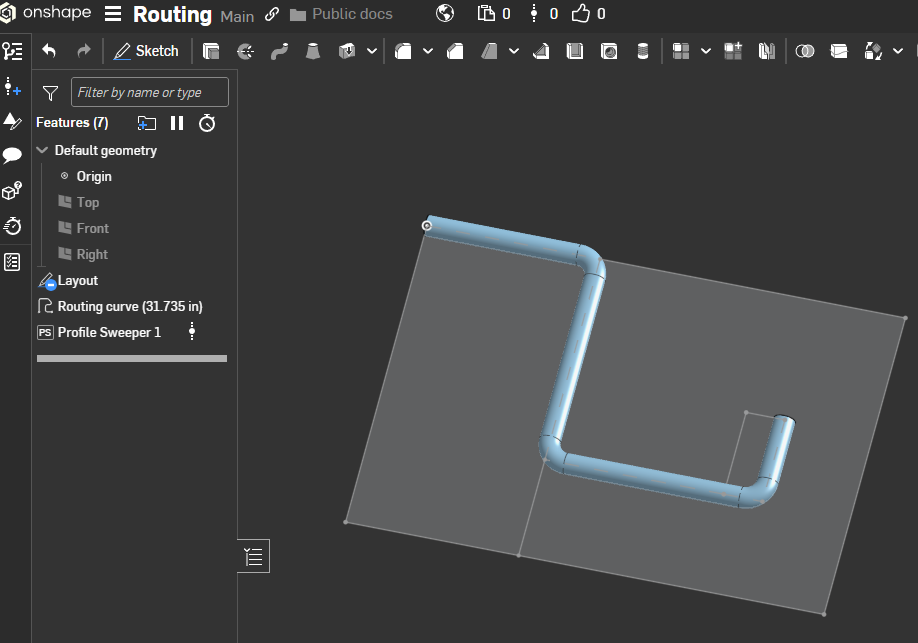
It looks like you are making your live much harder than you need to…Create the centerline only and then you can sweep each pipe in one feature (so you would need just 4 features to create what you have in your example).
I would do a "layout" sketch with all your key locations for machines etc… Then either use routing curves to make the paths, maybe adding an intermediate sketch before that referencing your key "routing" points (using the machine position sketch as a reference) if that helps.
Something along these lines:
https://cad.onshape.com/documents/80ed14a5ca259405fd5235c9/w/7a95c5e32472a7989e2f0124/e/13dca827a1ea827be20ebc12
I used the "profile sweeper" FS so I don't need to create the circular profile for the path.