Welcome to the Onshape forum! Ask questions and join in the discussions about everything Onshape.
First time visiting? Here are some places to start:- Looking for a certain topic? Check out the categories filter or use Search (upper right).
- Need support? Ask a question to our Community Support category.
- Please submit support tickets for bugs but you can request improvements in the Product Feedback category.
- Be respectful, on topic and if you see a problem, Flag it.
If you would like to contact our Community Manager personally, feel free to send a private message or an email.
Best Of
Re: In sketches, how can I change the colour of my under-defined lines ?
Thanks for the feedback! Some other users were having similar troubles and had a discussion about chrome plugins that can change our site to be of higher contrast:
https://forum.onshape.com/discussion/comment/32391
Our improvement requests are located on this forum in the section marked "Improvement Requests". If you go to that section and click "New Idea", you can type in your idea and similar ideas that have already been submitted will pop up. You can either vote on one of these similar issues or if none of these describe your issue well enough, submit your own request.

add ability to convert variables to variable studio
you can currently open the variables section on the right in a drawing and see variable studios and the variables, but moving variables from one to the other is manual. there is an ability to copy a table, but not to paste a table into the other type and no ability to rightclick a variable and move it to a different table.
I tend to create variables as I go along in the design, but then find later that it would be useful to have them in a variable studio if the design get complex enough to need multiple parts studios (including design in context) and/or share variables into assemblies

Re: Consultant recommendation for non-linear FEA?
The most significant FEA users that I knew designed contacts for connectors. I never realized how much science went into making a contact that lasted millions of cycles. It sounds like you're heading down this path and it's worth it. There's a lot to consider. It's not an analysis, it's a mindset on mastering material properties, boundary conditions & loading.
You're dealing with a brittle material and stock data sheets probably won't give you accuracies needed. You should plan on running you're own cycle tests and plotting stress & stain curves. You'll also need QA to validate materials properties from your suppliers. Look at matweb.com, material properties are all over the place and you need to control the material properties your design requires.
Cast parts and dendritic grow will typically create brittle parts which won't behave like the materials we studied in college. Typically these materials fail in strain and not stress. There really isn't a yield strength when dealing with cast parts. They will fail repeatably and you need to figure out the failure modes. It's not a textbook problem.
It's a lot of work designing production parts and understanding what makes them fail. It can be done with a lot of testing. There are connectors out there with infinite life and the manufacturers can prove it.
 billy2
Re: Honeycomb pattern on a curved surface (Grid Extrude impossible).

Anytime you plan on doing repetitive features like this on a part, its good practice to take the time to model in halves, quarters, eighths,. etc.
Doing it like this will save boatloads of regen time. I cheated on this one just to make the point by splitting it in quarters just before the attractor pattern. and then mirrored twice after attractor pattern and the regen time came in at 49s. If its modeled with this intent from the beginning it probably would save a bit more time too. although not terribly significant relative to the current regen time.
I had 99 seconds before the split/mirror mods. Now its 49 seconds. Nearly cut in half. So as you can see, it can be well worth the time to plan ahead.
 MDesign
Re: Create DXF of an Entire "View"
Just in case you missed it, as MDesign said:
you can export a sketch as a DXF

Re: Cut List (New Custom Feature!)
.
Update!
Measure cut list - Custom feature
- Added multi table support (Thanks @sloan_thrasher for the valuable feedback!)
- Added table naming


Re: Help with instantiation
Thanks for confirming the code itself was right. I figured out what I was doing wrong:
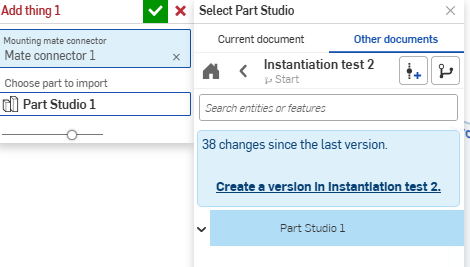
I was selecting "Part Studio 1" in the image without clicking the "Create version" button, first. Creating the version first resolves the issue and lets me bring in the part.
Re: Honeycomb pattern on a curved surface (Grid Extrude impossible).
Godspeed indeed. :D
Thank you - I will study and try to understand this approach. May ask more questions in the future. :)
Re: Parts list for dimensional wood projects?
@sloan_thrasher
Make sure you have the material option selected. If your material changes, remember to press the refresh button within the feature.

Also, I've pushed an update to allow for multi table support. I think this would be a valuable addition to the feature 😎


