Welcome to the Onshape forum! Ask questions and join in the discussions about everything Onshape.
First time visiting? Here are some places to start:- Looking for a certain topic? Check out the categories filter or use Search (upper right).
- Need support? Ask a question to our Community Support category.
- Please submit support tickets for bugs but you can request improvements in the Product Feedback category.
- Be respectful, on topic and if you see a problem, Flag it.
If you would like to contact our Community Manager personally, feel free to send a private message or an email.
Best Of
Re: How do i design something like this?
All three curves in the model are actually but intersections of the three cube sides with the same sphere.

Once you know that, you could make it much easier, though. ;0)
Just sketch 3 identical radius tangent arcs, one on each side, then split the sides with them. Delete unwanted faces, use the fill tool.

Re: How to copy part studio and keep the context

New FeatureScript: Mold Guide Pins
Hi everyone,
I made a new featurescript to create pyramid and hemisphere guide pins for 3D printed molds. I based the functionality on the hole tool, where you just have to select points. Add points to the parting surface and then select them to add and subtract guide pins from each side.
Here's a little gif demonstrating how easy it is.
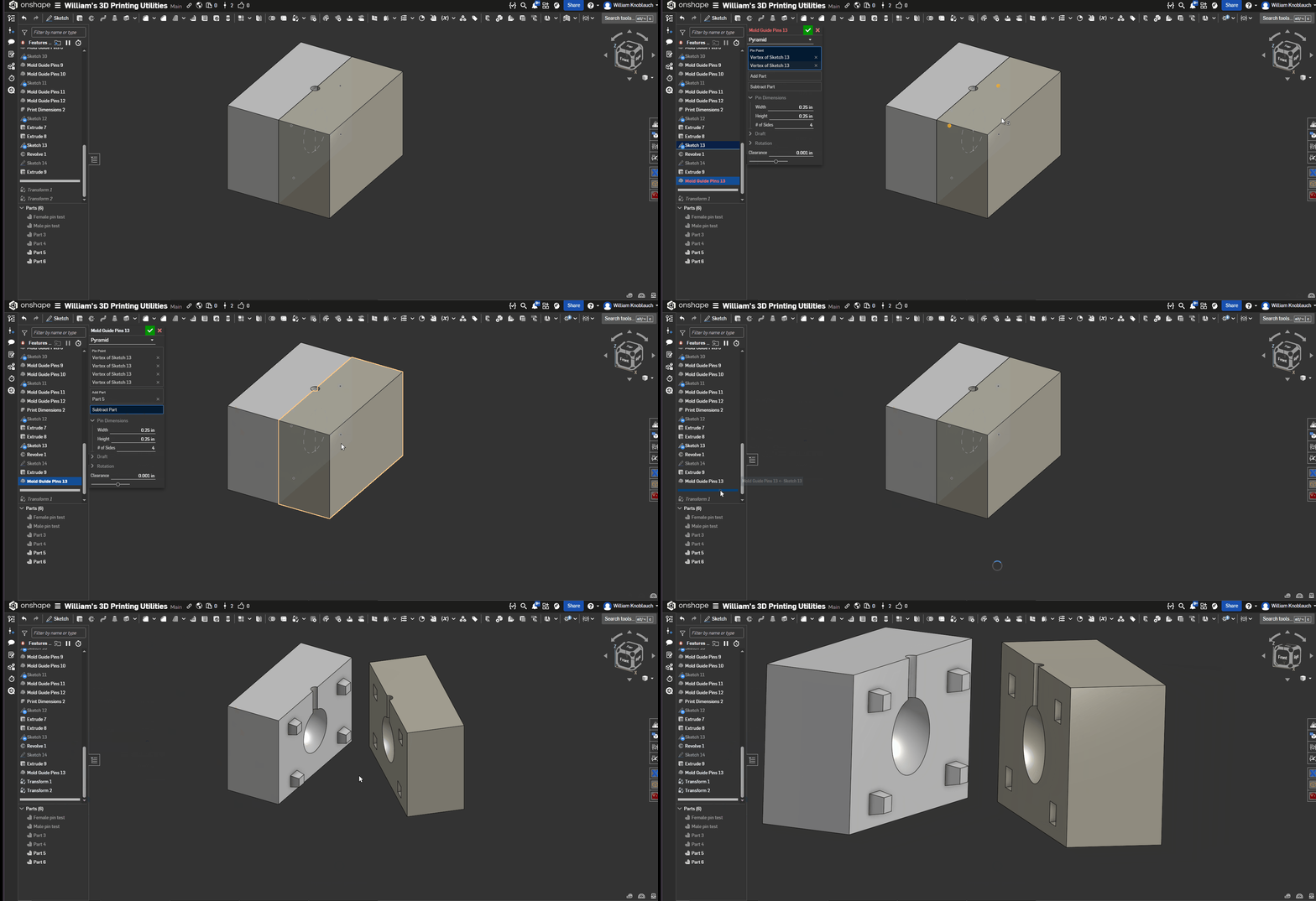
If you've got any questions or suggestions, they would be appreciated. I created this feature relatively quickly and didn't test it as thoroughly as I normally do. If you find any bugs, please let me know.
Also, if you couldn't tell by the name of the document, I plan on adding any other 3D printing utilities I come up with to this document. It shouldn't be as extensive as Julia's featurescripts, but I may add a few more things as needed. I've already added a 3D print dimensions script that scales prints in just the XY direction to correct inaccurate dimensions from my 3D printer. It can also offset faces that will be supported when printing to achieve better dimensional accuracy on these features.
Sharing My Custom Rack Generation Feature
Since I frequently use racks in my designs but couldn’t find a suitable built-in feature in Onshape’s FeatureScript library, I decided to create a custom rack generation tool—inspired by Alex’s Spur Gear script.
This tool lets you choose between Module and DP, and supports a range of parameters including:
Pressure angle
Tooth thickness
Tooth height
Root radius
Tooth chamfer
Helical gearing
Herringbone gearing
If you have any questions or suggestions for new features, feel free to leave a comment below!
Special thanks to Alex’s FeatureScripts Spur Gear for the inspiration—many structural elements from that script were adapted in this project.
FeatureScripts link:
https://cad.onshape.com/documents/9c0c64f14f6c0a8922d0c88e/w/668e7a22a2b41969f33591ee/e/37b645a19f12f3274efcd532


 sb_liu
Re: Cannot extrude remove due to "merge scope"


Re: How to use expressions to define a dimension relative to another?
Hi Denwen,
Probably the easiest way to achieve what I think you are trying to do is to use a geomtry contraint to make two reference lines equal. I know my geom is 2d whereas it looks like your sketch maybe on a 3d surface but the approach should work either way.
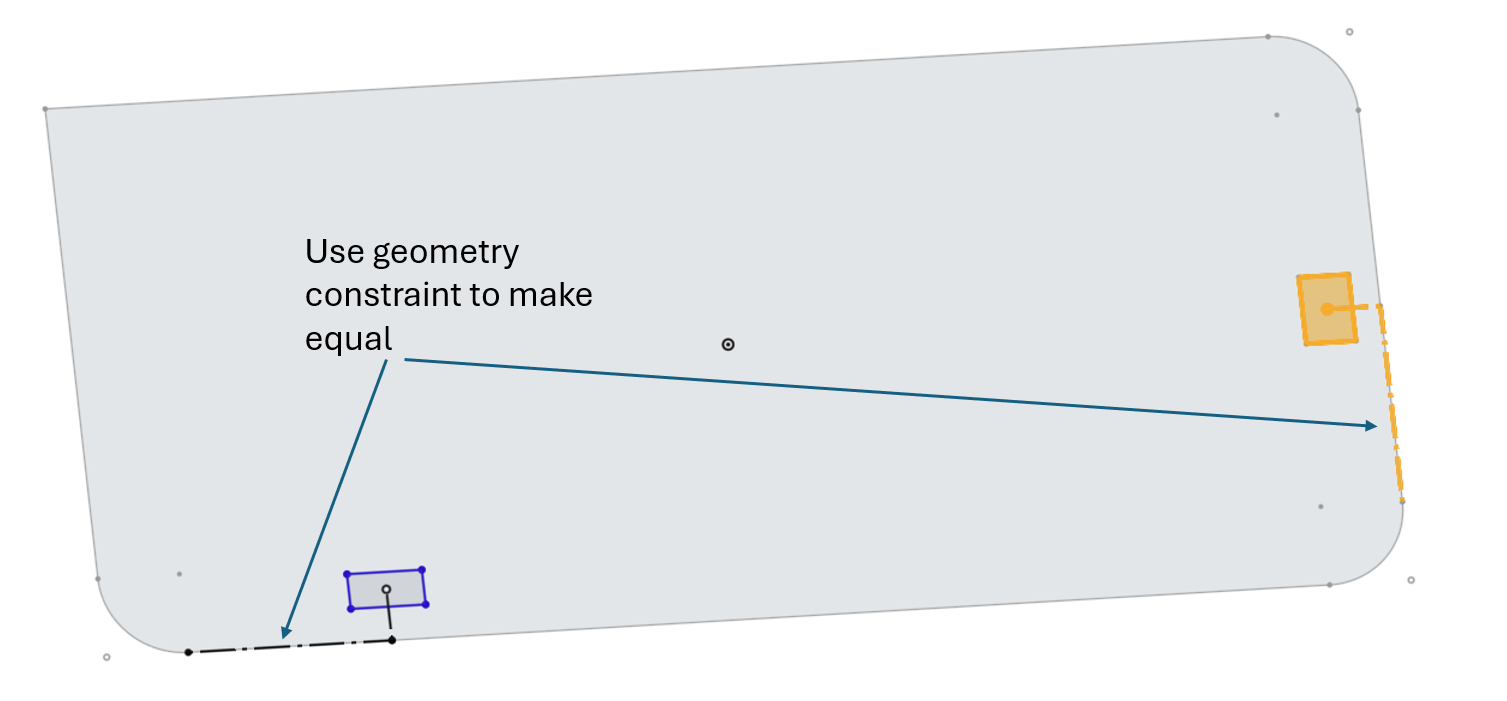
Hope this helps,
Paddy

Re: New FeatureScript: Plastic Threads
Thank you so much for making this script and responding to my newbie question! I did just finish printing the final version of the female thread and removed the additional .5mm I had added to the diameter and with the custom thread pitch of 3 the fit is PERFECT! Just need to reprint the male side in TPU to absorb impact if the inner tubes are dropped in uncontrolled. This part is for the bottom end of an extendable 33ft fiberglass antenna.
Thanks again!
Doug