Welcome to the Onshape forum! Ask questions and join in the discussions about everything Onshape.
First time visiting? Here are some places to start:- Looking for a certain topic? Check out the categories filter or use Search (upper right).
- Need support? Ask a question to our Community Support category.
- Please submit support tickets for bugs but you can request improvements in the Product Feedback category.
- Be respectful, on topic and if you see a problem, Flag it.
If you would like to contact our Community Manager personally, feel free to send a private message or an email.
Best Of
Re: Improvements to Onshape - August 29th, 2025
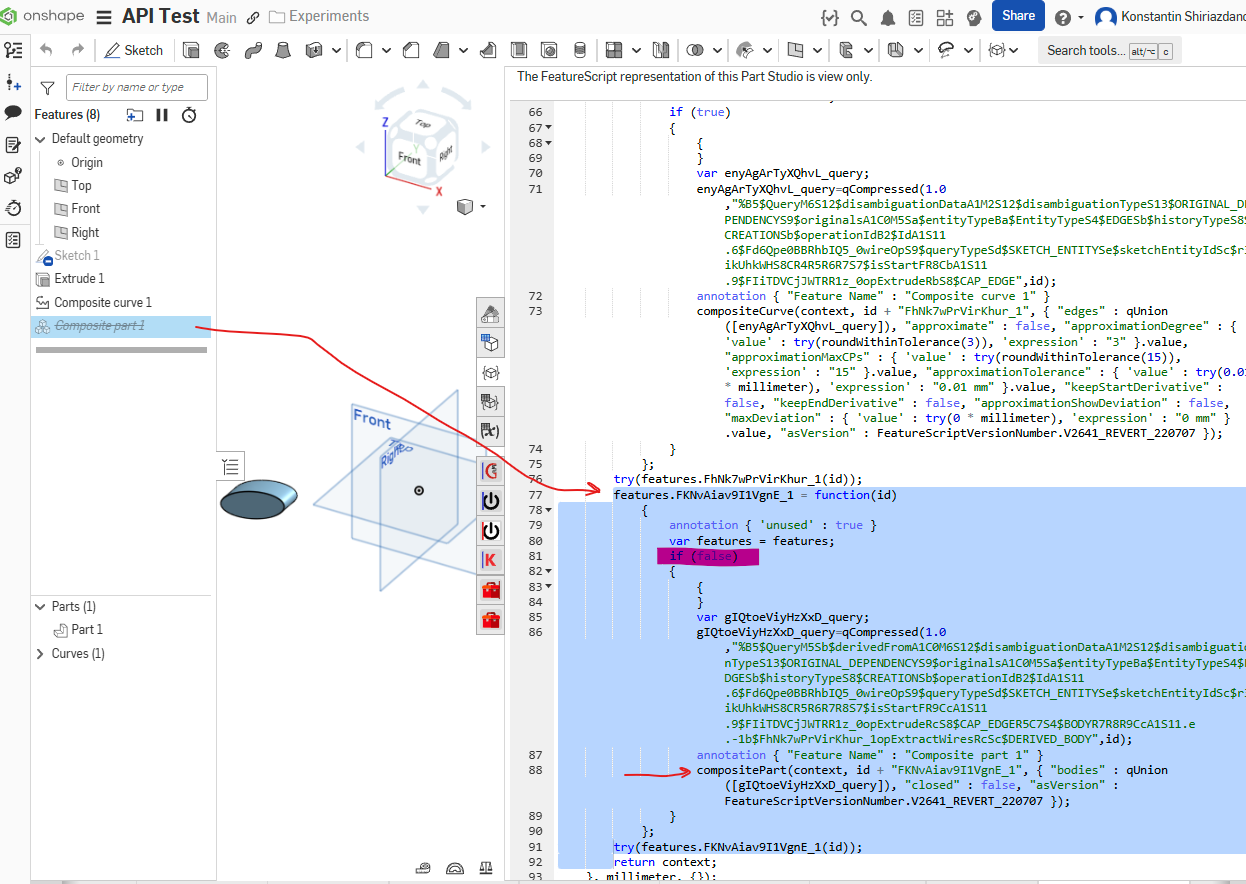
I think suppression is not easy to make driven with variables because its a different control layer in part studio code representation. Note the if(false) or if(true) wrappers around feature invocations, these true/false values is what defines whether feature is suppressed or not under the hood, and you can see they are not being feature parameters
 Konst_Sh
Re: Is Possible to add parametric node with "sheet name" in title block?
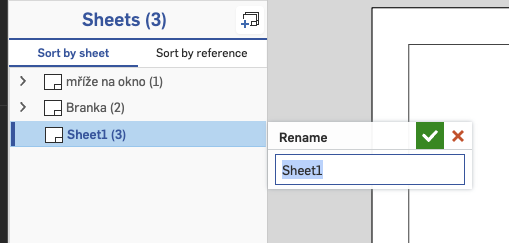
When I make a new sheet in the drawing, it's atomatically called Sheet1. And I like to rename it, to know what is inside, when I have more Sheets than just one (which I usually have). And also quite often there is more parts on one sheet than just one, So I don't want to drive the name (if it's possible) of the sheet by name of parts. I just want to rename it.
And with it, I would like, to automatically change my name of current sheet in title box. use Sheet1 as driver for title box.
There is parametric node "Drawing name" but not "sheet name". I don't know, maybe I do pointless work, but it still make sense to me. But, is there any way, I can do that? If not, I’ll find another way, or just manually copy/paste.
And thanks for your patience:)

Re: Sketch could not be solved - Maximum size sketch
I'm on mobile so haven't checked out your link but I'm guessing this is what you're asking. (sorry if I've guessed wrong)

Re: Referencing a previous version as a derived part in a part studio
One more potential option: create an assembly with your current and old version and edit your current one "in context". that would be a good way to have a "ghost" of your older version directly in your current part studio.

Re: How to duplicate a model and its associated drawing?
Glad you found it useful.
Note that you don't actually need to create a version in order to do the restore in the original document so that's why I didn't mention it…
I forgot about the "no empty doc" rule so you are right that you have to create a new tab (any kind of tab) before you can move both everything back to the original doc.
Note that renaming the tabs in the temporary doc isn't actually required as it will still work fine without doing that, but it's a good idea to make it obvious which is which when they are back in the original doc!
Re: Referencing a previous version as a derived part in a part studio
If you are just trying to look at part "volume", then the built in compare tool seems like the way to go.
I believe deriving a part studio into itself could cause weird things when updating a version etc… However you can create a new part studio and derive both the old and current version in there if you want to compare that way for some reason.
Re: How to duplicate a model and its associated drawing?
when replacing drawing references, if you switch to the sort by reference view of the sheets panel- the replace will handle all parent child view sets for the entire drawing - essentially a global replace for the reference in the drawing.
If you replace while in the sort by sheets view, the replace will handle just the current parent/child dependent set of views and no more.

Re: Create Class Error
I am also getting the same error. And yes I'm still and educator. Thanks
Split Part using Ruled Surface?
I've been working with some laser cut tubing recently, and have had to go back and forth with suppliers about normal-to-surface tube cutting that doesn't exactly match our model. I've found guides for normalizing coped and mitered cuts on round tube, and used them to come up with a process for transforming a tube modeled with the Frame features (with limited ends) into a normal-to-surface model ready for fabrication:
- Create a ruled surface from the outer edge, normal to the outer surface, towards the center of the tube.
- This step isn't in the guides, but the outer edge surface is needed with angled copes or miters to prevent part interference.
- Create a ruled surface from the inner edge, normal to the inner surface, towards the outside of the tube.
- Split the part from the Outer and Inner ruled surfaces (in that order).
I think this would process would be ideal for a custom feature, but I haven't learned FeatureScript yet, so I naturally turned to vibe coding. I'm starting with very simple constraints - round tubes with coped and mitered cuts, but would love to expand to more complex cuts or rectangular tubing in the future. After a lot of back-and-forth, I've gotten the feature to successfully create the ruled surfaces from the cut end, but I can't get opSplitPart to split the frame parts with the ruled surfaces. Any direction on how to get this to be functional?
The Normalized Tube End document contains:
- Normalized Tube End FS
- Manual Process - manually building the features/process
- Test Studio - base parts for testing custom feature

Re: Improvements to Onshape - August 29th, 2025
Query Variable! Nice!
Now we don't have to write up a niche featurescript for a simple task like this anymore.
