Welcome to the Onshape forum! Ask questions and join in the discussions about everything Onshape.
First time visiting? Here are some places to start:- Looking for a certain topic? Check out the categories filter or use Search (upper right).
- Need support? Ask a question to our Community Support category.
- Please submit support tickets for bugs but you can request improvements in the Product Feedback category.
- Be respectful, on topic and if you see a problem, Flag it.
If you would like to contact our Community Manager personally, feel free to send a private message or an email.
Best Of
Re: Offset tool on Text?
Dissapointing that this feature has not been added almost 8 years later.
Would be a good ticket item for an intern.

Offset tool on Text?
I'm designing a thingamabob to print on my 3D printer. I want to print and object, then have a text inlay printed as a separate part that snaps into the first part. I'm new at 3D printing, but I'm comfortably certain that I need to allow a small gap between the text inlay and the hole for the text inlay. So I was thinking that I'd create a text object in the sketch, then use the offset tool to create the gap, extrude both, use the boolean function to cut the text-plus-offset out of the first part, then remove the offset extrusion and have my text part remain.
But I can't get the offset tool to work with a text object in a sketch. Am I missing something here, or am I just out of luck?
Can't drag Documents to Folders since new update
Since the latest update, dragging and dropping Documents to subfolders no longer works. Documents in the currently open folder are shown in the bottom pane, subfolder in the top pane, and there seems to be no way to drag and drop between them.
I now have to right-click the Document and use 'Move to'
Is there a way around this?
Re: Auto arrange dimensions in sketch
Umm.. It would.. But how? Dimensions in a sketch are where you place them. I tend to try and lay them out as I would on a drawing. How should they be arranged? What would 'correct arrangement' look like?

Re: Sketches Created in Featurescript No Longer Appearing Under Feature
Oh interesting that makes sense. Thanks for reporting back on your fix. It really helps people with similar issues searching the forum.

Re: Sketches Created in Featurescript No Longer Appearing Under Feature
The problem turns out to be due to how the Id was being formed, I believe because the Id hierarchy was being broken. Fixing the Id assignments resolved the issue.
Re: How to achieve parametric- or feedback friendly design using frames
I have a variable for the frame size, and the frame is square tubing, so I could have done some stuff with 1/2 the frame size, but I didn't really consider that until I had gone down this path. If/when I do a lot more frames, I'll certainly plan things out a little differently.
I'd also like to see some more flexibility with the frames feature, like the IR that I shared. I could also see things where a reference could be two points so I don't need to add 3D Fit Splines or Sketches or Routing Curves to add elements between some existing points/verticies.
I'm sure that people that use Frames all the time have more wishes.
 S1mon
S1mon
Re: How to achieve parametric- or feedback friendly design using frames
@S1mon I've got a number of projects I'm juggling right now where all the frame bodies are defined by edges or faces of solids and I'm currently getting around the cornering problem by moving faces in by half a frame width but that's not gonna be stable if I decide to change the frame standards at any point. All of these things are reasons I'm weighing a refactoring of the frames tool but to do it the way I'd really like I would need the ability to make a separate tab for the surface body definitions required to implement "simultaneous frames" like was done for sheet metal. That would definitely require some prerequisites to be met by the internal dev team at Onshape though.

Re: How to achieve parametric- or feedback friendly design using frames
I've made a custom frame profile for one project and figured out how to add the tags. That's not the problem I was discussing.
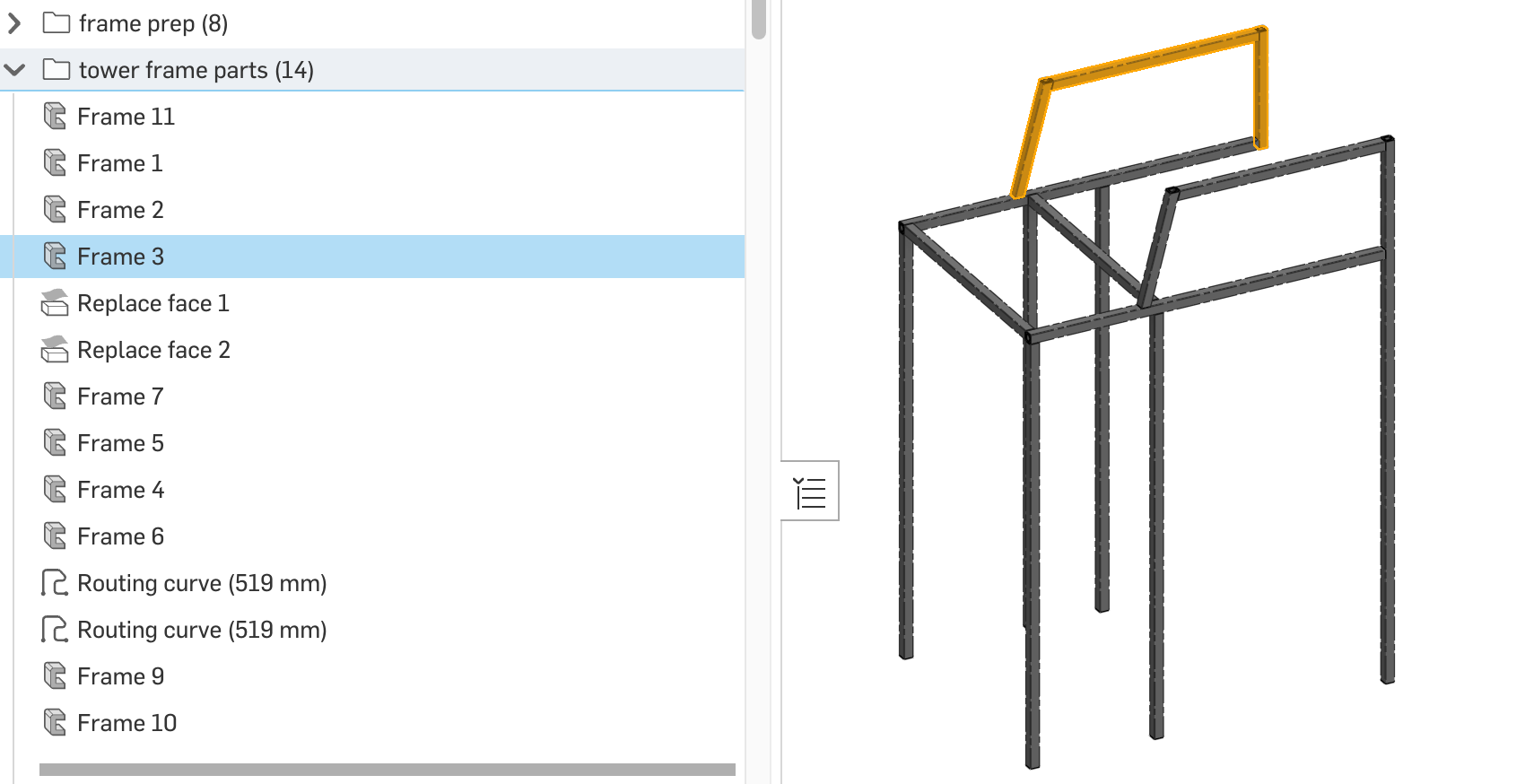
The issue I'm having is that this frame took multiple Frame features because I couldn't choose different points for different frame elements. Also the topology drove me to need more Frame features than I would have liked. In a few areas I could get several frame parts in one feature (see highlighted feature), but overall it was awkward. I suppose if I had started the reference sketches to all be on the center of the tubes it would have cut down on the complexity. But I wanted to reference corners which don't always work out neatly to be the same for all the elements.
 S1mon
S1mon
Re: Improvements to Onshape - August 7th, 2025
Great improvements - Thank you!
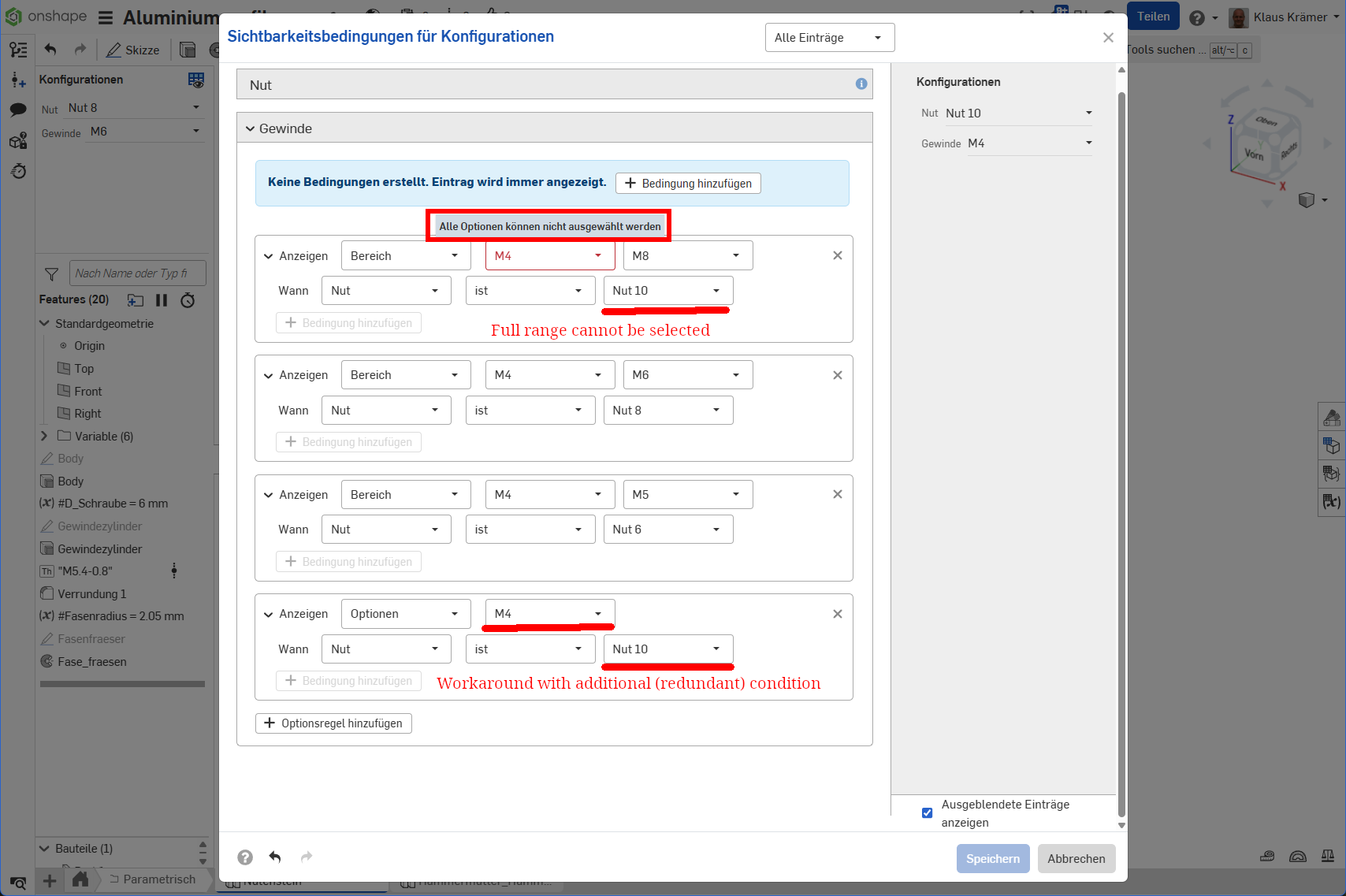
But Configuration Visibility Conditions are lacking the possibility to choose the whole range of options.
Imagine you have 3 sizes of T-Nuts for aluminum profiles in dimensions for slots 6, 8 and 10 mm. Options then provide inner threadings of 4, 5, 6 and 8 mm.
Selecting "Nut 10" (Slot 10 mm) should show all threading options from 4 to 8 mm. But you cannot use the whole range of options as there appears an error message "Alle Optionen können nicht gewählt werden" (You cannot select all options). You can see that in the uppermost box. But a workaround is to leave one option open (e.g. like I did "M4") and subsequentially add an additional condition for M4.
I think it's more of a bug than an inconvenience as redundant conditions are always prone to cause problems.