Welcome to the Onshape forum! Ask questions and join in the discussions about everything Onshape.
First time visiting? Here are some places to start:- Looking for a certain topic? Check out the categories filter or use Search (upper right).
- Need support? Ask a question to our Community Support category.
- Please submit support tickets for bugs but you can request improvements in the Product Feedback category.
- Be respectful, on topic and if you see a problem, Flag it.
If you would like to contact our Community Manager personally, feel free to send a private message or an email.
Creating pattern inside hexagonal helix or loft?


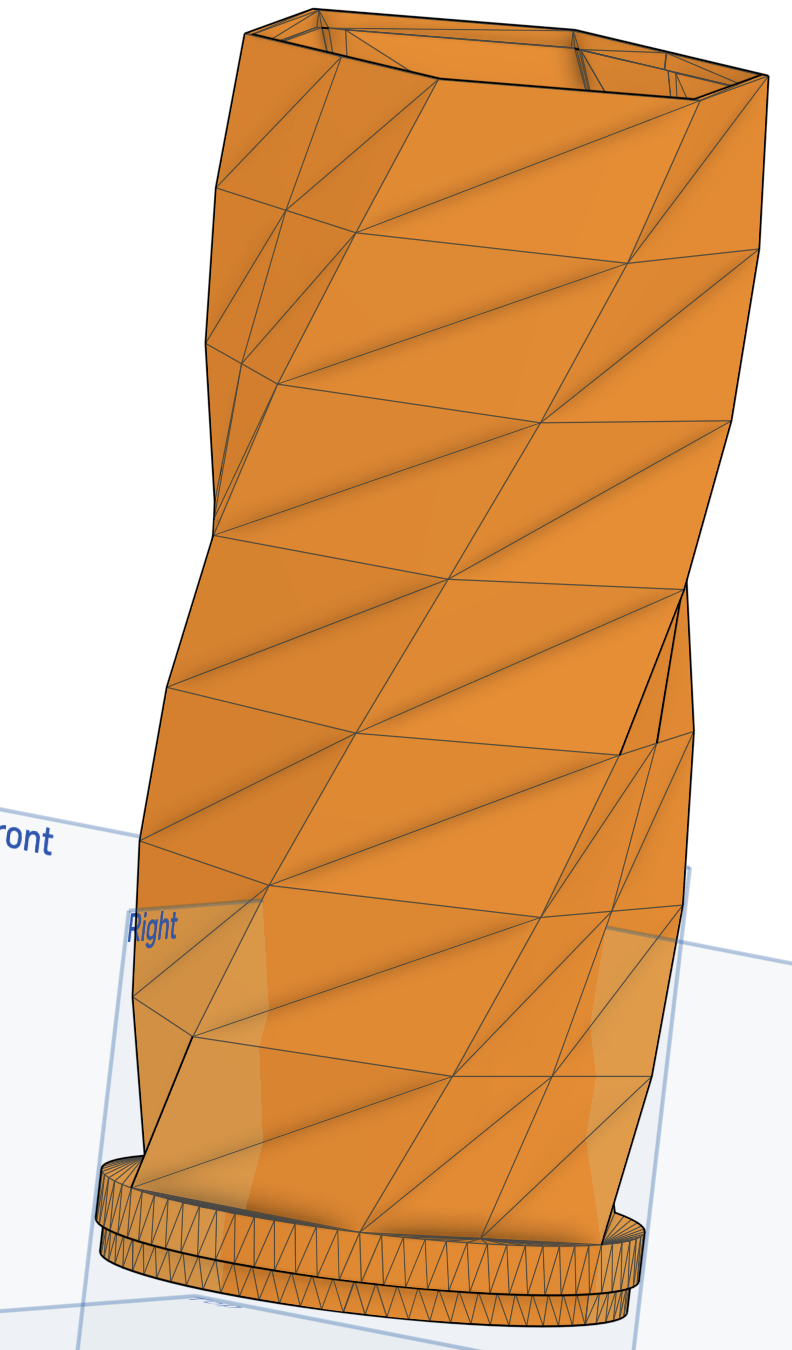
I have started with a loft that has matched vertex points. But not sure how to divide the interior strips up. How can I replicate the pattern?
https://cad.onshape.com/documents/bf20ccfa1d8896e8f4554ad5/w/d400dd11f79f4b8e55f26ba2/e/e90f7bddd9a8bffc808844d2
Best Answers
-
@andyshinn
I took a lot of steps to do this one
Maybe when my mind clears I’ll figure a way to reduce the number of stepsI got a feel that @konstantin_shiriazdanov has a lot more efficient way of getting this one done
for what it’s worth and in the meantime, here is one solution
https://cad.onshape.com/documents/4800279340242f3bc4b31ef3/w/8f52aed5e036d3426ecc0e6b/e/5cc61c19a4f210fb0648e6b6 3
3 -
@steve_shubin Hi, my approach is using splines between pairs of verteces to create bounds of facet primitive.2
-
I know this has already been answered thoroughly, but I had to get in on the fun. Here's my solution using only native features. It's very adjustable, but my main issue with it is that the boolean at the end doesn't update in a very smart way. My workaround was to set the instance count really high, then select all of them, then drop it back to something reasonable, that way if you add instances it will already select those bodies too.4



Answers
-
@andyshinn
I took a lot of steps to do this one
Maybe when my mind clears I’ll figure a way to reduce the number of stepsI got a feel that @konstantin_shiriazdanov has a lot more efficient way of getting this one done
for what it’s worth and in the meantime, here is one solution
https://cad.onshape.com/documents/4800279340242f3bc4b31ef3/w/8f52aed5e036d3426ecc0e6b/e/5cc61c19a4f210fb0648e6b63 -
Wow, I would have never figured this out. But it does look good and is what I wanted to do (to get closer to original mesh than just Helix). Thank you for this!
If it could be done simpler, great. But either way it looks like I need to learn some new concepts. I didn't realize planes could be manipulated in those ways.0 -
0
-
@steve_shubin Hi, my approach is using splines between pairs of verteces to create bounds of facet primitive.2
-
I know this has already been answered thoroughly, but I had to get in on the fun. Here's my solution using only native features. It's very adjustable, but my main issue with it is that the boolean at the end doesn't update in a very smart way. My workaround was to set the instance count really high, then select all of them, then drop it back to something reasonable, that way if you add instances it will already select those bodies too.4
-
@konstantin_shiriazdanov
@Evan_Reese
@andyshinnThanks to Konstantin and Evan.
You guys both did some real nice work
A person can certainly learn from reviewing different features lists. I know I learn, when I look at the different ways people go about forming there parts
Evan, you used intersect to flatten the top & bottom. Sometimes it’s easy to not remember or miss things like that. That the thicken happens normal to the surface. I don’t always catch details like that with my vision on my iPhone
In reviewing Konstantin’s document, I found that I could not use the Helix tool at the start. I also found out that I couldn’t use Onshape’s Wrap tool. I had to use Konstantin’s Sketch Wrapper to make it work with the other features in that document.
All in all, this was interesting and enlightening in seeing how you guys did it
0 -
I edited the above post0
-
Love the different solutions. Thank you all!0
-
Here is my approach without custom features (with configurable side count etc., layer height limit is just onshape's linear pattern limit and your patience). I've found this model to be surprisingly robust.
https://cad.onshape.com/documents/cbd1f3a466d633590064d02f/v/b4bdba6224621a18c4c20400/e/8cd4101b4ca37c52cd4045d6


Get in touch: contact@alnis.dev | My personal site: https://alnis.dev
@alnis is my personal account. @alnis_ptc is my official PTC account.2 -
