Welcome to the Onshape forum! Ask questions and join in the discussions about everything Onshape.
First time visiting? Here are some places to start:- Looking for a certain topic? Check out the categories filter or use Search (upper right).
- Need support? Ask a question to our Community Support category.
- Please submit support tickets for bugs but you can request improvements in the Product Feedback category.
- Be respectful, on topic and if you see a problem, Flag it.
If you would like to contact our Community Manager personally, feel free to send a private message or an email.
Custom Feature: Query Variable+
Comments
-
I think it’s cleaner if that lives as a different feature. I can see more features coming that modify geometry and output a QV for downstream operations (like the auto split edges feature I just made based on Ramons autoLoftconnections work)
People looking for this ‘split faces by direction function’ aren’t going to be looking for it in a QV function, nor does the QV function lend itself well for the interface and functionality expansion that this operation may warrant later down the line.
0 -
Yeah probably best to just make a different feature instead of making QV+ sometimes produce unexpected behavior. Looks like the only 2 real operations that return a query are related to shadow projection or isocline results for draft type features so I'll just split those off into their own thing.
0 -
Looks like one of my previous updates overrode the qEverything and qParallelish options. Restored them and added the icon in V13.
Next update coming today likely. Trying to make it possible to pass QVs through a derive operation to save selection sets in one document and reuse them in another document using attributes.1 -
V15 release brings the ability to save and load Query Variable selections to pass between derived part studios. Set up a QV in your seed document and check the box to save that selection for use in derived studios and now all of those entities will be labelled with an attribute that stores information about the name of the QV on those entities. Then when you derive those parts / entities into another document the attributes come with them and you run a second QV+ targeting the derive operation, all of the attributes that QV+ picks up from the geometry will get reconstructed into new QVs with their original names.
If you're a fan of procedural workflows this update was for you.
1 -
-
Oh boy, I was just thinking about this functionality yesterday! Thanks @Derek_Van_Allen_BD !
0 -
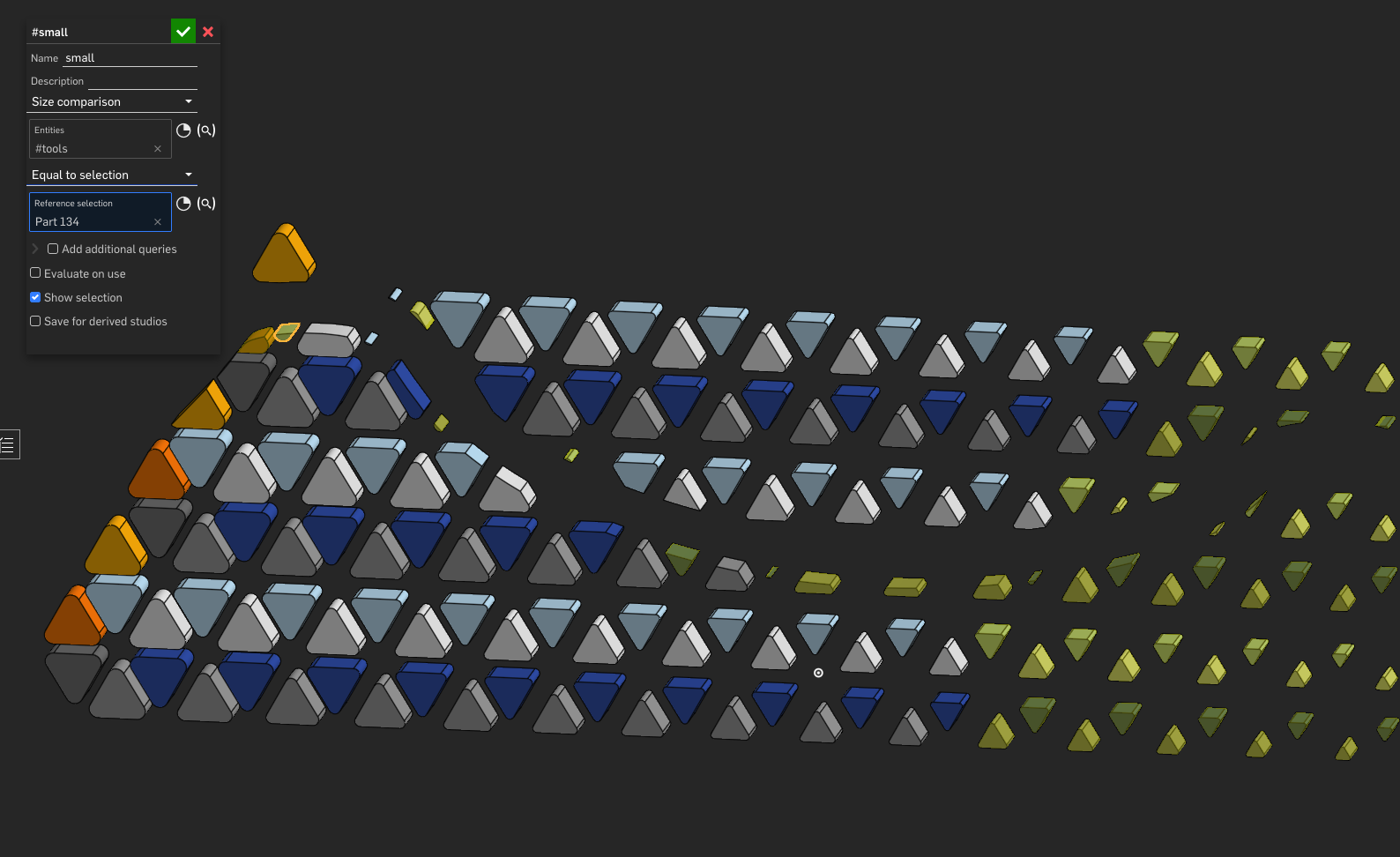
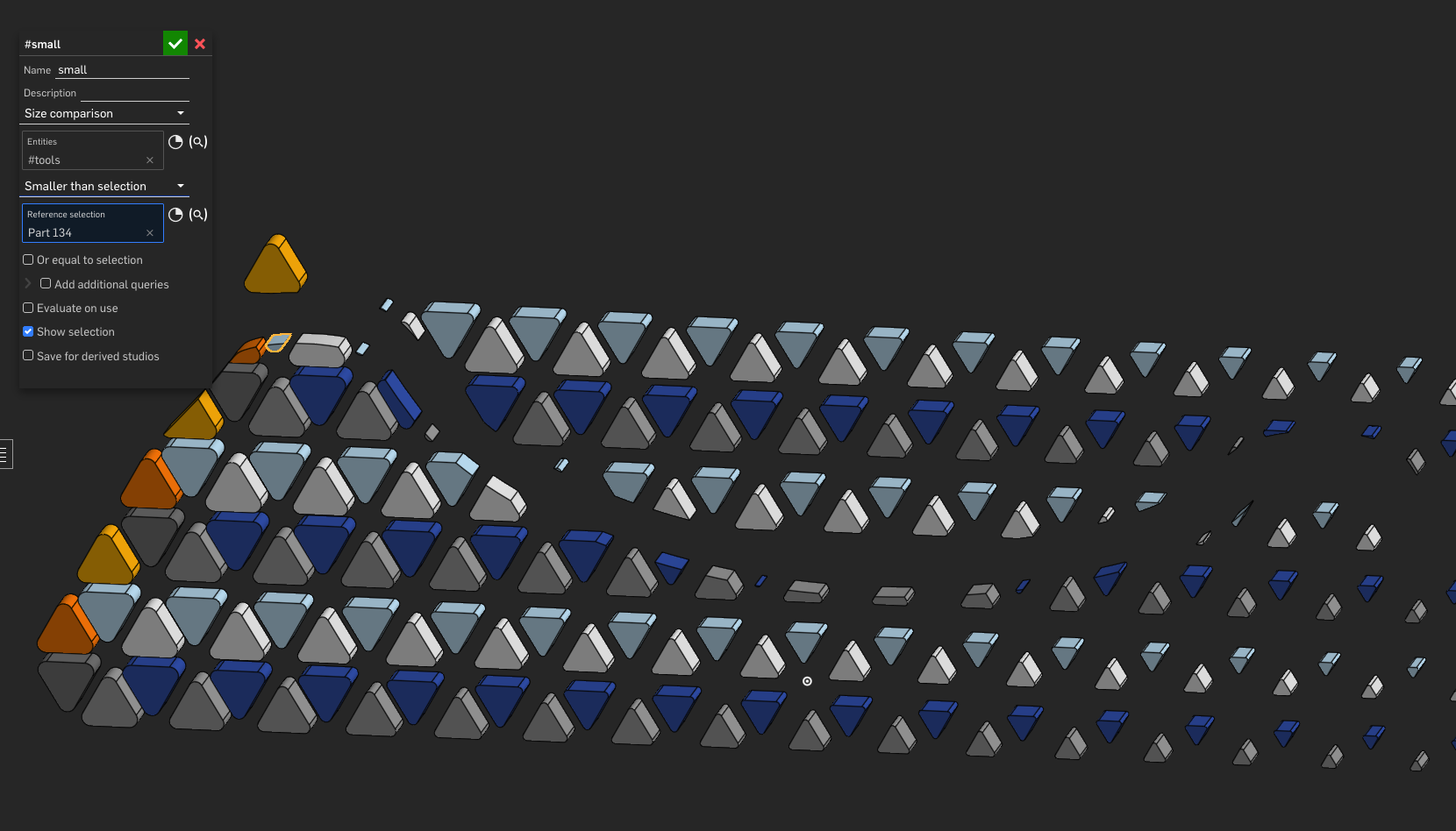
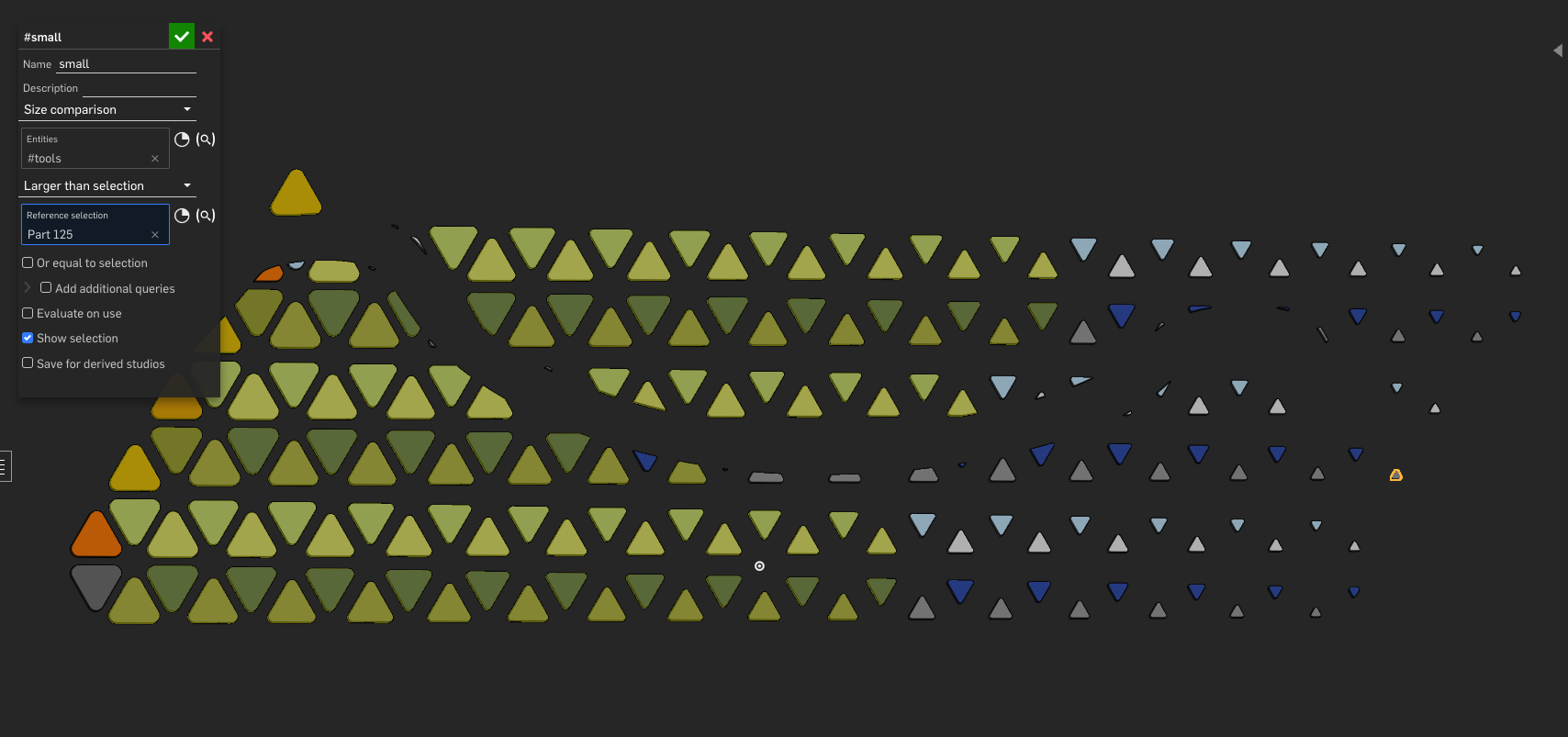
I'm not sure if I'm making a mistake, but Size comparison seems to be not working correctly.
 0
0 -
Could be something I messed up. Care to link the document for diagnosis?
0 -
Here you go!
Pattern Testing, size comparison bug0 -
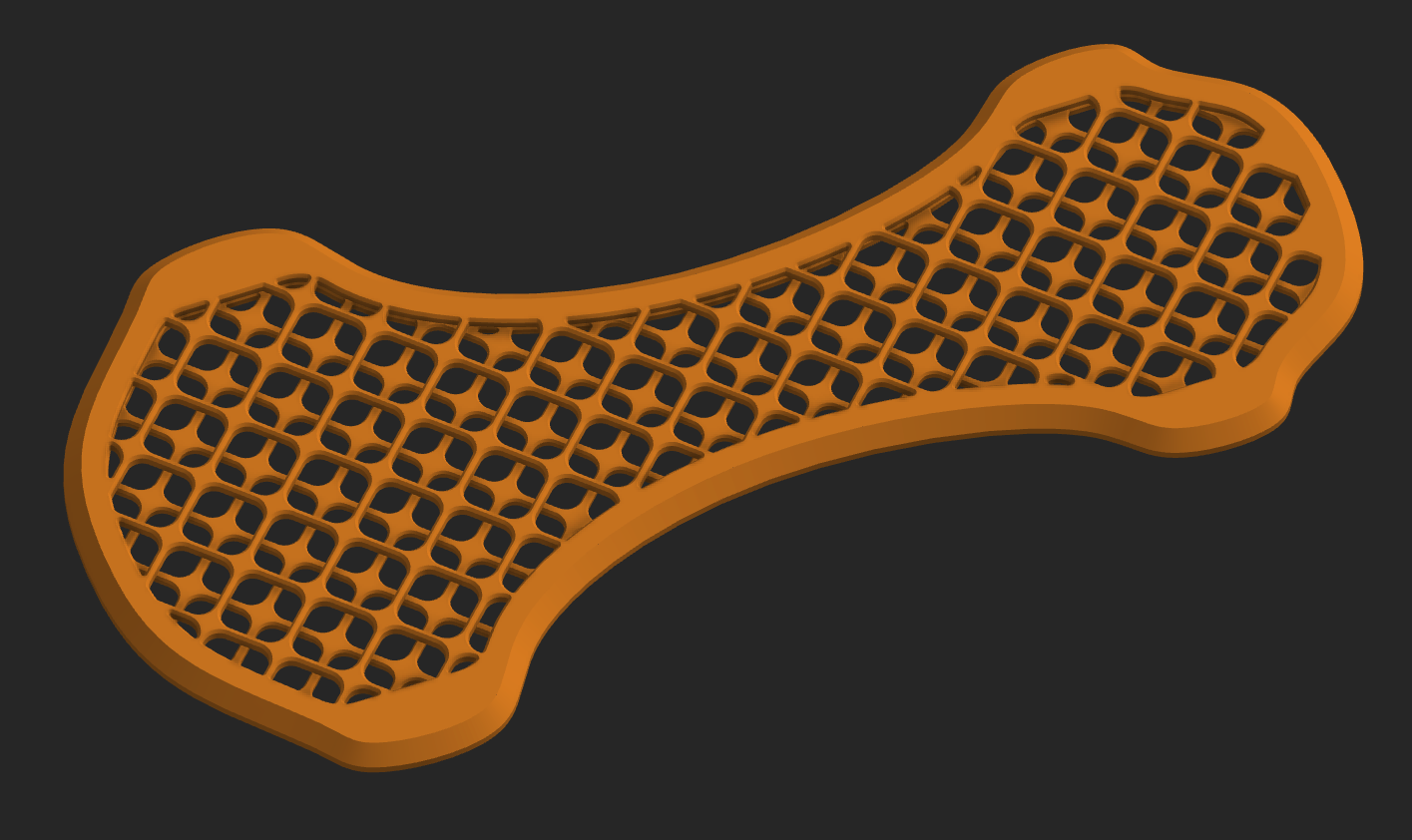
Also, wanted to say a huge thanks, because I can now stop using Grasshopper with your tools and Evan's attractor pattern for this simpler patterns I use for FDM printing.
 2
2 -
Ah, looks like a scale related issue. My tolerance values are not size dependent on the input so it's casting too wide a net at smaller scales. I don't typically work in mm scale so that explains why I missed this. I'll look into updating that to be some percentage of the input reference instead of a global tolerance for comparison.
1 -
Thanks a bunch!
Another one one I've noticed is in the Positional > plane normal, it selects faces that are normal to the chosen face independent of direction. Would love for that to have the ability to have it only allow if the normal is actually in the same direction as the reference face.
For example, the orange part I posted earlier, those internal crosses are identical on top and bottom and exist on the same plane, but I just wanted to select all the ones that were facing upward in order to chamfer. Had to split the part into two bodies, query the faces, then boolean, then chamfer.0 -
@armandoRR looks like there's an overload for the parallelPlanes query that I could use to toggle parallel / antiparallel geometry so I can pencil that in for an update as well. Currently I'm messing around with sheet metal queries (and inventing a few new ones that I would argue should already exist) so it may take a moment before I push that update.
1 -
I've helped Evan out before with some bug fixing on his featurescripts. I would love to help you work on these as well if you're up for it.
0 -
Yeah man feel free, @jelte_steur_info has some contributions to QV+ already so it's already something of a community effort. I'll just have to do a little code review to make sure any contributions don't conflict with the WIP version I've got floating in main when I go to push the public version.
0 -
V17 release: query extraction now supports multiple derive operations from multiple sources without overwriting things or skipping them. Most of my workflows are starting to look like a stack of QV+s and Amalgamates so it helps to define a selection set once for various operations. The way I did it should union queries from all sources if they were defines with the same name, so if you keep to a standard naming convention of something like "paintedFaces" on all of your 3d printed parts ecosystem of tube fittings for example, a custom paint feature will apply colors to all of those faces as intended.
1 -
-
I'm guessing this might be an internal Onshape limitation but I was trying to select a bunch of context faces (basically some identical faces using "match") using QV and QV+ but not having any luck…
I don't really want to a "copy in place" as it will create a ton of junk and be very slow (and kind of defeats the purpose a bit as this would have to be manually updated).Anyway, this would be a useful use-case if it was possible to add!
0 -
@eric_pesty Yeah I'm pretty sure nothing will load into a part studio for selection unless explicitly selected by the user in a context window. I ran into some buggy cases with Poly-Mates where I wanted to be able to copy a whole set of mate connectors from one studio to another via assembly context and wasn't able to get there with any level of automation.
This among many other reasons is why my work tends to stick to a strict top-down hierarchy with derives handling most of the inter-part complexity, and why I did that previous update for loading QVs from derives.0 -
-
Love this extension and have been using it a ton on configurable designs. Something that could be useful is the ability to reference the selection in the main query from additional queries in the same feature.
0 -
Glad you're getting a lot of use out of it. I'm finding more and more that QV+ combined with Amalgamate or other derive features I can skip the development of custom features I would otherwise have had to write before query variables were a thing in Onshape. I have thought about implementing a way to pull the same seed from the main input into the other additional queries options but the way that the inputs are all registered separately depending on which query type you're trying to run made my attempt at it into sort of a nightmare and I didn't get a successful result out of it. Next best thing is to do one QV+ feature and feed it into all of the inputs for another one.
0 -
Yeah, as soon as I wrote it out it felt like a nightmare feature to implement, sorry for putting that on you :)
Now that QV/QV+ exists the question becomes: should every feature have the option to create a query variable containing its output? The QV/Amalgamate workflow is trending towards a node-based modeling paradigm that the linear timeline/feature list doesn't map well to…
0 -
Well you can always pick up the output after the fact if you run a CreatedBy query on a feature. Assuming your feature creates things, which not every feature does. I did bake in the QV output into my Poly-Mates custom feature because that one's use cases are almost always intended to be used as a power selection set which QVs allow you to manage very easily so skipping the extra step is helpful but I don't know that features like Extrude for example come with the same implication in usage. There definitely are times when I want a qModifiedBy query or something like it though that a feature doesn't create new geometry but I am interested in performing further operations on the things that feature touched in its operation.
As for trending towards node-based modeling that's 100% my goal with QV+ and Amalgamate. To draw amazing things once, and spend the rest of my career running remixes of the classics, and I haven't even gotten started talking about wave function collapse yet. Are the Onshape developers themselves intentionally driving their product towards engineering ala Sim City logic? Probably not, but they gave me a heck of a lot of keys to start driving that way myself.0 -
Wave function collapse in a cloud-based CAD modeling app? Can't wait to see that!
While I've got you here do you have a good workflow for generating mate connectors from a QV selection set of faces to feed into amalgamate? It's almost like I need a combination of MultiMateConnectors' connector from face and Poly-Mates' mate connector creation. I'm doing some hex scenery and I want to add connectors to faces based on position and orientation but I can't seem to get from faces to mate connectors.
body → QV → faces → mate connector per face → amalgamate
0 -
Thank you for this excellent custom feature! Something that I could see as a useful addition would be the ability to select ONE element of a query result! The first one, or the last one — it doesn't really matter as long as it is only one. I’ll give a practical example I have recently run into. The screenshot below shows a main body that I want to extend with "bumps" (see the grey body!) around its "equator". To do this, I need to select one of those big, rectangular side faces, extrude it, then circular-pattern the extrusion around the body. If I want to select one of those side faces with a query variable, however, that's a tedious exercise!
The way I managed to do it was to first query all the faces of the body. Then, I filtered this down to the largest ones with your "Size comparison" option — this gave me the 6 equally-sized side faces. Then I filtered this down to the ones parallel with the front plane — this gave me 2 side faces. Finally, I filtered this down to only one using "In front of plane" and the front plane as a reference. This is a lot of non-trivial filtering just to simply get ONE of those initial 6 — any of them! Moreover, if I use an even number of sides for the main "diamond"-shaped body, the above filtering method will not even work anymore!
(Of course, it is entirely possible that I am missing some obvious way of filtering down a query result to only one element, or that there is some Custom Feature somewhere that does exactly this and only I don't know about it :) )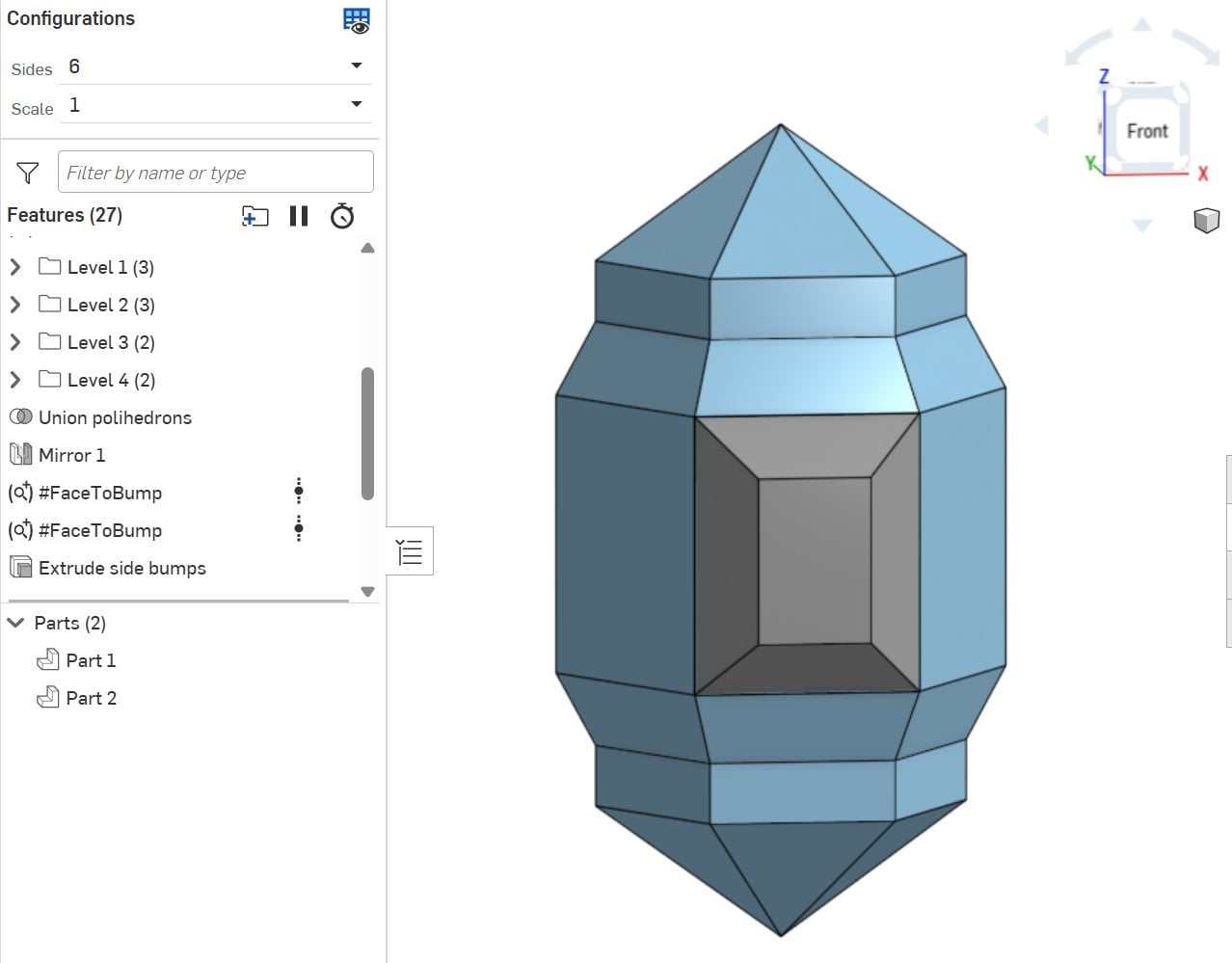 0
0 -
@zoltan_nemeth973 there is a query for Nth elements of a set, just haven't gotten around plugging it in yet. Implicitly the existence of that could also get you first or last elements of a set. I'd probably have to implement some kind of companion query sorting thing to get those to resolve in a stable way because nth elements can sometimes flip flop around on you when you change the inputs but that would also be theoretically possible.
@sasha_sklar061 I have run into a few scenarios with that in Poly-Mates where I wanted to do the centroid of a bunch of faces or midpoint of a bunch of lines for query pattern shenanigans so that's a utility I would make use of as well. Just need to prioritize it and figure out the most stable way to implement it without breaking how it works now.
0 -
@zoltan_nemeth973 in the meantime I did a few experimental query features when I was fiddling around with it after it came out. As part of that I did make a qNthElement() feature, which ended up being a precursor to my Query Pattern feature. Query Pattern, incidentally, could also model what you're trying to model here, even if the faces to bump are all different shapes and not symmetric on an axis.
https://cad.onshape.com/documents/72fe52d876901cf8ed9da655/w/053d4c99ad6bccab3a9d8c21/e/cdeea8323ca24a66755f6ea0
0 -
Over here experimenting with qFarthestAlong back in October and ya just let me plug away on my own until December before that made its way into QV+ without saying anything. We really do gotta catch up more regularly.
0