Welcome to the Onshape forum! Ask questions and join in the discussions about everything Onshape.
First time visiting? Here are some places to start:- Looking for a certain topic? Check out the categories filter or use Search (upper right).
- Need support? Ask a question to our Community Support category.
- Please submit support tickets for bugs but you can request improvements in the Product Feedback category.
- Be respectful, on topic and if you see a problem, Flag it.
If you would like to contact our Community Manager personally, feel free to send a private message or an email.
Custom Feature: Query Variable+

-Link to feature up front-
Query Variable has been a game changer for more programmatic workflows that save me from needing to develop custom scripts when I can instead pass other existing features through a QV and get results that way. That being said, there are some more powerful querying techniques which haven't yet been added to the default Query Variable implementation that I'm taking some time to write into an extended toolset. For example: just about everything in the old Query Explorer feature could be used as a QV to enable more parametric workflows involving spatial, geometric, or directional filtering of your queries. My long term goal is to implement all of these Query Explorer features into the new Query Variable feature but I'm starting out small with a few easier lift features and will add more over time.
The first two features in my Query Variable+ implementation are the following:
Tangent(ish) Faces
This one is simple, the qTangentConnectedFaces() function in the standard library already has an overload which allows you to specify an angle tolerance for some flexibility in the definition of the word "tangent" so I just replaced the version in Query Variable with this angular tolerance version. This lets me flood select face groups from cursed not-mesh import geometry and use the selections to create patch faces and create new clean parametric surfaces without having a feature tree to work with.
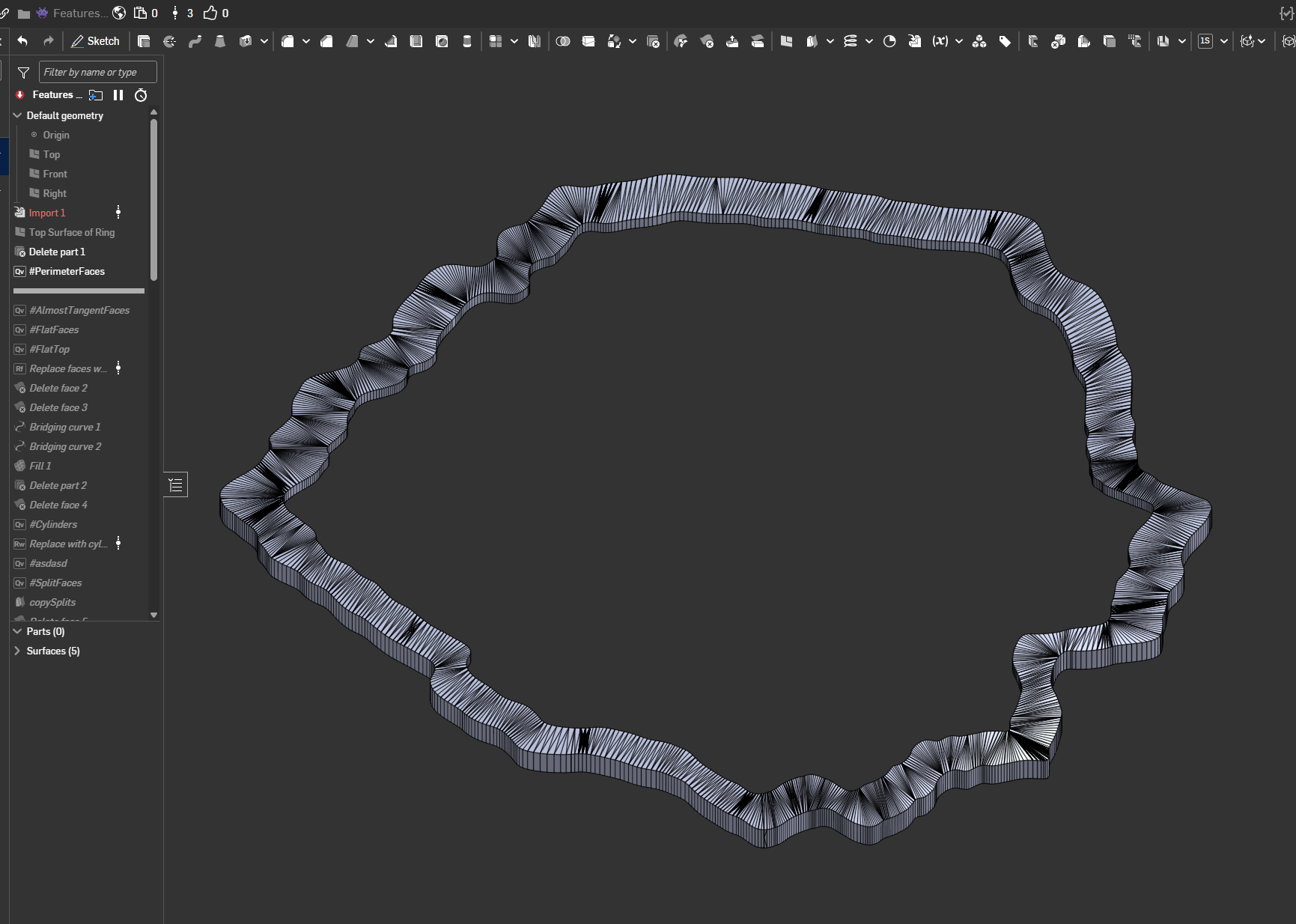
This is not a mesh.
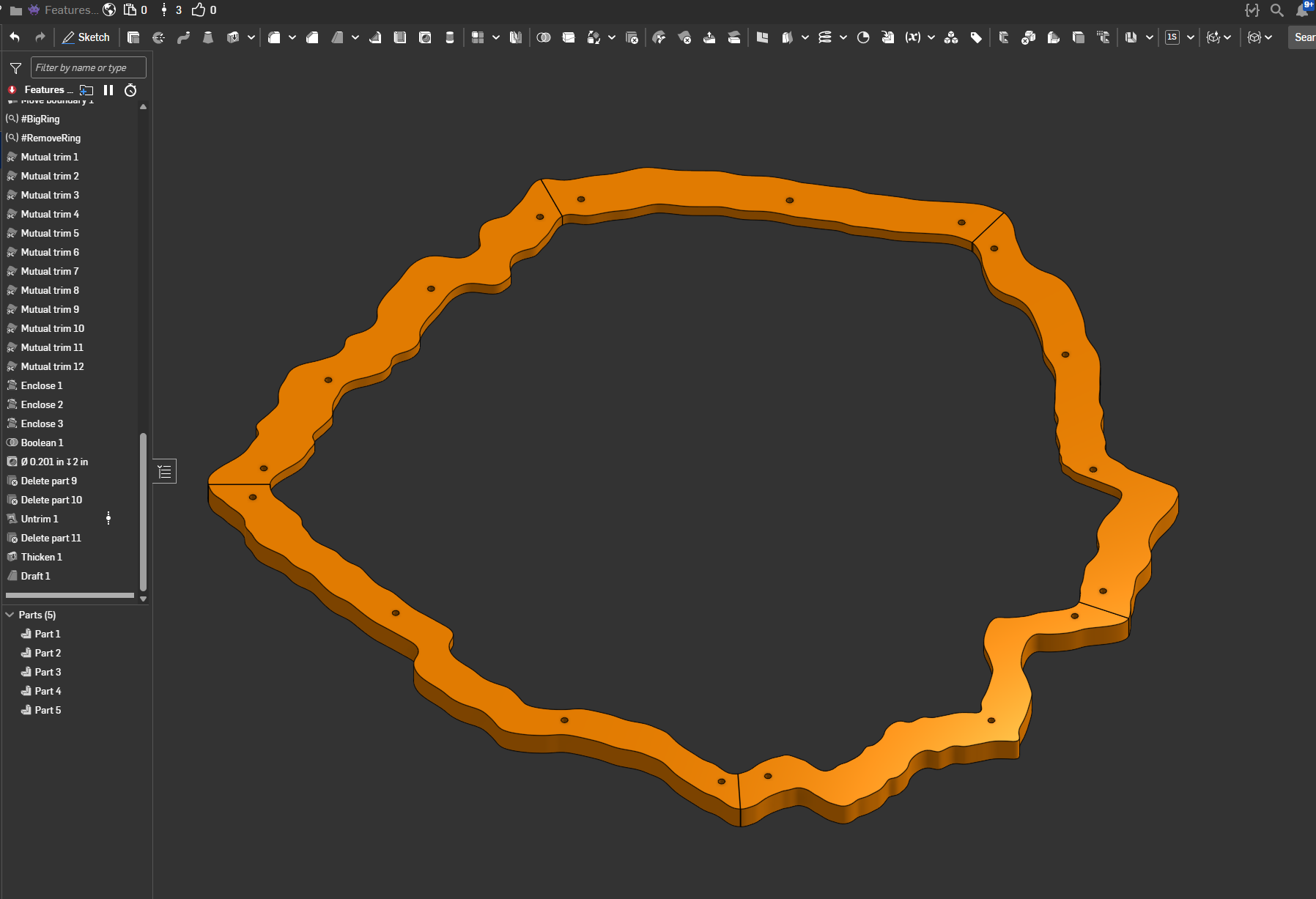
But with a little bit of curve approximation and resurfacing later it can become usable geometry again. Selecting groups of nearly tangent faces made this much easier to execute.
Matching Bodies
Query Variable comes with the ability to select matching edges or matching faces, why not matching bodies? Well the qMatching feature doesn't allow this selection type so that's why it's not allowed here, but there's a similar function called clusterBodies that does something close to this for cut list purposes. I leveraged this into a qMatchingBodies function that allows you to select a part and the function will return all parts in the studio that clusterBodies identifies as a geometric match for the input. (With some tolerance)
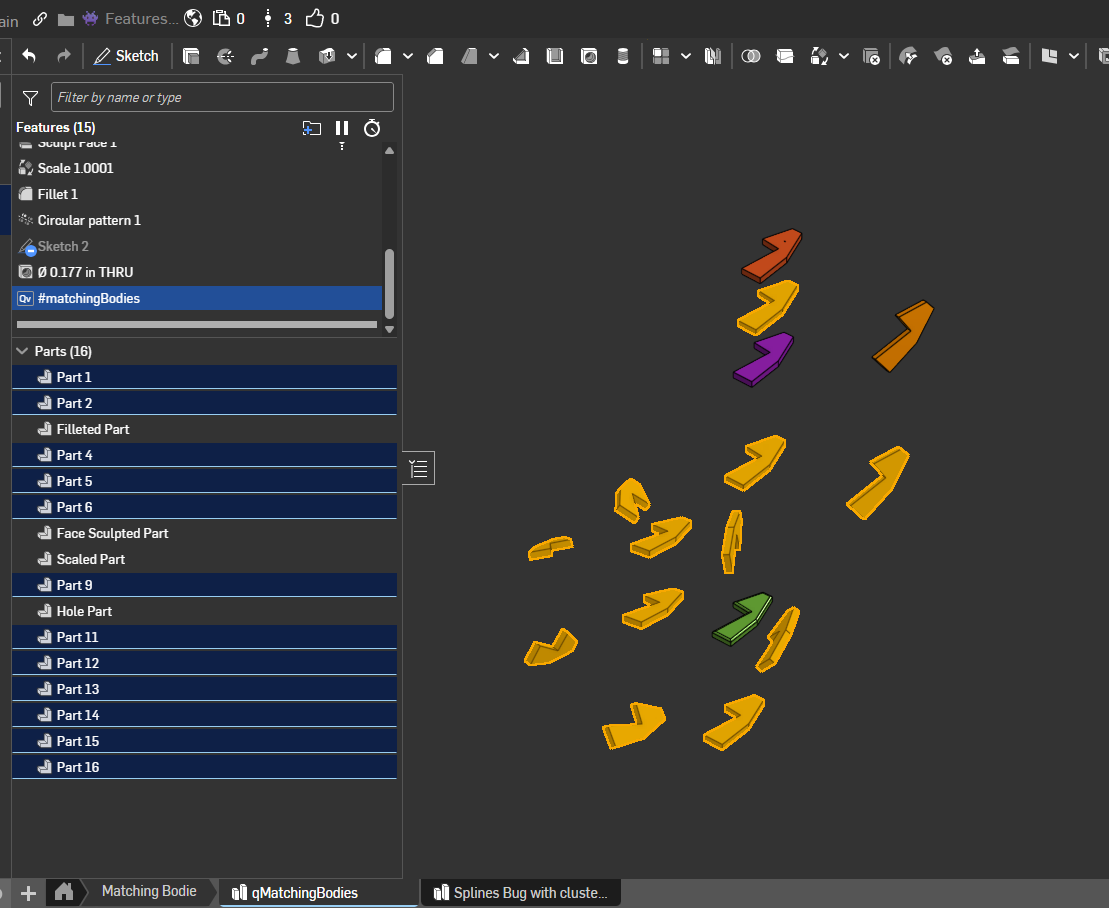
Useful for workflows where you're working with repetitive geometry that's not necessarily the result of a pattern, or if you've willfully ignored the "best practices" instructions of assembly modeling workflows and need to check that your parts actually are still copies of each other at the end of the tree.
Other features I'd like to implement into the list from Query Explorer:
- Geometry filters for face types
- Distance filters
- Direction filters
- Attribute filters for sheet metal and frames
- Cap entity filters
- …And more things I'm sure will be useful to someone at some point that I have yet to discover
Comments
-
YES! I'm glad you're taking this on. It needs to be a thing.
1 -
qAdjacent functionality added. Kinda wild that this one wasn't in the original Query Variable implementation actually.
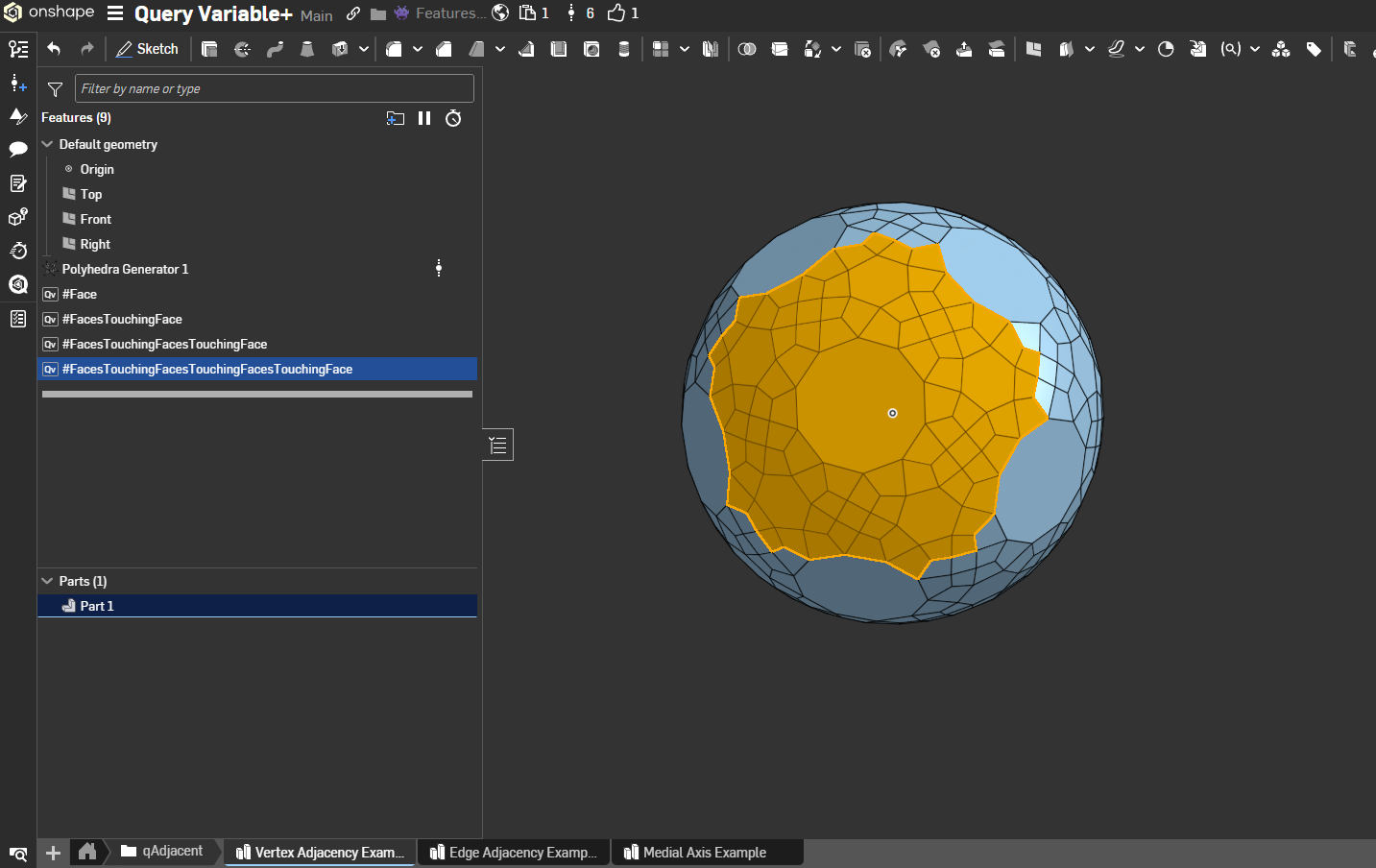
If you look closely there's the seeds of another useful featurescript in here too.
1 -
If you look closely there's the seeds of another useful featurescript in here too.Hmm. The Median curves? I had no idea there was functionality for that in Parasolid.
Simon Gatrall | Product Development, Engineering, Design, Onshape | Ex- IDEO, PCH, Unagi, Carbon | LinkedIn
0 -
There isn't, as far as I know. That tab is an extrude with an 89 degree draft, a query variable to grab all the edges of that operation and another one to subtract all edges adjacent to the first input face, and a projection of the remainder onto the input face. It's one of a few methods of medial axis approach and is somehow way more performant than the delaunay method I was working on before. Could use some size comparison threshold filtering though, which will be one of the things I add to QV+. Could turn into its own script when the concept is proven, and actually a lot of use cases for QV+ could be turned into dedicated scripts based on concept studios like this one.
0 -
qGeometry support added. Now you can filter by all the things that qGeometry lets you filter by and use them as an input in future operations. Edge filtering for straight lines vs arcs vs other curves could have some utility for frames features. Face filters have some less obvious use cases but I could see them being handy for working with stubborn import geometry.
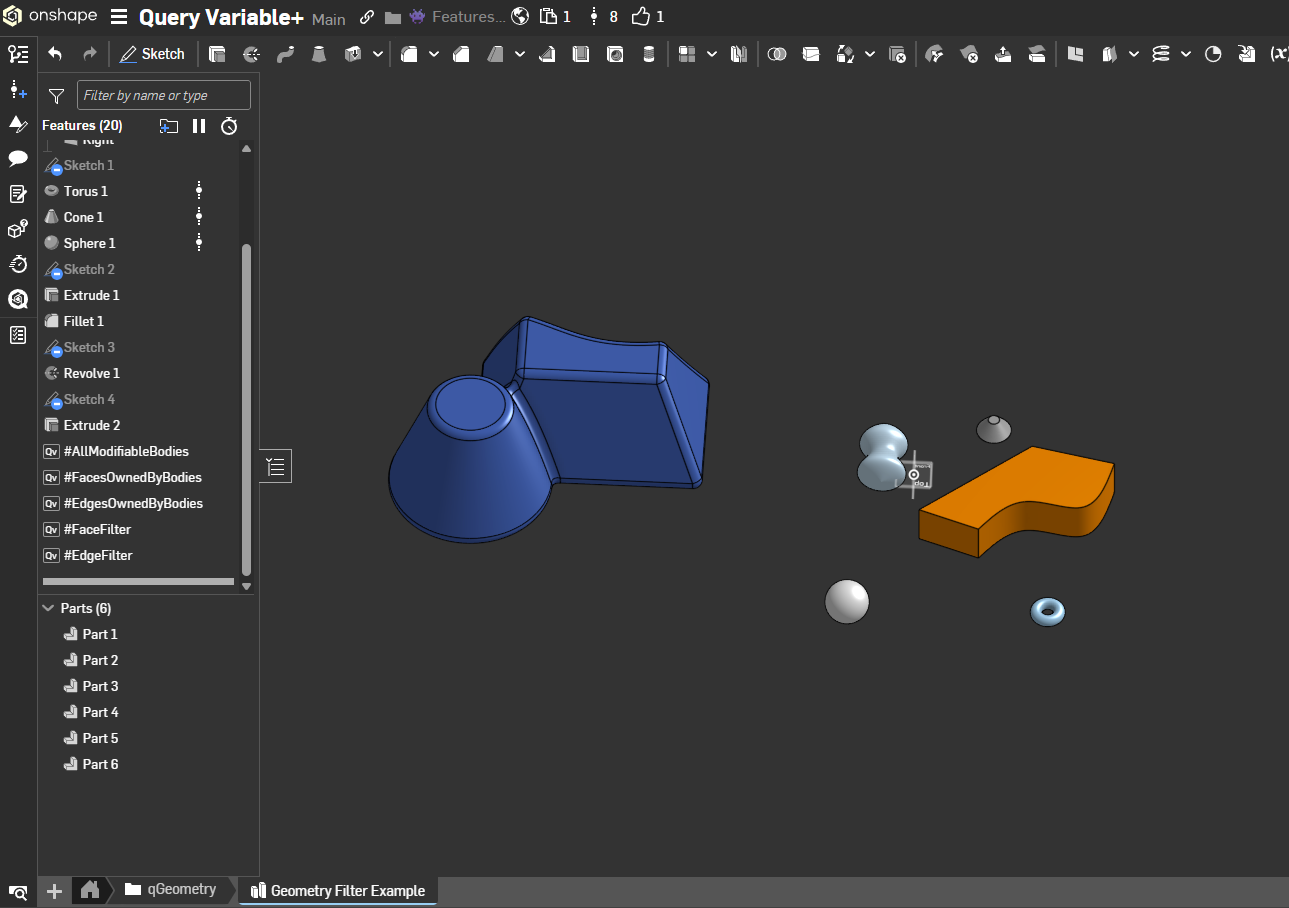
If you're following along with these additions and have suggestions on which query functions to tackle next let me know and I'll slot them into a future update. Probably next is gonna be fillets and direction queries.
2 -
Hi Derek,
I've had needs for qCapEntities before, so that'll be very useful!
Jelte
0 -
Hi @Derek_Van_Allen_BD :
I was in need of the qCapEntities Filter and created it myself as an additional option filter to "Is Created By"
feel free to add it to your query variable+ to prevent clutter. I'd rather contribute to your good query variable + version, then create a whole bunch of new ones…
Just ctrl-F for: "//added by for Cap Filter by Jelte" … "//end added by Jelte" and copy paste those bits. (after a bit of review and checking perhaps):https://cad.onshape.com/documents/d235b229e9002129febbb90e/w/4681d88c2fa02968068670d3/e/4243c76ef0022c2f4089c1f7?renderMode=0&uiState=690ddcf38ff2a03fae52d925
0 -
AND then I went for a walk and realised a better way to implement it that's more compliant to the original Query Variables UI. So please disregard v1 and use V4 wich requires 11 small code changes/additions…
1 -
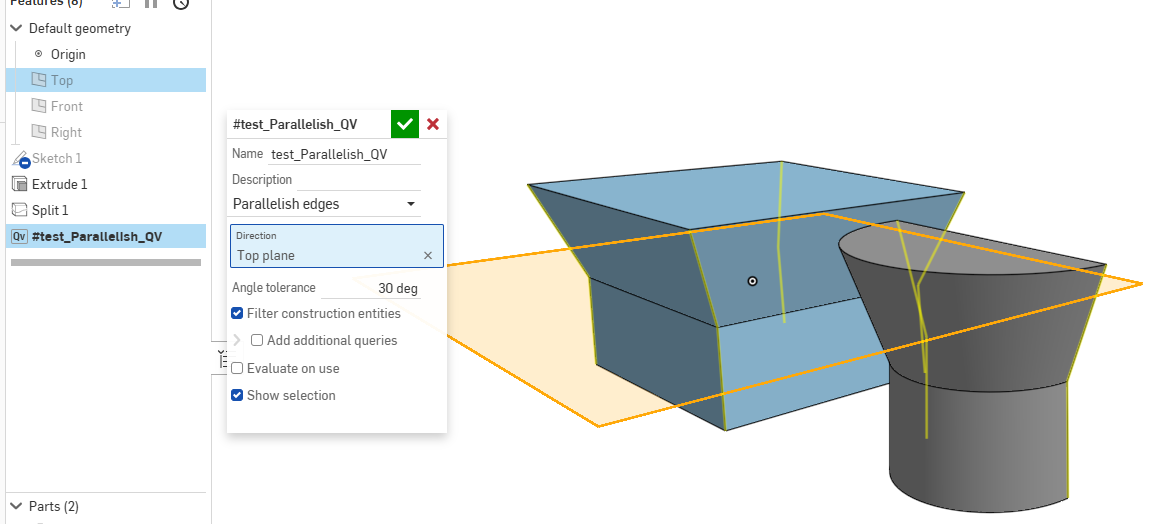
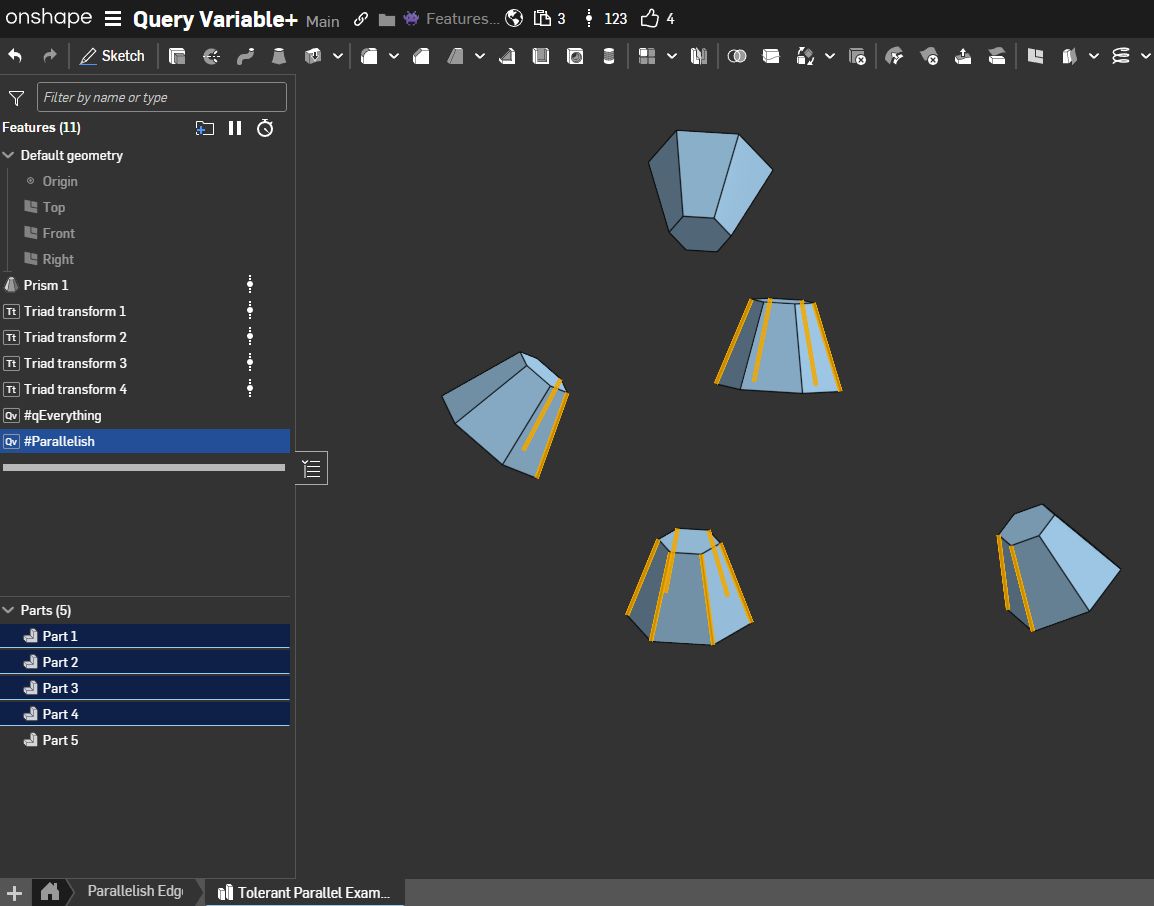
I've also added a "Parallelish" query in my new version V6. It's a tolerant parallel query that allows a set angle tolerance. Comes in handy to filter for edges with some draft on them.
0 -
some additional feedback @Derek_Van_Allen_BD:
I used your query Variable + in qAdjancy mode. I wanted to query a face AND all its adjacent faces. I think this is a common use for it. However the qAdjacent only queries the adjacents, and omits the seed faces. I had to add those by uniting with an additional query. It works, but it cumbersome and less robust. if i want to edit the seed faces, i'll have to edit them in two different places.
a simple boolean in the UI predicate would be nice:
annotation { "Name" : "Include seeds", "Default" : true }
definition.includeSeeds is boolean;and a subsequent conditional qUnion in the function.
1 -
Dang, you've been busy. Nice implementation of nearly parallel edges, I could see that being useful for putting fillets in the XY coordinates on 3d printed parts and not on the top or bottom where they'd look terrible and mess with printability.
I did develop the qAdjacent filter with the exact opposite case in mind where I wanted to query everything around the seed and exclude the seed on purpose to support draft features, but I could see some use cases where you might want to include the seed as well. I'll get to work on plugging these edits into the main feature.1 -
On the topic of parallelish edges, I'm running into challenges where I'd like to choose ALL parallel edges in a part studio, not just limited to ones on the selected entity. I'd later use that to intersect some other criteria to get the selection count under control. I also keep wanting to be able to choose a direction in addition to any line. I very frequently want all "up" edges, and would rather pick the top plane than a random edge somewhere.
0 -
Pushed an update to merge recent changes from the last few updates to the standard library's QV to keep the plus version sync'd up. Next I'll work in integrating @jelte_steur_info's cap filter and parallelish query
1 -
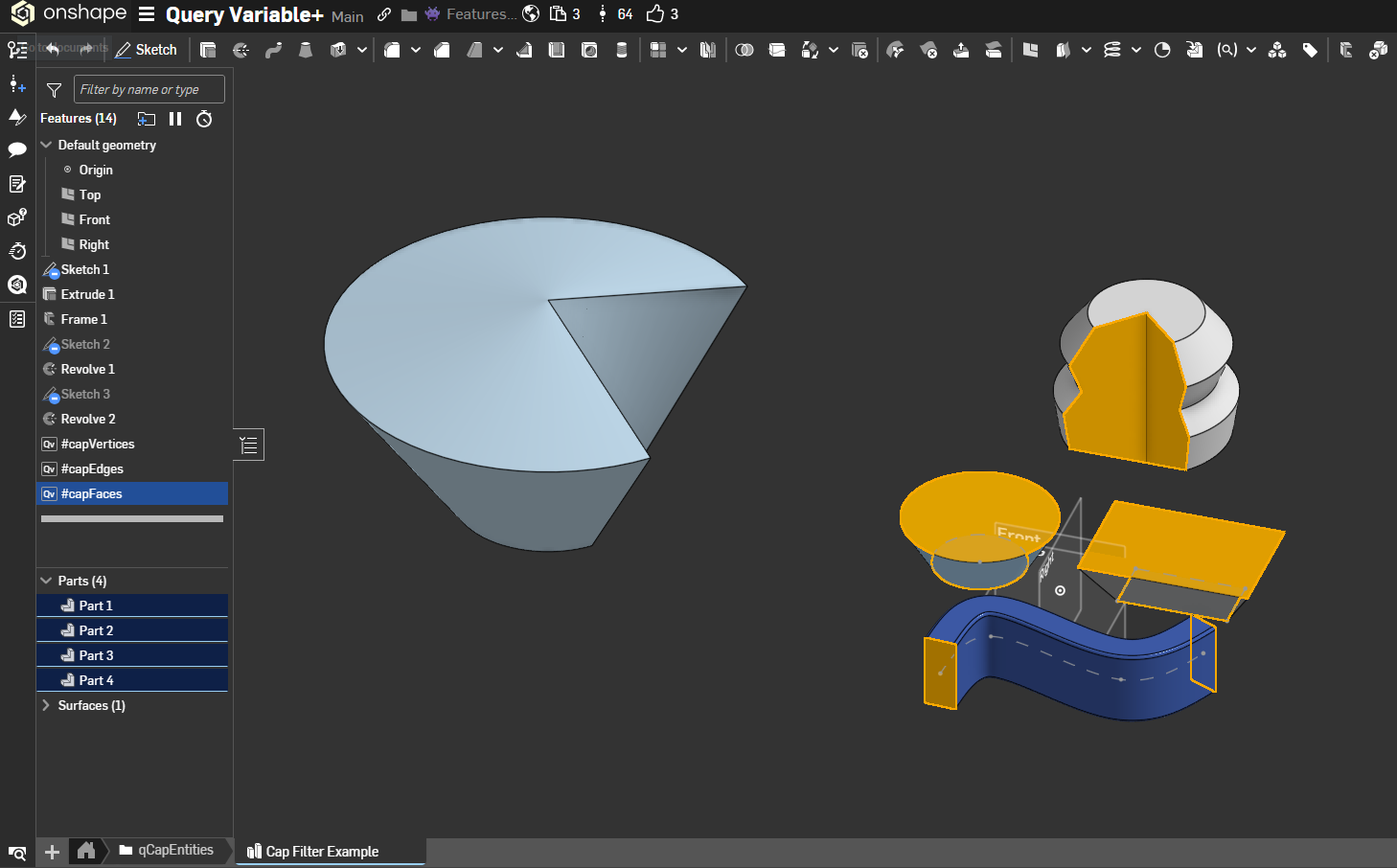
qCapEntities support added. Thanks for putting in the work Jelte.
 1
1 -
@Derek_Van_Allen_BD : Thank you for integrating it so everybody can benefit from a great QV+ feature.
I expect to use the parallelish a lot to fillet edges of injection molded parts after implementing drafts already. any tranverse fillets will then propagate easily accross the tangent edges…@EvanReese my parallelish implementation uses the queryFilterCompound.Allows_direction filter so any direction will work. And it works on multiple parts as well.
 0
0 -
I was just thinking about updating the qCapEntities to include a NonCap type next to End/Start/Either, only to find you already made a separate nonCapEntities query! Awesome work! you implementation is probably cleaner as well.
This catch may also be added to qCapEntities I guess?:
if (definition.entityType == EntityType.BODY){
throw regenError("Non-cap queries cannot resolve bodies.", ["entityType"]);}
0 -
Yeah I was pondering adding filters at the input level for the entity types to only allow you to select valid types for a given query but that would mean I'd need to split up the input field into several depending on what's valid for a given operation.
I did start with cap vs noncap being a separate field but because Onshape's standard library has them defined as separate features I did them as separate selections for consistency with how you would actually implement things in a featurescript and with the Query Explorer's implementation.0 -
Size Comparison query operations added. qLargest, qSmallest added with vanilla operations and I've added Smaller Than and Larger Than conditions to the pool as well to do some power filtering of geometry of interest for features. Helpful for simplification on import geometry where you might want to delete small errant faces or bodies or other cleanup operations you'd like to make more parametric.
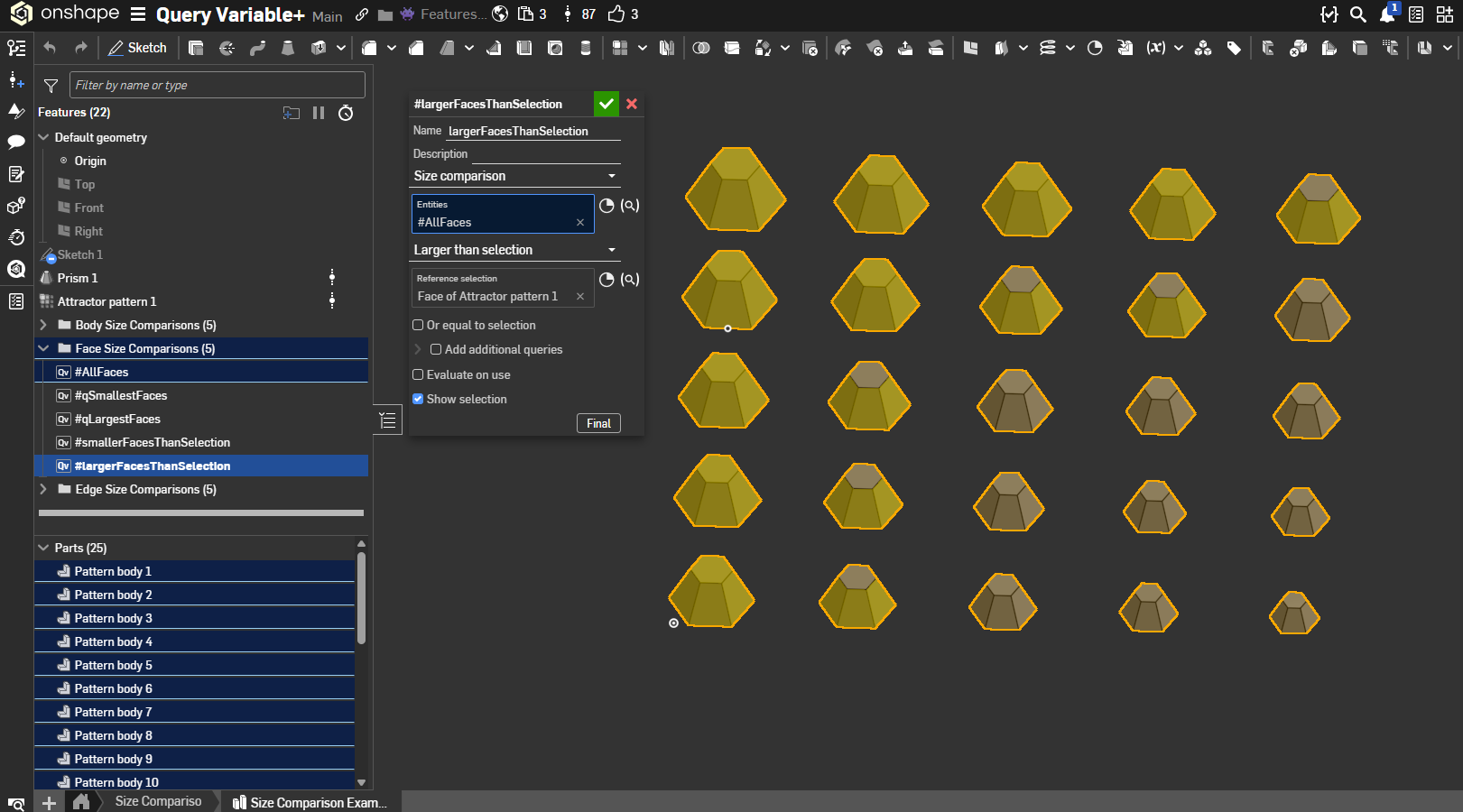
Oh and there's some tolerant Equal To filtering in there if you're looking to include geometry that matches the size of the original selection.
2 -
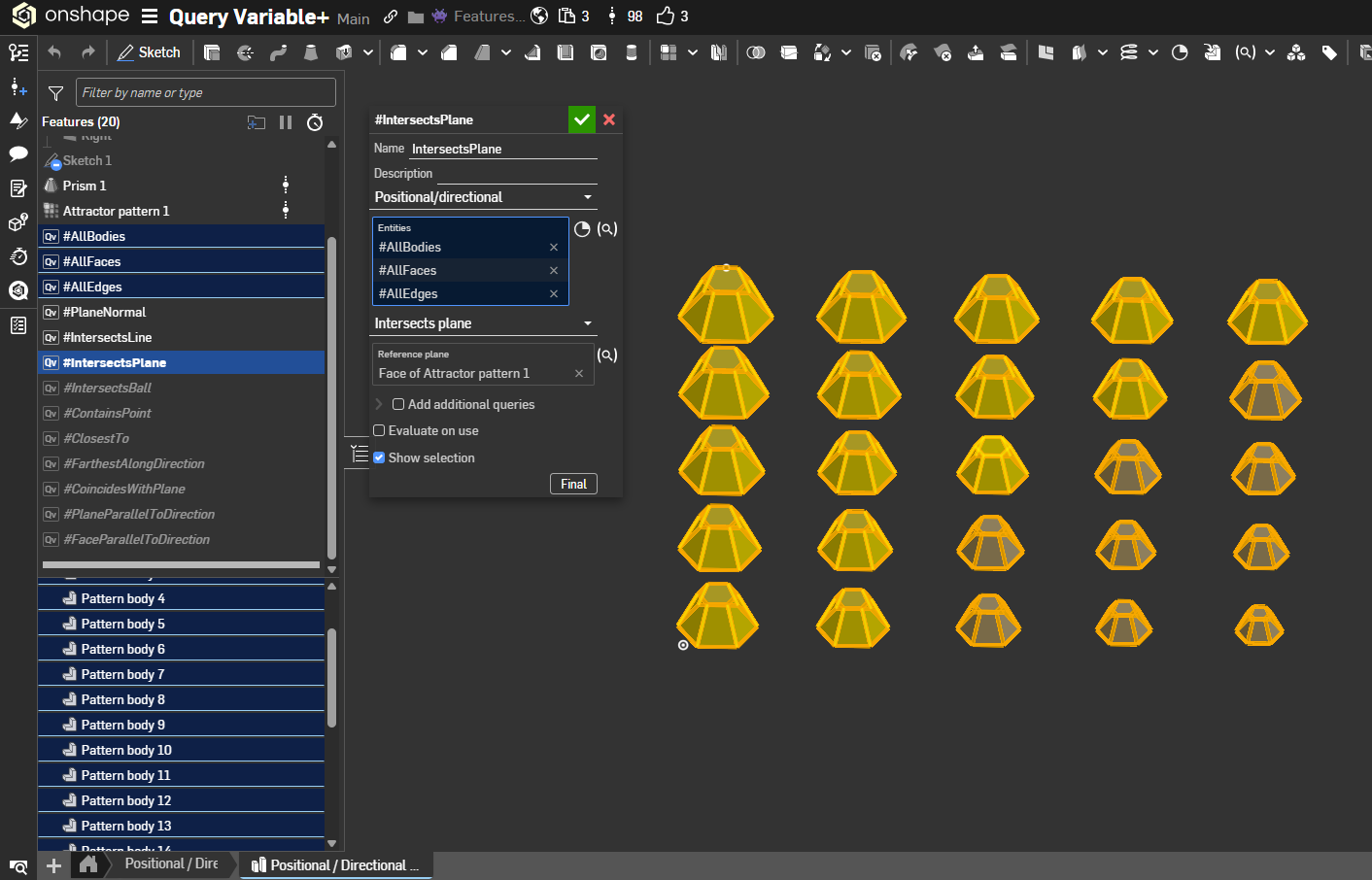
Yeah yeah okay fine, that update was mid and I could do better. Here's 10 more query options for you all under the Positional / Directional query umbrella:
- Plane Normal: Takes a reference plane face (
positionalPlane) and filters the input entities (positionalEntities) to those with normals parallel to that plane viaqParallelPlanes; returns a Query of the matching entities. - Intersects Line: Uses a selected linear edge (
positionalLine) to keep entities intersecting that line throughqIntersectsLine; outputs a Query of the intersecting entities. - Intersects Plane: Requires a planar face reference and applies
qIntersectsPlaneto find entities crossing that plane; returns a Query of intersecting entities. - Intersects Ball: Uses a reference vertex plus a radius to select entities within that sphere via
qWithinRadius; emits a Query of entities inside or touching the ball. - Contains Point: With a reference vertex, applies
qContainsPointto find entities that include the point; outputs a Query of containing entities. - Closest To: Given a reference vertex, uses
qClosestToto pick the nearest entities to that point; returns a Query of the closest hits. - Farthest Along Direction: Accepts a direction reference (edge or direction-capable selection) and uses
qFarthestAlongto keep entities farthest in that direction; results in a Query of those entities. - Coincides With Plane: Selects a reference plane and returns entities that lie on it via
qCoincidesWithPlane; output is a Query of coincident entities. - Plane Parallel To Direction: Uses a direction reference and
qPlanesParallelToDirectionto keep planar entities whose normals align with that direction; produces a Query. - Face Parallel To Direction: Also direction-based; applies
qFacesParallelToDirectionto retain faces parallel to the given direction, returning a Query of those faces
 3
3 - Plane Normal: Takes a reference plane face (
-
@Derek_Van_Allen_BD there is also qInFrontOfPlane, and using intersection query of 2 such queries for plane-offset/2 and -plane +offset/2 there can be made a query for entities within +-offset/2 from plane - a tolerant version of qIntersectPlane
1 -
@Konst_Sh Those could be really useful. I also realized that I might be able to get some use out of a generally tolerant equal to size query since I've already got the conditions built for larger than / equal and smaller than / equal. Different from qMatching if I'm looking for things that differ in geometry.
@jelte_steur_info I implemented a modified version of tolerant parallel that doesn't assume a qEverything because there are cases where I'd like to filter for parallelish items on a specific subset of queries. To make it up to you I also implemented qEverything so you can still get the job done with two QV+s in a trenchcoat. Actually I needed some qEverything for other use-cases anyway so we can knock that one off the list.
 1
1 -
@Derek_Van_Allen_BD also from my experience qLargest/qSmallest can pretty increase regen time, because they are based on length/area/volume calculations which are slow for non-primitives.What I found is that in most of the cases taking largest entity by the estimation of its bounding box volume is good enough and much faster, at least for solid bodies
0 -
@Konst_Sh I work with a lot of long curvy snakey pieces due to the industry I'm in, so that metric would probably find incorrect results for a lot of cases I'd be using it for but I see the use for some geometries. I'll plan on implementing that and the plane queries into a future update.
0 -
@Derek_Van_Allen_BD
aha! you made a filter out of it. Makes sense. qEverything can be rather expensive in complex models. Thanks for improving!0 -
@jelte_steur_info realized after pushing an update that I missed an opportunity to add qNothing too.
0 -
I was just about to start my own implementation just to get
qParallelPlanesfunctionality. Thank you so much!0 -
@armandoRR feel free to persuade me which queries to add next. I'm feeling sheet metal and frames attributes are next to come.
0 -
@Derek_Van_Allen_BD Most of my functionality requirements are around smart fillet selections. I had been using Evan's Selection Fillet FS before query variable arrived.
My workflow is usually for making parts machinable, so it's a lot of convexity + parallel + above/below a plane. This lets me select all edges per machining setup (bottom, side, top) and make changes quickly.
My other large use case is for selecting all faces that lie on the same plane.
Would love sheet metal functionality because I use it for designing flex PCBs. Was considering a standalone FS that handled Sheet Metal → Flex PCB, but haven't set the time to create that just yet.0 -
@Derek_Van_Allen_BD
I wish you a happy and peaceful winter solstice.
please find the QueryVariable+ icon attached.1
 -
Thanks @jelte_steur_info, I need to find a better way to extract the default icons and modify them because my last attempt at scraping the site gave me 15000 icons unsorted and unnamed.
Point of order for future QV+ enhancements, I have an implementation of a Visible Faces From Direction "query" that's actually just a geometry operation that returns queries after it runs. The way that geometry operation works, it would actually modify the input objects and create new split line geometry and edges in some cases where occlusion happens, so it's not a pure query function. Probably in the cases you'd reach for a query like this you'd be making the same modifications that the operation returns so I could convince myself that violating the purity of a query only function has justifiable utility but I don't want to muddy the waters with unexpected behavior when every other query in the feature does no modification to the input.
Should this be included in QV+ or should I start a separate operator Query Variable feature that has utility but potentially modifies your input geometry?0




