Welcome to the Onshape forum! Ask questions and join in the discussions about everything Onshape.
First time visiting? Here are some places to start:- Looking for a certain topic? Check out the categories filter or use Search (upper right).
- Need support? Ask a question to our Community Support category.
- Please submit support tickets for bugs but you can request improvements in the Product Feedback category.
- Be respectful, on topic and if you see a problem, Flag it.
If you would like to contact our Community Manager personally, feel free to send a private message or an email.
How do I add a standard extra fine thread, specify pitch (not ThreadLab), or override callouts?
 Ruth_Wrigley
Member Posts: 2 PRO
Ruth_Wrigley
Member Posts: 2 PRO
Hi,
I'm fairly new to onshape but a long time CAD user. I often work with slightly peculiar but still standard threads such as astronomical lens/camera threads. In this instance I am trying to use an ISO standard extra extra fine thread, M14x0.5. I'm after a way of either specifying the pitch, adding to the list of ISO available standards, or flat out overriding the callout at the drawing level without having to manually write out each dimension. I am having this issue with both internal and external threads, I am aware of and have used ThreadLab and yes you can specify thread but the cosmetic setting leads to messy drawing views and strange callouts
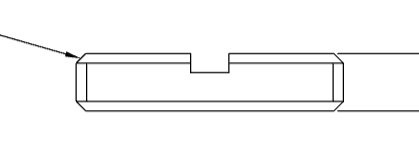
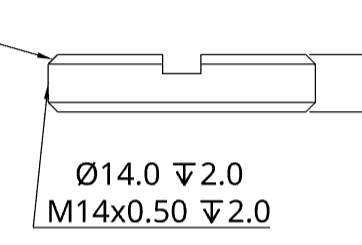

I'm finding Threadlab even more annoying with internal threads as it defaults to adding material instead of removing it. I need the holes to be modelled at tap drill diameter for manufacturing purposes and it used that as the thread dimension instead of being able to specify.
At the moment I am using the finest set M14 thread with a specified tap drill dia to create the holes and relevant drawing features but I have to manually write the callout in a note and attach/place in a suitable manner. I feel like there should be an easier way to do this and at the moment if anyone else picks these parts up and alters the thread they may miss the lack of propagation to the drawing.
Thanks.
Answers
Never Mind. A third re-read and you are doing what I was suggesting. (Manually adding notes). Hopefully someone can make a better suggestion.
Have a good Christmas!