Welcome to the Onshape forum! Ask questions and join in the discussions about everything Onshape.
First time visiting? Here are some places to start:- Looking for a certain topic? Check out the categories filter or use Search (upper right).
- Need support? Ask a question to our Community Support category.
- Please submit support tickets for bugs but you can request improvements in the Product Feedback category.
- Be respectful, on topic and if you see a problem, Flag it.
If you would like to contact our Community Manager personally, feel free to send a private message or an email.
Tapered Chamfer
 shuswap_pat
Member Posts: 27 ✭
shuswap_pat
Member Posts: 27 ✭
in General
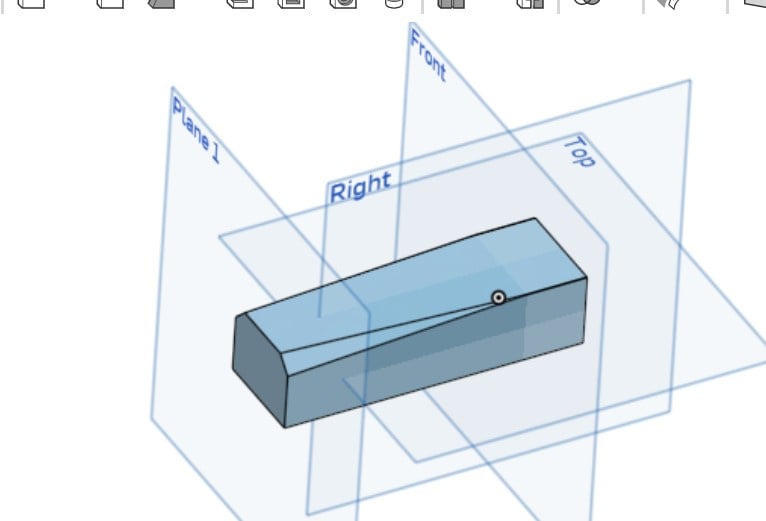
I was trying to figure out a tapered chamfer and finally tried to loft, and had to cheat.
I had, and my 0.250 chamfer on one plane, and had to put a 0.001 chamfer on the plane where I wanted it to stop.
Is there a better way to do this?
Tnx
Pat
0
Comments
Perhaps something a bit easier:
Tapered Extrude(Draft Angle):Sketch your profile and use theExtrudefeature.In the Extrude dialog, enable theDraftoption (or set a Taper angle) to make the extrusion expand or contract as it moves.- Scotty
One other solution - if you want it to taper to absolute zero -https://cad.onshape.com/documents/6a927c4c065369aa796b6776/w/7dcf1d665cd68f45b08a2907/e/1c7555a136987c94aabaaf5a?renderMode=0&uiState=69663a3117e3a342a509cf43
Maybe there's some Custom FeatureScript that can do variable, tapered chamfers. Anyone know of such a thing?
Unemployed Onshaper - Operating on European time - More of me here ➤➤ https://linktr.ee/Liam.G
And another. Split.
https://cad.onshape.com/documents/5c09eee33437df0e152bed2f/w/4201cfd98fed76e438ecc2f7/e/d1bd733af9aa80536ab3d12e