Welcome to the Onshape forum! Ask questions and join in the discussions about everything Onshape.
First time visiting? Here are some places to start:
- Looking for a certain topic? Check out the categories filter or use Search (upper right).
- Need support? Ask a question to our Community Support category.
- Please submit support tickets for bugs but you can request improvements in the Product Feedback category.
- Be respectful, on topic and if you see a problem, Flag it.
If you would like to contact our Community Manager personally, feel free to send a private message or an email.
Free Form Deform Sandbox

Lazy post this time because this is not really a feature. More like the concept of a feature. The people yearn for generalized object deformation in Onshape and I recently vibe coded up some core utilities that can offer a solution in that space but it's real rough stuff at the moment and y'all are gonna be waiting some while before I can chisel this script into something polished that does this job cleaner. Until then I'll publish what I've got and let the other featurescript gurus take a look inside if they're interested and work on improvements to this one-afternoon rough build of an FFD utility.
Relevant conversation in this thread over here and some demo gifs of my messing around, but I figure a dedicated post in the featurescript directory might be more of a suitable place to collect discussions on this script specifically and be a better place for me to infodump my findings.
Will edit with more detail over time but until then enjoy the wiggly gifs.
Here are some of the examples of prior work that I liberally borrowed from and the core concept paper from 1986.
Comments
-
Awesome work so far! I really hope this eventually becomes something to flex whole parts!
0 -
WOW!
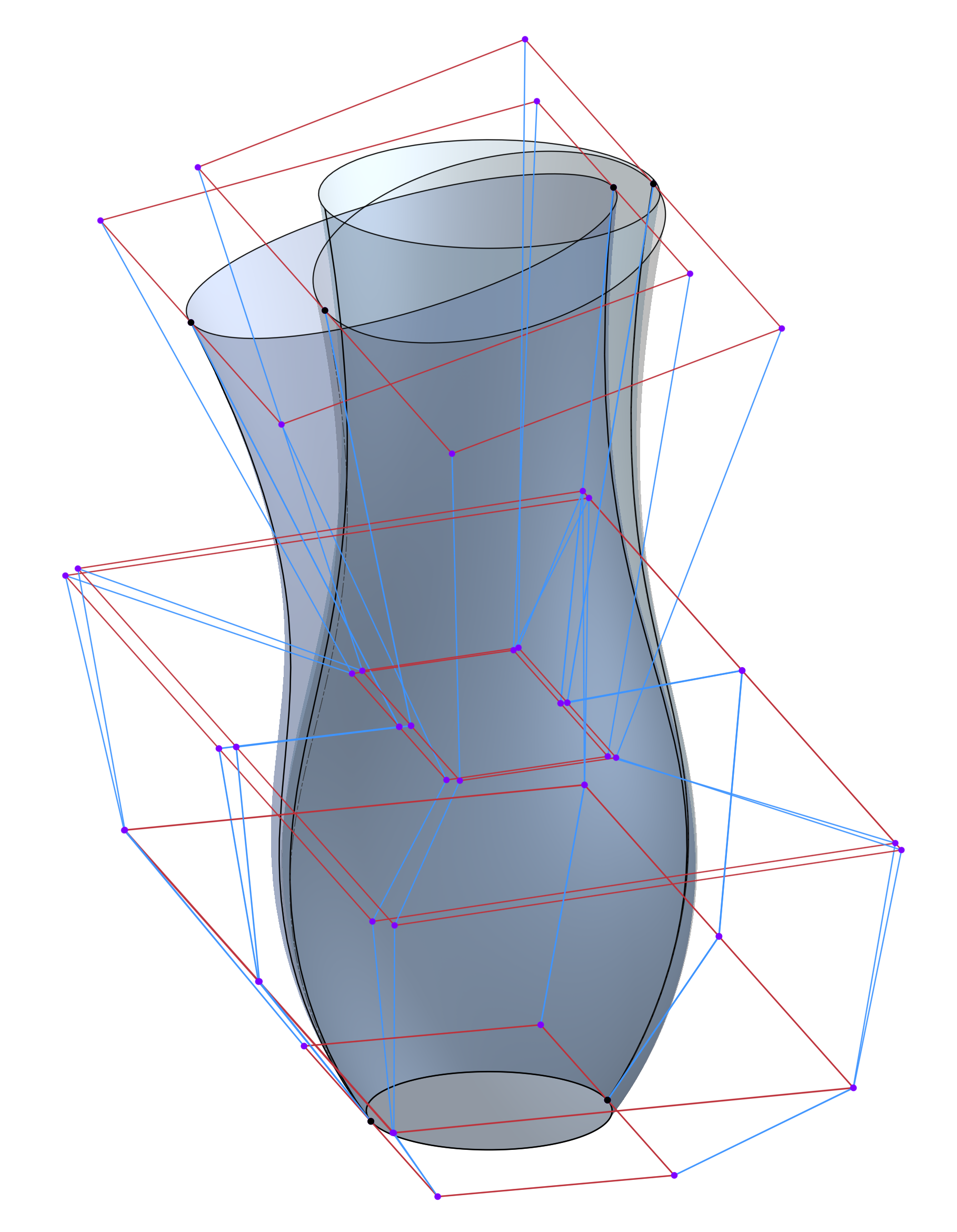
I don't fully understand the capabilities and techniques yet, but what I've been able to do so far is amazing. I started with a simple revolved degree-4 spline and was able to generate these very clean vases with tilted and scaled tops. Right now it seems like FFD always generates new surfaces. I assume at some point this will (optionally?) modify an existing surface without generating new ones.
Simon Gatrall | Product Development, Engineering, Design, Onshape | Ex- IDEO, PCH, Unagi, Carbon | LinkedIn
0 -
@S1mon Somewhere in that document is a tilty vase from a revolve surface that I squished and squashed to make something organic, then I did a Face Curves and a bunch of lofts to turn it into developable strips to turn into sheet metal with my no-safeguards sheet metal feature. Yours looks nicer than my quick attempt though. The full lattice feature was a little annoying to work with so I did a planar manipulator version that lets you do the things you see in the gifs but theoretically I could extend that even more to add scaling manipulators to the triad ones to get some taper action going.
I don't know if there's a way to implement this script such that it modifies the original surfaces. Probably replace face would work on simple cases but what if your whole surface set is twisted and warped and miles from the input? If there is, I'd definitely implement it that way but I have my doubts.0 -
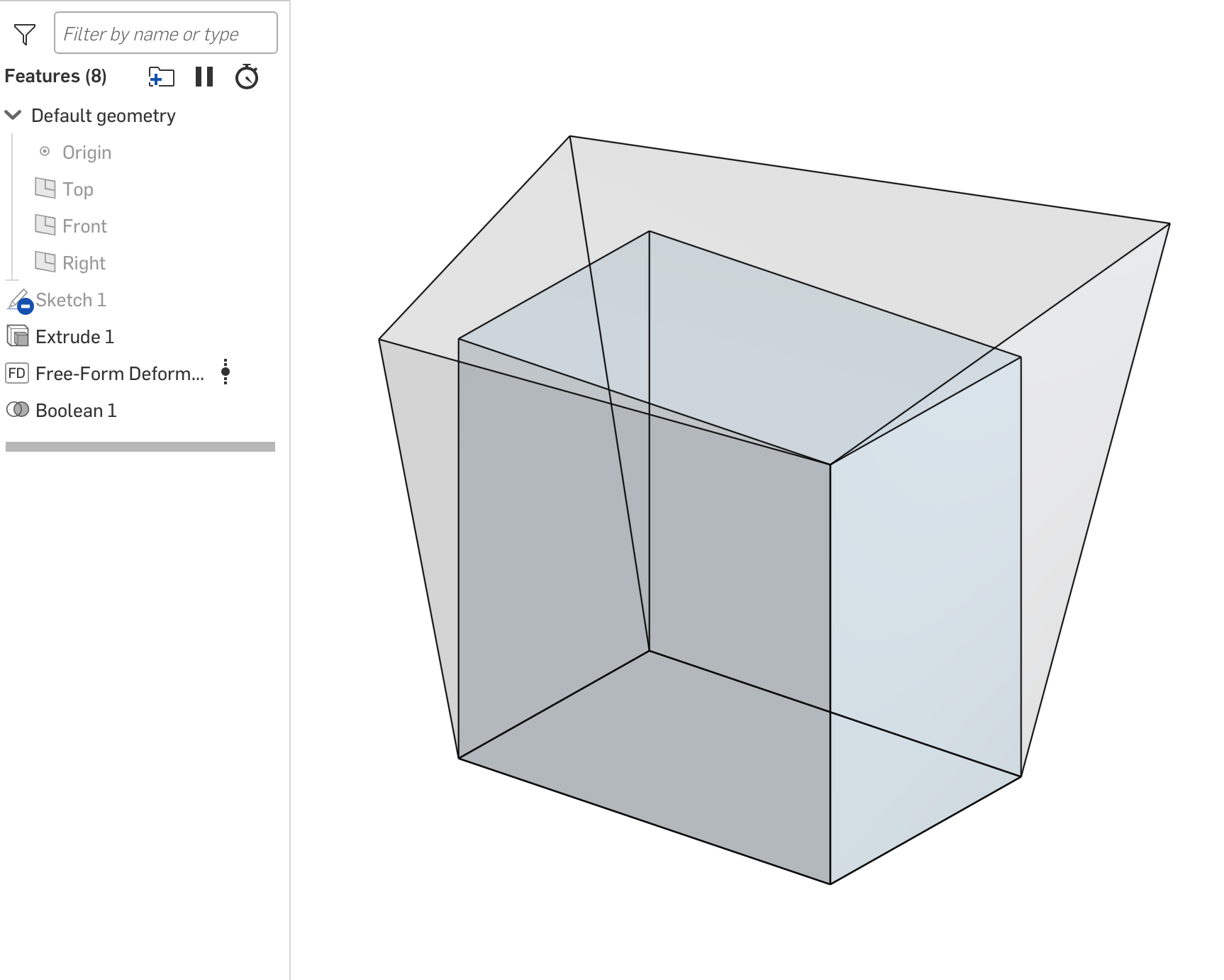
What I've found so far is that it untrims surfaces, so if you have something that's composed of surfaces which aren't trimmed, you can flex a whole part. It will explode the surfaces.
Here's a simple example with an extruded box. I had to boolean the 6 sides back together to make a solid. Also note that because the boxes' sides are flat, FFD treats them as degree 1x1 surfaces. I can't bow/curve the middles, but I can twist the flat surfaces to be warped.
Some wishes (may already be on your lists):
- Add an optional mate connector input to orient the lattice in a way that makes sense for non-orthogonally oriented surfaces
- Allow (optionally) increasing the degree of the input surfaces to enable more deformation
- Enable some way to modify multiple points of the lattice together (most likely way beyond the scope - really an Onshape issue)
Simon Gatrall | Product Development, Engineering, Design, Onshape | Ex- IDEO, PCH, Unagi, Carbon | LinkedIn
0 -
Point by point:
I'm actually thinking of something more complex than that as an end-game. Arbitrary lattice orientation is one thing, but I'd actually like to be able to run the inverse operation to this one in some cases. Take a pre-deformed lattice from some passed definition or from analysis and straighten it out to be flat. But then I'm sure I'll be deep in literature reading about Frenet-Serret frames and slamming my head against a wall debugging. But if I achieved that more complex implementation I get locally oriented lattices for free.
Surface Tween has some knot insertion magic (that I need to revisit because it isn't perfect) that will eventually allow elevation for the FFD frames to do manipulation of these in-between regions that don't have anything to wiggle.
Multi point movement is definitely possible but challenging to handle from the UI which is why I went to the trouble of making a plane manipulator to grab all lattice points that lie in one of the STU slices and move them all at once. There's probably another way to make the manipulator logic grab a set of points and move them as a unit but I'll defer to @GregBrown since I'm sure he's tried more UI stuff for surface editing than I have at this point.1 -
A few more wishes:
- A cylindrical mode, ideal for revolved shapes
- The ability to scale control points relative to a selected origin
- A mirror mode (with selectable mirror plane(s)) for control point movement
BTW, I created an improvement ticket to enable rebuilding surfaces to arbitrary degrees which would enable more detailed surface manipulation with FFD:
Simon Gatrall | Product Development, Engineering, Design, Onshape | Ex- IDEO, PCH, Unagi, Carbon | LinkedIn
0 -
I don't know if there's a way to implement this script such that it modifies the original surfaces. Probably replace face would work on simple cases but what if your whole surface set is twisted and warped and miles from the input? If there is, I'd definitely implement it that way but I have my doubts.
Sculpt Face seems to work fine. A quick review of the code shows it's using replace face. Once you start manipulating a bunch of surfaces at once, I could see replace face being problematic.
Simon Gatrall | Product Development, Engineering, Design, Onshape | Ex- IDEO, PCH, Unagi, Carbon | LinkedIn
0

