Welcome to the Onshape forum! Ask questions and join in the discussions about everything Onshape.
First time visiting? Here are some places to start:- Looking for a certain topic? Check out the categories filter or use Search (upper right).
- Need support? Ask a question to our Community Support category.
- Please submit support tickets for bugs but you can request improvements in the Product Feedback category.
- Be respectful, on topic and if you see a problem, Flag it.
If you would like to contact our Community Manager personally, feel free to send a private message or an email.
Ternary Formula for Global Variable

I have a variable declared in a variable studio table that is giving me an error. I can't find any documentation on if ternary formulas can contain parentheses or not. Can I not use a formula for the result of the 'if' clause?
I'm trying to write a ternary formula representing this if/else clause (using Javascript notations). The variable "frame_material_width_2x4" = 3.5; the variable frame_material_width_2x6 = 5.5; the variable "frame_material_width" is set to 3.5
if (#frame_material_width > #frame_material_width_2x4 ) {
var front_leg_length = #frame_material_width + 10.75
} else {
var front_leg_length = #frame_material_width + 14
}
In the variable table, with the variable "#frame_material_width" = 3.5, This ternary formula evaluates correctly and yields a correct number of 17.5, as the 'else' clause of the ternary formula is true:
(#frame_material_width > #frame_material_width_2x4 ? ( 10.75 + #frame_material_width) : 17.5) in
This formula generates an error - the 'if' clause of the formula is true. It seems that if there is a formula for the clause that is true (material width is less than #frame_material_2x6), it evaluates to an error:
(#frame_material_width < #frame_material_width_2x6 ? ( 10.75 + #frame_material_width) : 17.5) in
Can I use a formula to set the result that is true in the if/else ternary formula?
Answers
-
You should be able to get this working, and I suspect an units mismatch. For example, if #frame_material_width is a length not a number then your formula would result in an area because you multiply it by "in" at the end. You could check by trying your exact same formula in a Variable feature set to "Any", which will allow you to run any expression that evaluates to something, even if it's not the kind of thing you wanted (i.e. area, not length). If that fails too, then you know it's a syntax error, not a units mismatch. This kind of thing is why I actually prefer to always keep the units with any values I'm working with instead of working with raw numbers and adding units after. It's a bit more cumbersome, but when done right it should let you know when you've made an error.
Btw you could declare all of the width's in a single map variable if you want. Something like:
#widthMap = {"2x4" : 3.5 * inch,"2x6" : 5.5 * inch,};Then later you can get them like
#widthMap["2x4"]1 -
Oh, so that's how you get maps to work inside of studios? You may have mentioned it in a video, but I must've forgotten. I kept trying to use dot notation.
Ramon Yip | glassboard.com
0 -
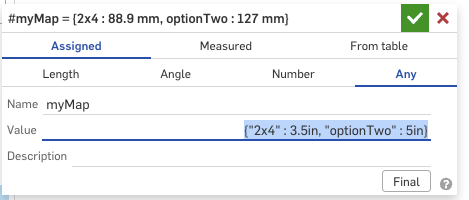
dot notation will work for strings as keys, but something in my liminal conscious was saying that a string starting with a number would mess it up. I just checked and that seems right. In this map #myMap.optionTwo works and #myMap.2x4 fails, but the bracket notation works for both.
 3
3 -
Yep, it was with numbers that it didn't work. Thanks for catching that distinction.
Ramon Yip | glassboard.com
0

