Welcome to the Onshape forum! Ask questions and join in the discussions about everything Onshape.
First time visiting? Here are some places to start:- Looking for a certain topic? Check out the categories filter or use Search (upper right).
- Need support? Ask a question to our Community Support category.
- Please submit support tickets for bugs but you can request improvements in the Product Feedback category.
- Be respectful, on topic and if you see a problem, Flag it.
If you would like to contact our Community Manager personally, feel free to send a private message or an email.
Best performance method to make or use parts with hundreds of grid holes

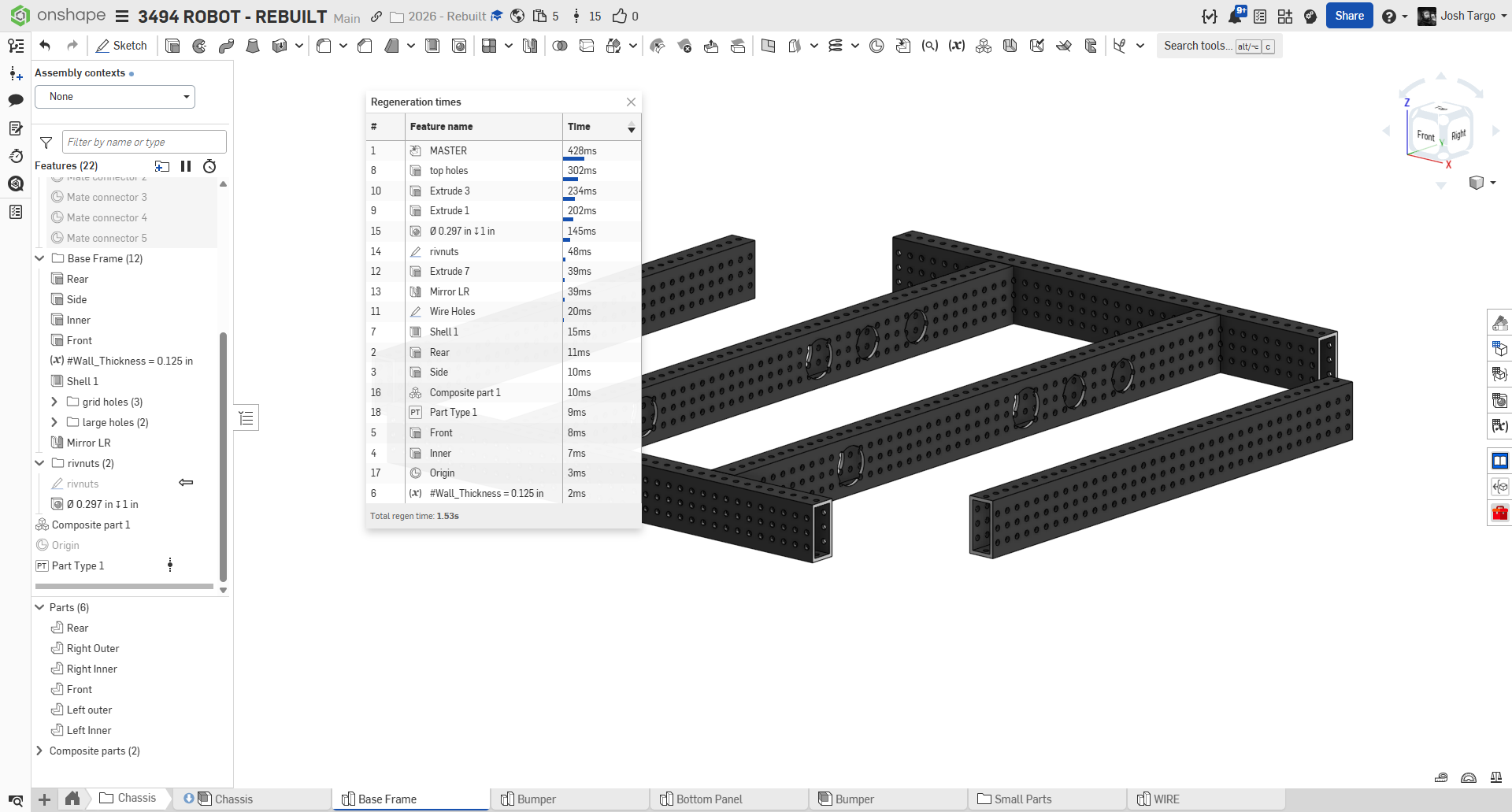
we deal a lot with Rev MaxTube. just these six pieces are using more than 1s of regen time, but there are more on the robot.
How can we use these kinds of parts, in an editable way, in our document, with better performance?
Does this impact Assemblies (other than number of triangles?
Does this affect other part studios if we derive in sketches of other parts from studios with these kinds of tubes?
0
Comments
You could represent the patterned holes via split face circles only on exterior faces. Haven't tested but this would for sure reduce the data. And you could color those "hole" face black so that it still looks like holes.
.
Learn more about the Gospel of Christ ( Here )
CADSharp - We make custom features and integrated Onshape apps! Learn How to FeatureScript Here 🔴
There was a custom feature I saw that used some game dev trickery to do more performant fill patterns by patterning the seed to a 2x2 and doing a Boolean, then doing a 4x4 and Booleaning that, and so on and so on to try to reduce the number of comparisons to huge data sets, it didn't go full greedy meshing algorithm though. I'll see if I can't find it.
Edit: here's the feature, it was called performant part pattern. Somewhere in my infinite backlog is a task for myself to improve on the template this features sets for pattern performance. I've consumed enough youtube devlogs on voxel games that solve this kind of problem in a high performance way that could do even better than this feature does.
Derek Van Allen | Engineering Consultant | Meddler@MichaelPascoe i can try, but I think a lot of the slowness comes from the original sketch of circles. I even hard-coded them in (instead of sketch pattern) and they are still slower than i want (but faster than pattern).
doing a hole feature pattern is much slower than circles and a big extrude. i have a feeling that a big face split won't see a lot of improvement.
@Derek_Van_Allen_BD i'll see if i can modify his code for removal patterning.
@joshtargo might require an approach like @jelte_steur_info's Regional Pattern feature to turn the logic into a subtractive operation. Partly based on vibes but I'll say semi-informed vibes.
Derek Van Allen | Engineering Consultant | Meddler@joshtargo you should only have one circle sketched. Do NOT pattern those holes within the sketch.. 😎 Use the pattern feature not sketch pattern.
Learn more about the Gospel of Christ ( Here )
CADSharp - We make custom features and integrated Onshape apps! Learn How to FeatureScript Here 🔴
I worked on a customer project that had a similar issue. Metal extrusions with holes every inch.
What we did was create a configuration checkbox for the parts to turn the holes on and off.
If you aren't mating to the holes, then you can turn them off when they aren't needed. Obviously this workflow doesn't work for every case, but it made a huge difference for that specific workflow. Not making the holes is faster than any method of making them.
Experts in Onshape Automation - Custom Features and Integrated Applications
With decals, you might also consider the illusion of holes instead of holes. Similar to cosmetic threads.
Simon Gatrall | Product Development, Engineering, Design, Onshape | Ex- IDEO, PCH, Unagi, Carbon | LinkedIn
@MichaelPascoe using feature pattern was about 4x slower than doing all the circles in a sketch and then extruding the whole batch at once
@S1mon the holes are very important for layout and mating, so I think we need them to be real
Face pattern will probably be the fastest if you need all the holes.
Simon Gatrall | Product Development, Engineering, Design, Onshape | Ex- IDEO, PCH, Unagi, Carbon | LinkedIn
@joshtargo maybe a combo of decals and patterned mate connectors, or circular curves. You could make a well configured master (if you haven't already), then set up some check boxes to define the output (real holes, vs mates etc). The final thing could be a composite part so it can contain circular curve entities that you can still mate to without having the weight of splitting faces or cutting holes, but that all stays together as one part.
The Onsherpa | Reach peak Onshape productivity
www.theonsherpa.com
i think @GregBrown might have some recommendations here. He's been experimenting with similar problems. In terms of holes, you dont actually need the geometry, do you? You just need the position (and we assume the diameters are all the same, standard, and all holes are through). Could you pattern just a mate connector at every hole location? I suspect this would be a lot lighter. I just did the max pattern count (2500 instances, 50x50) and regen time from just patterning mcs is ~150ms.
I do need a performant duplo sheet generator script which is the inverse of this (need to generate pegs, not holes) so I might dig into it myself a little more as well after I'm out of sheet metal land.
Derek Van Allen | Engineering Consultant | MeddlerIf it's for 3D printing you can get away with not booleaning them, all since that's your main regen killer.
The Onsherpa | Reach peak Onshape productivity
www.theonsherpa.com
It's for CNC routing full 4x8 sheets of them. Gotta be one solid when we send it to the mill. Oh and they're not perfectly square grids, there are islands in the middle and random topography scattering the edges so it's gotta be a fill pattern with offsets from the walls. Also no, we can't do a .dxf export of them because we care about manufacturing tolerances in full X Y and Z dimensions and our entire mill pipeline works on raw parasolid imports.
This kind of jam.
Except with the bricks going up onto the topo too.
The mill department loves these.
Derek Van Allen | Engineering Consultant | MeddlerHow about polygon holes with 8 sides? You can still place parts in the center with a mate connector.
@sebastian_glanzner the management of the Boolean count is the performance drag, not the tesselation of the final result.
Derek Van Allen | Engineering Consultant | MeddlerWell tbf the boolean is the main drag, but poly count can help, esp loading big assemblies.
@Derek_Van_Allen_BD You get to work on some fun things! love seeing that kind of thing. I guess you can create all of the studs as separate bodies, then make a Query Variable of them all to boolean in at the end and configure suppression of that so you only crunch those numbers when needed.
The Onsherpa | Reach peak Onshape productivity
www.theonsherpa.com
@EvanReese the job is equal parts dream and nightmare. If you've ever wondered why some of my scripts end up the way they do where a simpler approach would cover 90% of everyone else's use cases but I choose an implementation 10x more complicated for that last 10% of use cases it's because of parts that look like the above images.
We do already have some fill pattern suppression happening for keeping things light during our workflow but a 3 second rebuild on duplo fill has to happen in the same file as 40 seconds of other highly interrelated model structure so everything I can shave off helps. The single mondo boolean at the end is still gonna run 1000 comparisons between each little stud and the final sheet so if I dice everything up into regions and chunkify them and then memoize the chunks I can probably cut that down to at least sqrt(1000) booleans which would be a huge improvement. Assuming Onshape works anything like Minecraft which it kinda does.
Derek Van Allen | Engineering Consultant | Meddler