Welcome to the Onshape forum! Ask questions and join in the discussions about everything Onshape.
First time visiting? Here are some places to start:- Looking for a certain topic? Check out the categories filter or use Search (upper right).
- Need support? Ask a question to our Community Support category.
- Please submit support tickets for bugs but you can request improvements in the Product Feedback category.
- Be respectful, on topic and if you see a problem, Flag it.
If you would like to contact our Community Manager personally, feel free to send a private message or an email.
Mates that should in theory follow a center path

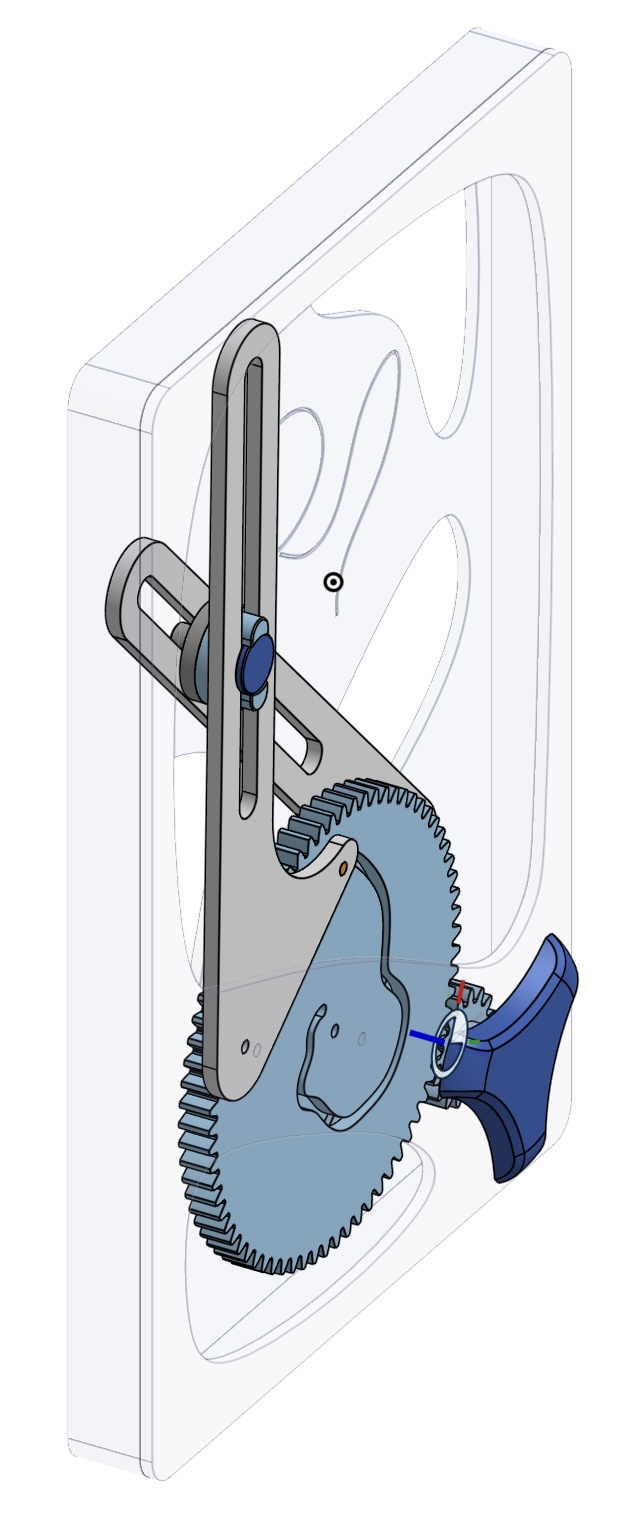
Hi, I'm new to OnShape, but have been having a wonderful time with the product. I decided to give myself a stretch project, which is a toy that features a cam which drives two arms; at the intersection of these arms is a gliding part which houses a magnet (meant to be a bee following a path between some flowers).
There are two related mating strategies I'm struggling with, and they can both be described as a thing that needs to slide between two other things. Specifically:
- The cam follower pin in the arm ideally needs to be constrained by both faces of the cam track. I have this modelled with two tangent mates. However, in practice I have to have one of these suppressed at a time. The desire for needing a tangent mates on either side of the pin is due to the when the pin (when solver is delayed) jumps to the other side (outside the track/into the part itself) of the cam track.
- I think, what I'd really need here is to something to say that the cam follower pin should stay within (but not necessarily touching) the two tangent mates, or that the pin center line should coincide with some path between the middle of the two channels.
- The glides in the two arms have a problem such that I can make a glide mate so the glide runs along one track, but when I add a second glide mate for the other arm (Right Arm Slide) the solver complains of overdefinition when I do, so I have to suppress that too; meaning that I cannot make the glide follow both arms.
- I suppose this is because its a cycle between the cam tracks on the front and back, the two arms, and the glides. This cycle could perhaps be broken if there a way to configure a mate as driven but not driving… but I haven't seen such a thing. Is there another way of doing this?
The model is available at the following. Thanks for any feedback and ideas.
https://cad.onshape.com/documents/0472e7d04bd98783ce0de97e/w/4c503141b19defed7a2b796b/e/584e15fb1a444ac97cb4b670?renderMode=0&uiState=6985a06255dd59293de1c713
PS. Cams are a laborious nuisance, and I'm sure there are more established ways of working out their profiles; I thought it would be a useful task to learn some Featurescript with… but that's a future goal.
Cheers kindly,
Cameron Kerr